29
Installing the Wireless Bridge
Physical Installation
Using DC Power
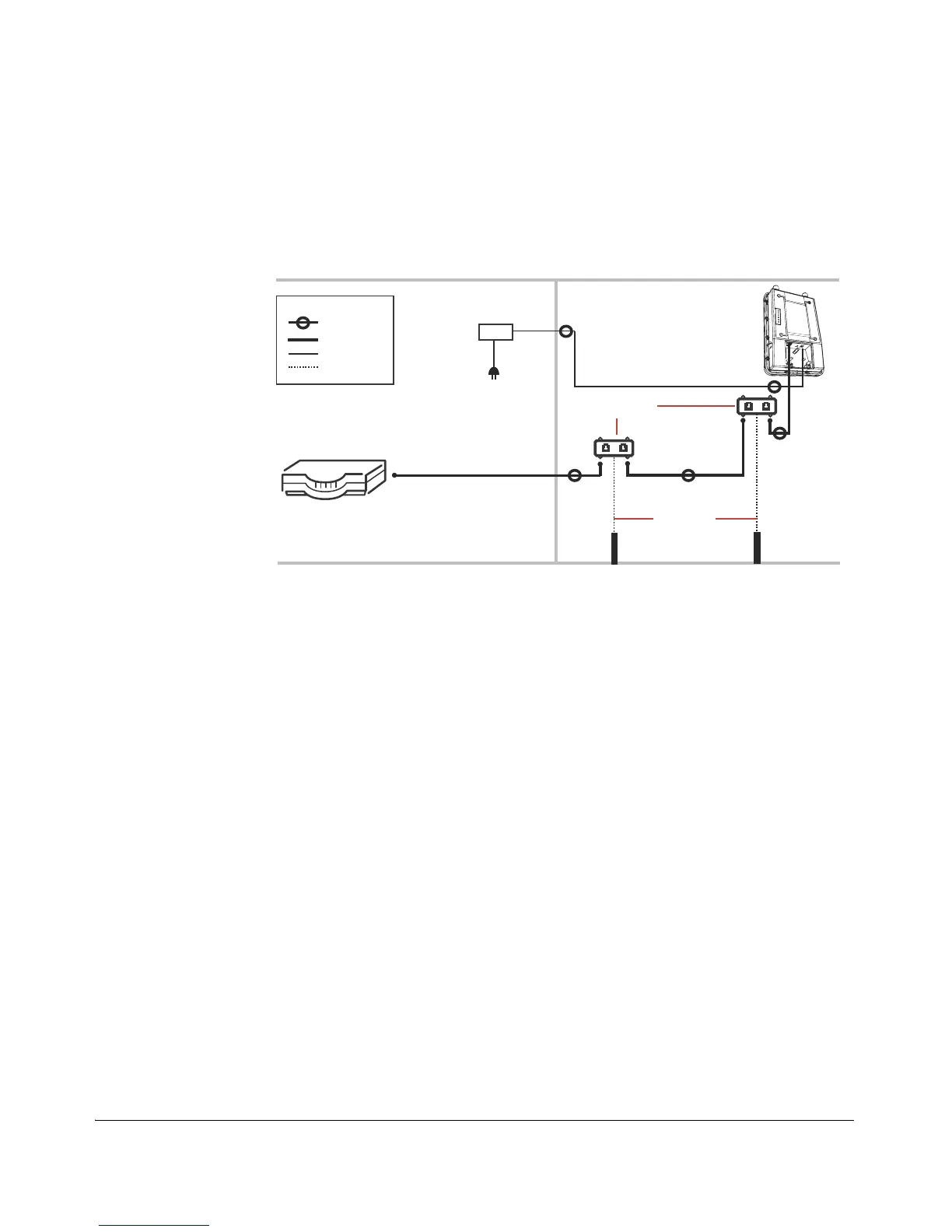
Refer to the following diagram for installation components when using DC to power
the Wireless Bridge.
Figure 23. Installation components for a DC power installation
Drip loops
Ruckus Wireless strongly recommends forming a 3-5” (75-120 mm) drip loop in any
outdoor cable where water running along the cable could possibly enter any outdoor
component. If the orientation of the cables is such that water cannot possibly enter,
then drip loops are not necessary.
Router or switch
Outdoor-rated
Cat5e FTP cable
ZoneFlex 7731
Wireless Bridge
INDOORS
OUTDOORS
Ground rod
Ethernet surge
protectors
18 AWG min
green-and-
yellow
wire used
Ground rod
DC power
supply
Cat5e Ethernet cable
Drip loop*
Legend
Ethernet cable
Power cable
Ground wire



 To Next Page