• If a Trunk Port is configured as a Supplicant, a user name and password must be
entered to authenticate the port to the 802.1X aware LAN switch.
• If an Access Port is configured as an Authenticator, the administrator must define
the RADIUS server that the Authenticator communicates with. All Ethernet ports of
a single AP are configured with the same RADIUS server.
Enable MAC authentication bypass: If MAC authentication bypass is enabled, the port
first attempts to authenticate the attached device by MAC address, and if that fails, it
attempts to authenticate the device using 802.1X.
Configuring Hotspot Service
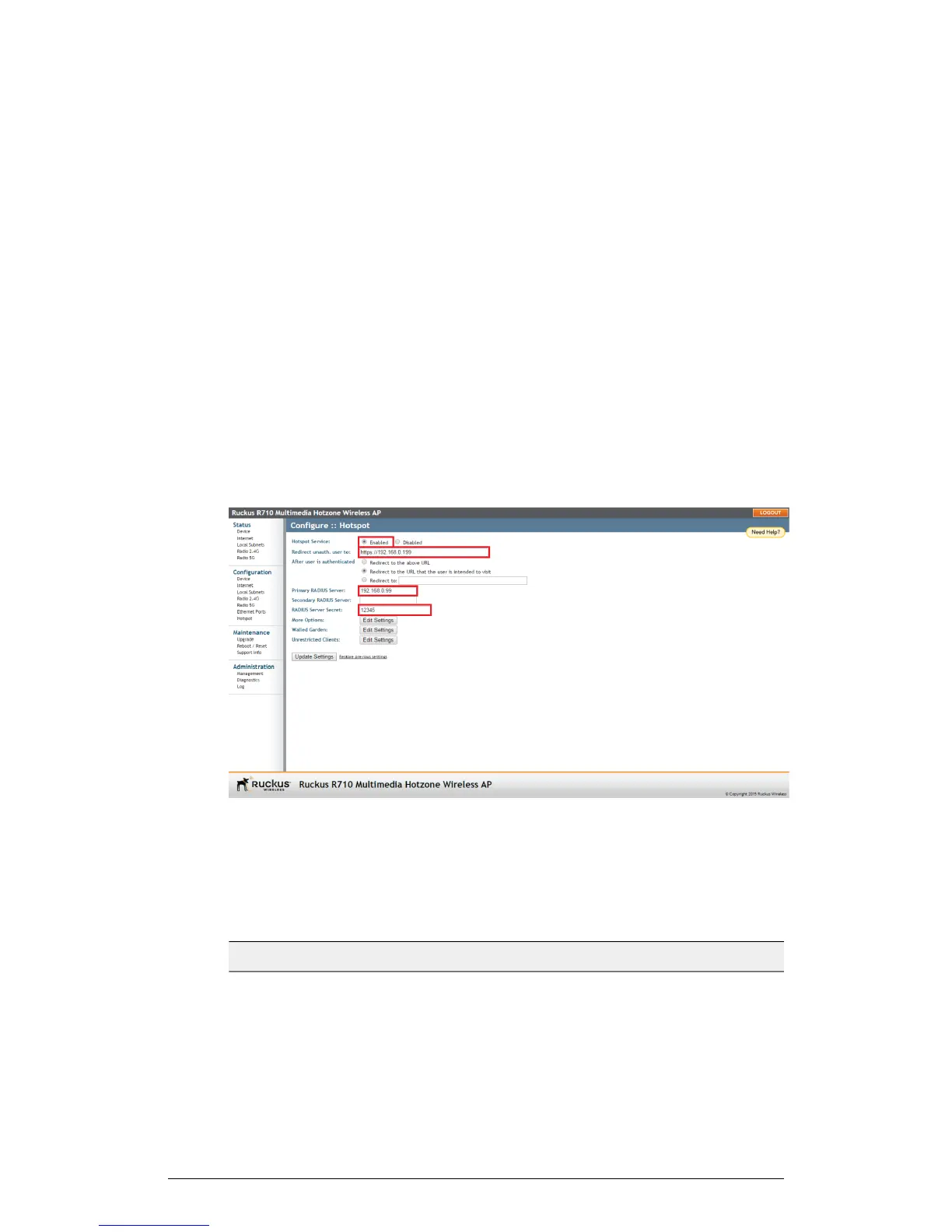
Hotspot service can be deployed on standalone APs through the web interface.
At a minimum, you must configure a login redirect URL and a RADIUS server to which
users are authenticated. Additional options and controls are provided on subsequent
pages.
1. Go to Configuration > Hotspot.
Figure 62: Minimum configuration settings for providing Hotspot service
2. Click Enabled next to Hotspot Service.
3. Review the settings in the following table, and make changes as needed.
Table 51: Hotspot configuration settings
DescriptionSetting
Redirect unauthenticated users to the
specified URL (login page).
Redirect unauth. user to
ZoneFlex Indoor Access Point Release 104.0 User Guide
121
Configuration
Configuring the AP











 To Next Page