DescriptionLED
• Off: The 5GHz WLAN service is down. Green: The WLAN service
is up, at least one client is associated, and no downlink MAPs are
connected.
• Slow flashing green (one flash every two seconds): The WLAN
service is up, at least one downlink MAP is connected, and no
clients are associated.
• Fast flashing green (two flashes every second): The WLAN service
is up, at least one downlink MAP is connected, and at least one
client is associated.
• Amber: The WLAN service is up, but no clients or downlink MAPs
are associated or connected.
5GHz WLAN
One RJ-45 port for a 10/100/1000 PoE (Power over Ethernet,
802.3af/at Class 3 or 4) connection.
PoE In Port
Bottom Panel
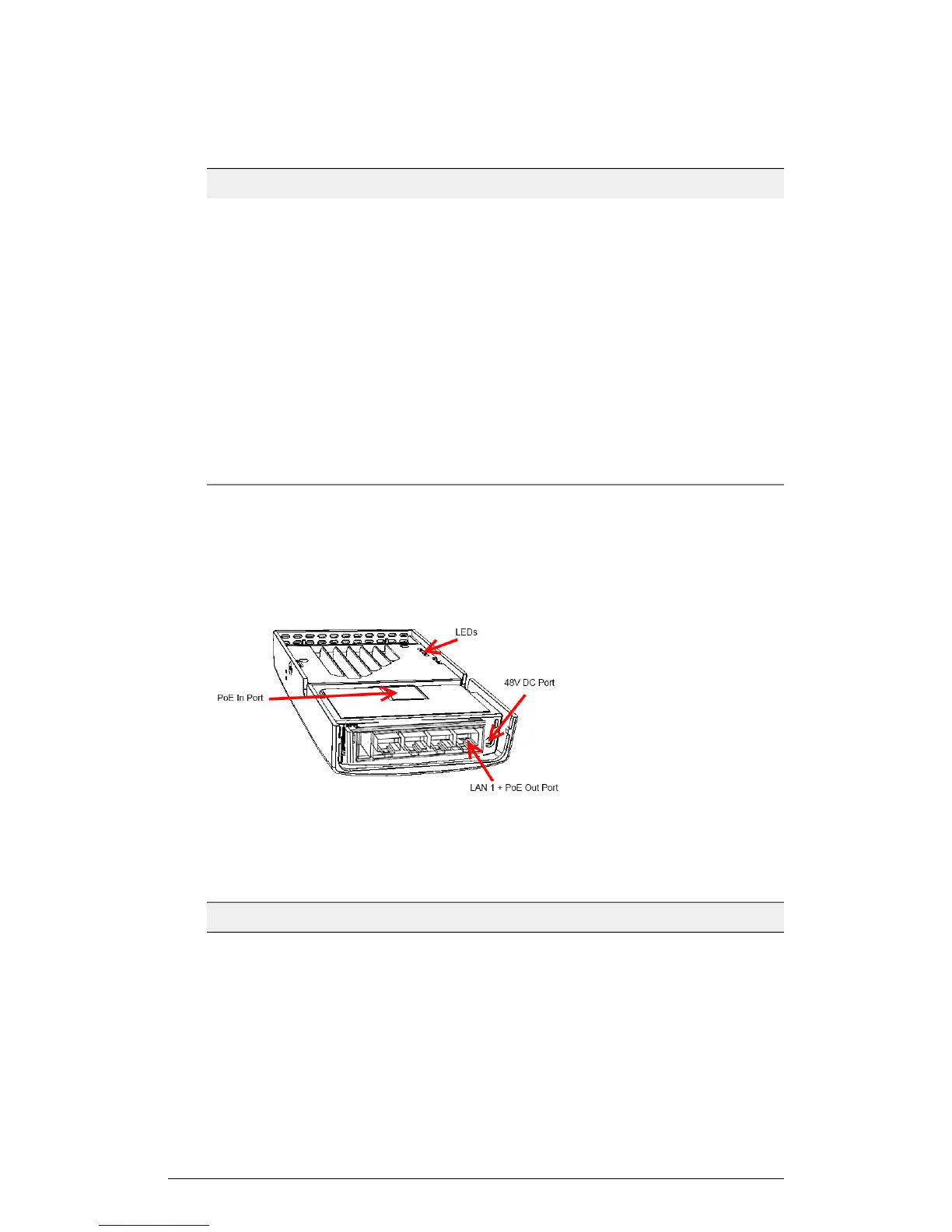
The following figure shows the bottom view of the H510. For a description of each bottom
panel part, refer to the table below.
Figure 21: H510 bottom panel
Table 18: H510 bottom panel elements
DescriptionItem Name
Optional USB connector (refer to
Appendix A: AP Support for Bluetooth Low Energy Devices on page 148).
USB port
10/100 RJ-45 Ethernet Port.LAN4 port
10/100 RJ-45 Ethernet Port.LAN3 port
ZoneFlex Indoor Access Point Release 104.0 User Guide
41
Introduction
Getting to Know the AP Features











 To Next Page