Installer reference guide / Mono tank integrated type 125
8.3 Service Mode
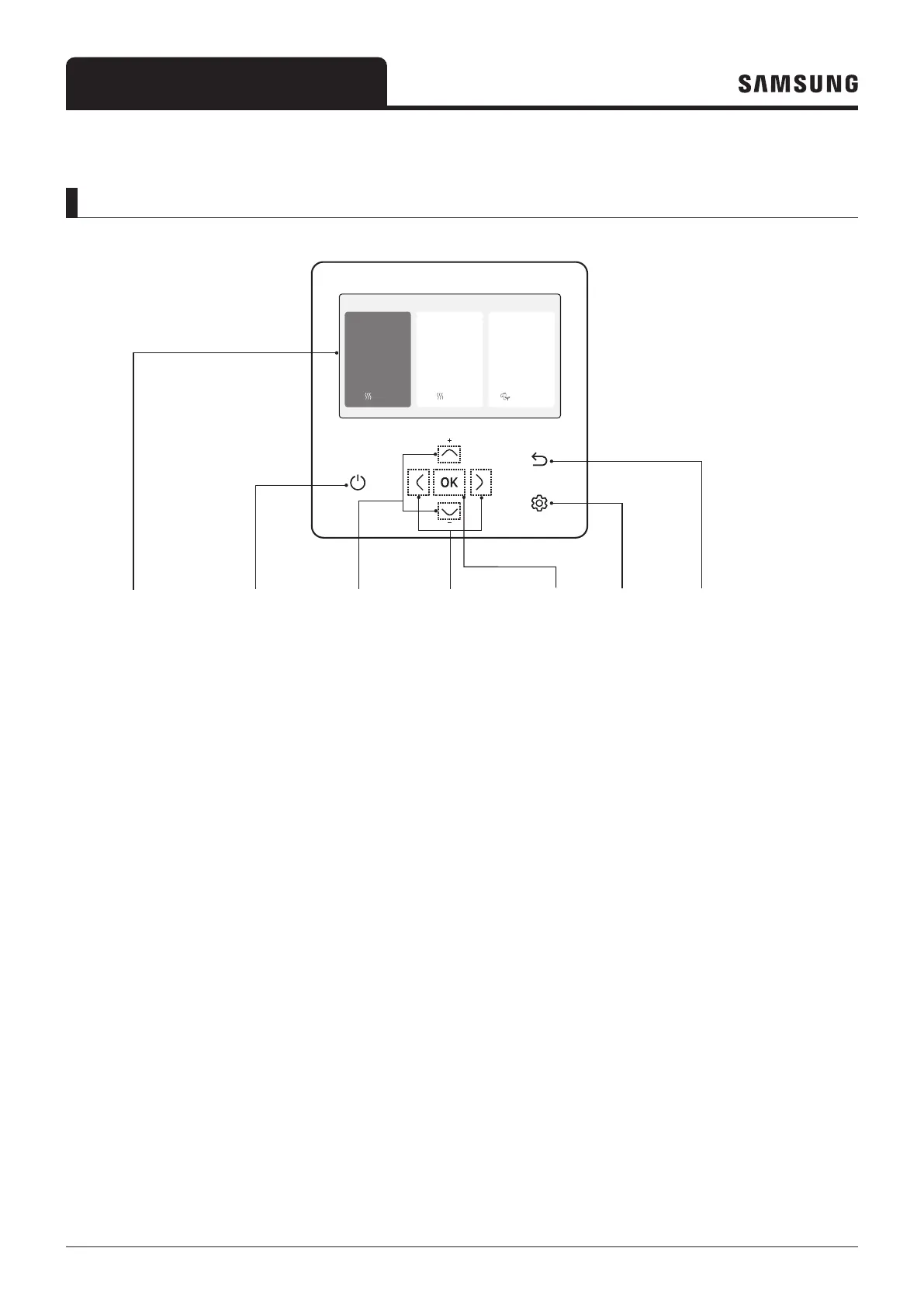
Remote controller overview
Outdoor 07/30/2022 1:30 PM
Zone1
Zone2
30
Heat
Set
°
°
28.2
.0
24
Heat
Set
°
.0
DHW
45
Economic
Set
°
.0
➀ Operation status
display
② Operation
On/Off button
(LED display)
③ Up/Down
button
④ Left/Right
button
⑥ Option
button
⑦ Save & Return
button
⑤ OK
button
1 Operation status display
– Display the operation/function settings and statuses.
2 Operation On/Off button (LED display)
– Turn the air to water heat pump power On/Off.
3 Up/Down button
– Move between items vertically or changes the set temperature.
4 Left/Right button
– M
ove between items horizontally or changes the item value.
5 OK button
– Save your new settings.
6 Save & Return button
– Save your new settings and returns to the previous step.
7 Option button
– Select the detailed setting function.



 To Next Page