7. Electrical installation
Installer reference guide / Mono tank integrated type 97
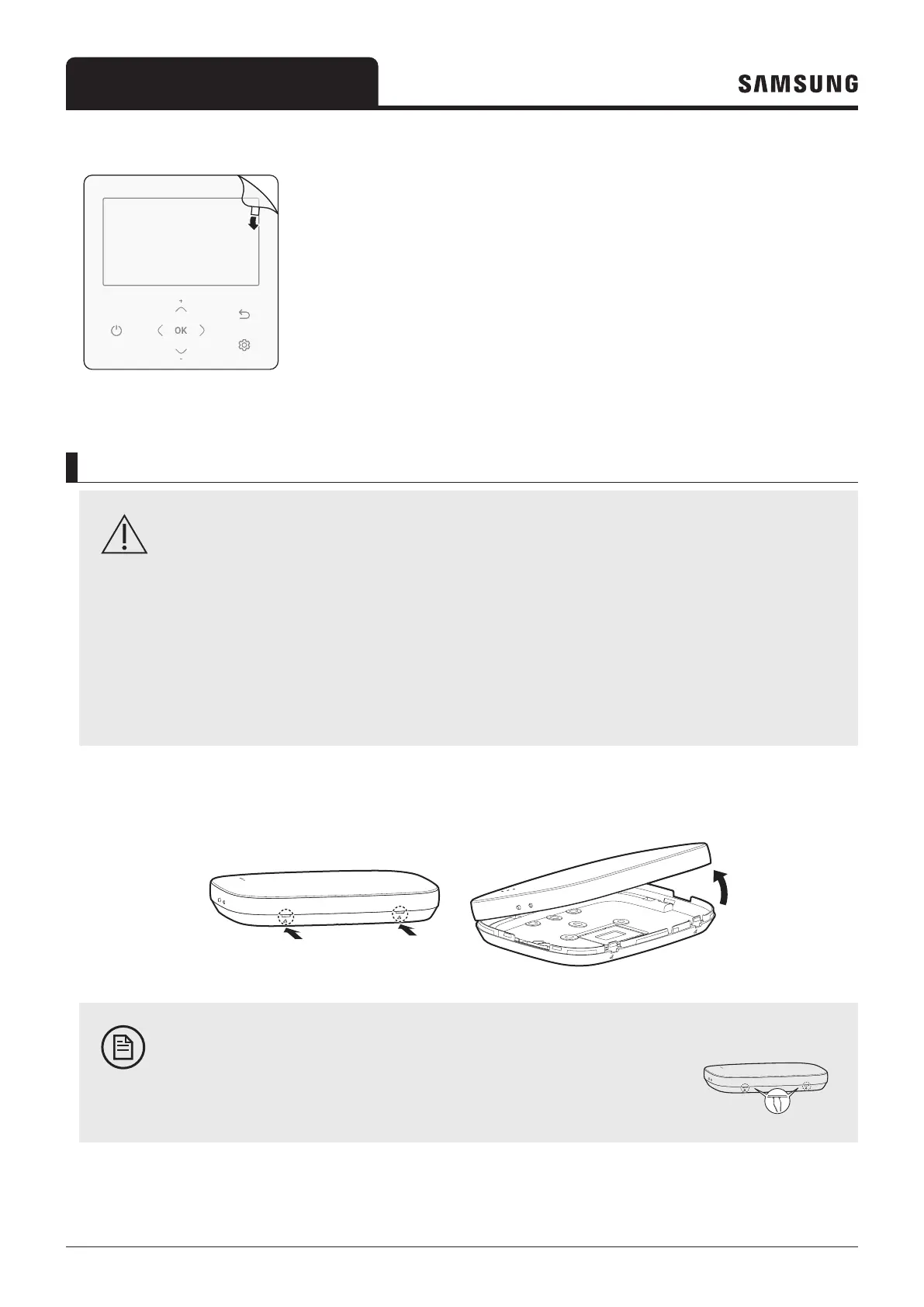
6 Remove the front protective film.
To connect the Wi-Fi kit
CAUTION
• To ensure smooth operation, there should be no obstacle between the Wi-Fi Kit and wireless router that
may interfere with communication. When the Wi-Fi Kit is too far from a router or there are potentially
interfering elements between them, it may cause problems with the performance of the Wi-Fi Kit that
cannot be resolved by customer services.
• Place the Wi-Fi Kit in an area where you can easily press the AP button for device verification.
• Do not install the Wi-Fi Kit in an area where it may be exposed to moisture or impact.
•
1 Use a flathead screwdriver to turn each of the square holes at the lower part of the Wi-Fi Kit and remove the back
cover.
Push both latches at the same time.
NOTE
• Use a flathead screwdriver to turn the rectangular hole at the upper part of the
fixing hook for easy removal.



 To Next Page