Installer reference guide / Mono tank integrated type 153
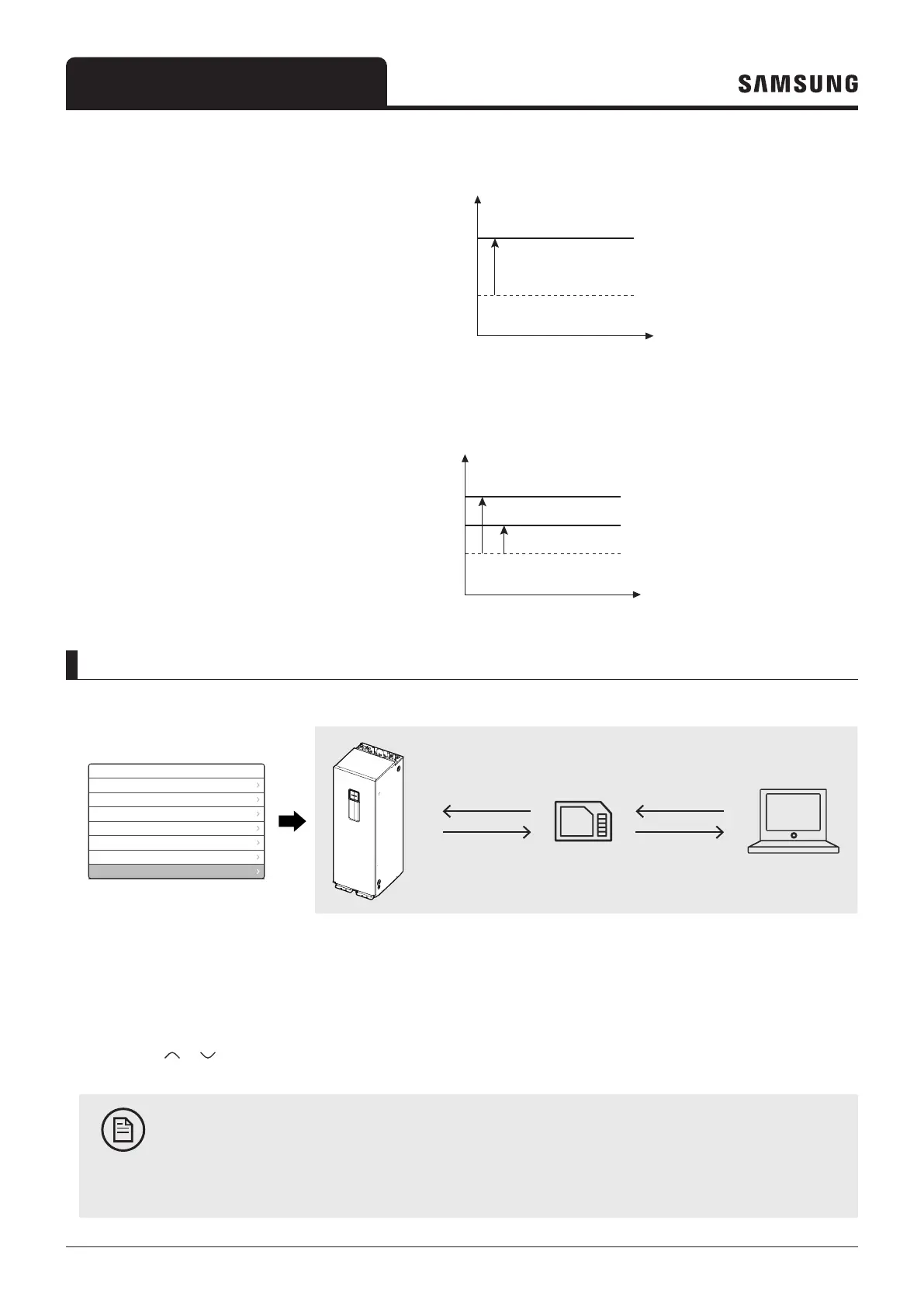
• Mode 3 : 1 Step-up operation
– The heating and DHW setting temp are set according the setting temperature shift value (Heating/DHW) FSV
(#5092/#5093).
Setting temp (°C)
(Room/ Water outlet/ WL/ DHW)
Setting temp in Mode 3 (°C)
(Room/ Water outlet/ WL/ DHW)
[Heating or DHW mode]
Ts+#5092
(Room/Water outlet/WL)
Ts+#5093 (DHW)
• Mode 4 : 2 Step-up operation
–
Setting temp (°C)
(Room/ Water outlet/ WL)
Setting temp in Mode 4 (°C)
(Room/ Water outlet/ WL)
[Heating mode]
(Water outlet or WL)
FSV Upload / Download
To make an easy installation and service possible, please use an SD card and the wired remote controller's function.
Field Setting Value
10** | Remote Controller
20** | Water Law
30** | DHW
40** | Heating
50** | Others
Simple Setting
FSV Upload/Download
FSV DATA
FSV DATA
Operation DATA
FSV DATA
Operation DATA
S-Net Pro2
FSV DATA
Micro SD Card
How to upload or download the Field Setting Values (example)
1 Insert an SD card into the Sub PBA SD Card slot on the tank integrated hydro unit.
2 Select Field Setting Value in the Service mode.
3 Press the
or button to select FSV Upload/Download.
NOTE
• Upload: Uploads the FSV data of the tank integrated hydro unit to the SD card.
• Download: Downloads the FSV data of the SD card to the tank integrated hydro unit.



 To Next Page