Installer reference guide / Mono tank integrated type 157
Operating basic mode
Operating basic mode
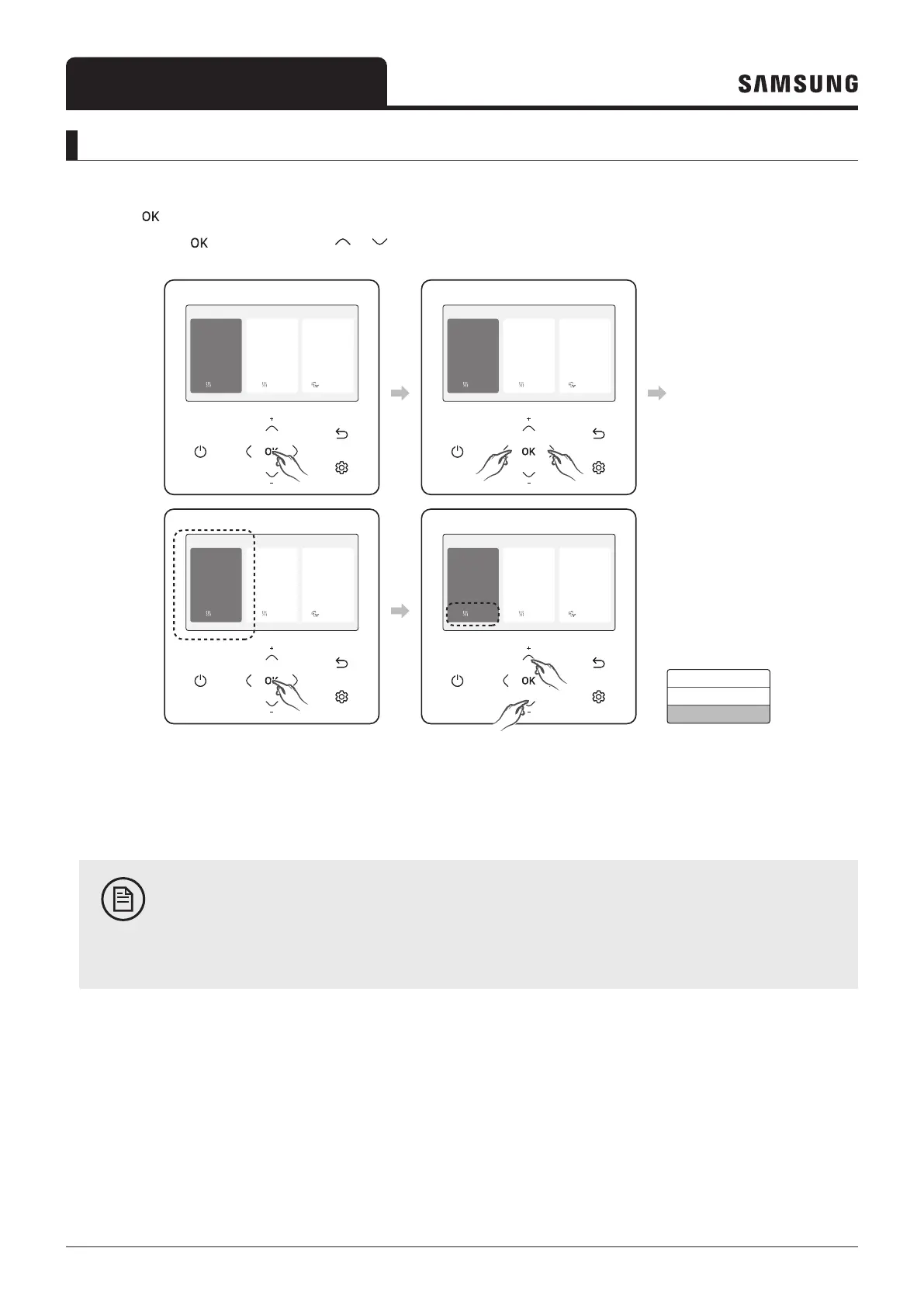
Press the
button to enter the Setting screen from the home screen with the Zone 1 or Zone 2 activated. On each
screen, press the
and then press the or button to select any of Auto, Cool, and Heat modes.
Outdoor 07/30/2022 1:30 PM
Zone1
Zone2
30
Heat
Set
°
°
28.2
.0
24
Heat
Set
°
.0
DHW
45
Economic
Set
°
.0
Outdoor 07/30/2022 1:30 PM
Zone1
Zone2
30
Heat
Set
°
°
28.2
.0
24
Heat
Set
°
.0
DHW
45
Economic
Set
°
.0
Outdoor 07/30/2022 1:30 PM
Zone1
Zone2
30
Heat
Set
°
°
28.2
.0
24
Heat
Set
°
.0
DHW
45
Economic
Set
°
.0
Outdoor 07/30/2022 1:30 PM
Zone1
Zone2
30
Heat
Set
°
°
28.2
.0
24
Heat
Set
°
.0
DHW
45
Economic
Set
°
.0
Auto
Cool
Heat
Auto mode
For indoor units set to automatic mode, the tank integrated hydro unit automatically adjusts the temperature of the
discharged water.
NOTE
• When WL is active, the target supply water temperature will be determined automatically depending on
the outdoor temperature: For the Heat mode, colder outdoor temperatures will result in warmer water.
Cool mode
You can adjust cooling temperature as you like with the Cool mode to cool indoor place.
• When selecting the Heat mode during the Cool mode, the Cool mode will be canceled.
Heat mode
Floor heating is available with the Heat mode by providing hot water in the spring, autumn and winter.
• You can check the defrost operation on the operation status menu under option.
• When selecting the Cool mode during the Heat mode, the Heat mode will be canceled.



 To Next Page