Installer reference guide / Mono tank integrated type 126
Service Mode
0
Please enter your PASSWORD
Service Mode
16
Scanning…
Outdoor 07/30/2022 1:30 PM
Zone1
Zone2
30
Heat
Set
°
°
28.2
.0
24
Heat
Set
°
.0
DHW
45
Economic
Set
°
.0
Outdoor 07/30/2022 1:30 PM
Zone1
Zone2
30
Heat
Set
°
°
28.2
.0
24
Heat
Set
°
.0
DHW
45
Economic
Set
°
.0
Operation
Status
Quiet
ON
Priority
DHW
OptionEnergy
Outing
OFF
Schedule
Settings
0 2 0 2
Please enter your PASSWORD
Service Mode
Service Mode
Service Timer
Quiet Mode Automatic Time
Indoor Zone Option
Connection Information
Device Information
Reset All Service Modes
Power Master Reset
ODU K3 Reset
Field Setting Value
Self-Test Mode
Indoor Unit Option
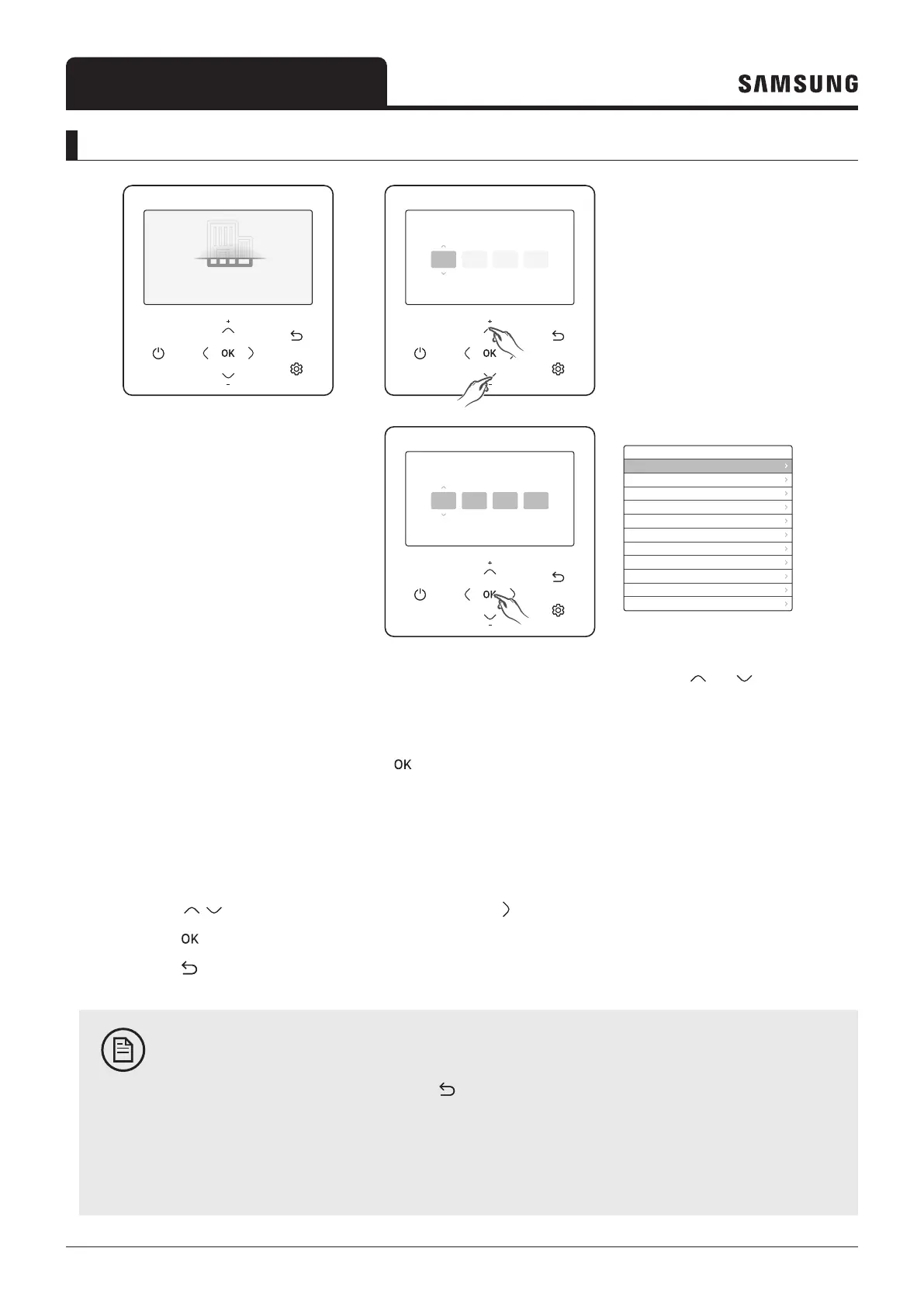
1 If you want to use the various additional functions of your wired remote controller, press the and buttons
at the same time for more than 3 seconds.
– The password entry screen appears.
2 Enter the password, 0202, and then press the
button.
– The settings screen for installation/Service Mode appears.
3 See the list of additional functions of the wired remote controller on the next page, and then select the desired menu.
– Once you have entered the setting screen, the current setting appears.
– Refer to the chart for data setting.
– Using the
/ buttons, change the settings and press the button to move to the next setting.
– Press the
button to save the new setting.
– Press the
button to move to the Home screen.
NOTE
• While setting the data, you can press the button to move to the Home screen after observing the
saving status at a pop-up screen.
• Unavailable functions are marked inactive and they cannot be set.
• If communication initialization is needed after the setting, the system will reset automatically and
communication will be initialized.



 To Next Page