Installer reference guide / Mono tank integrated type 158
NOTE
• When setting standard cooling & heating temperature as indoor temperature, the Auto mode cannot be
selected.
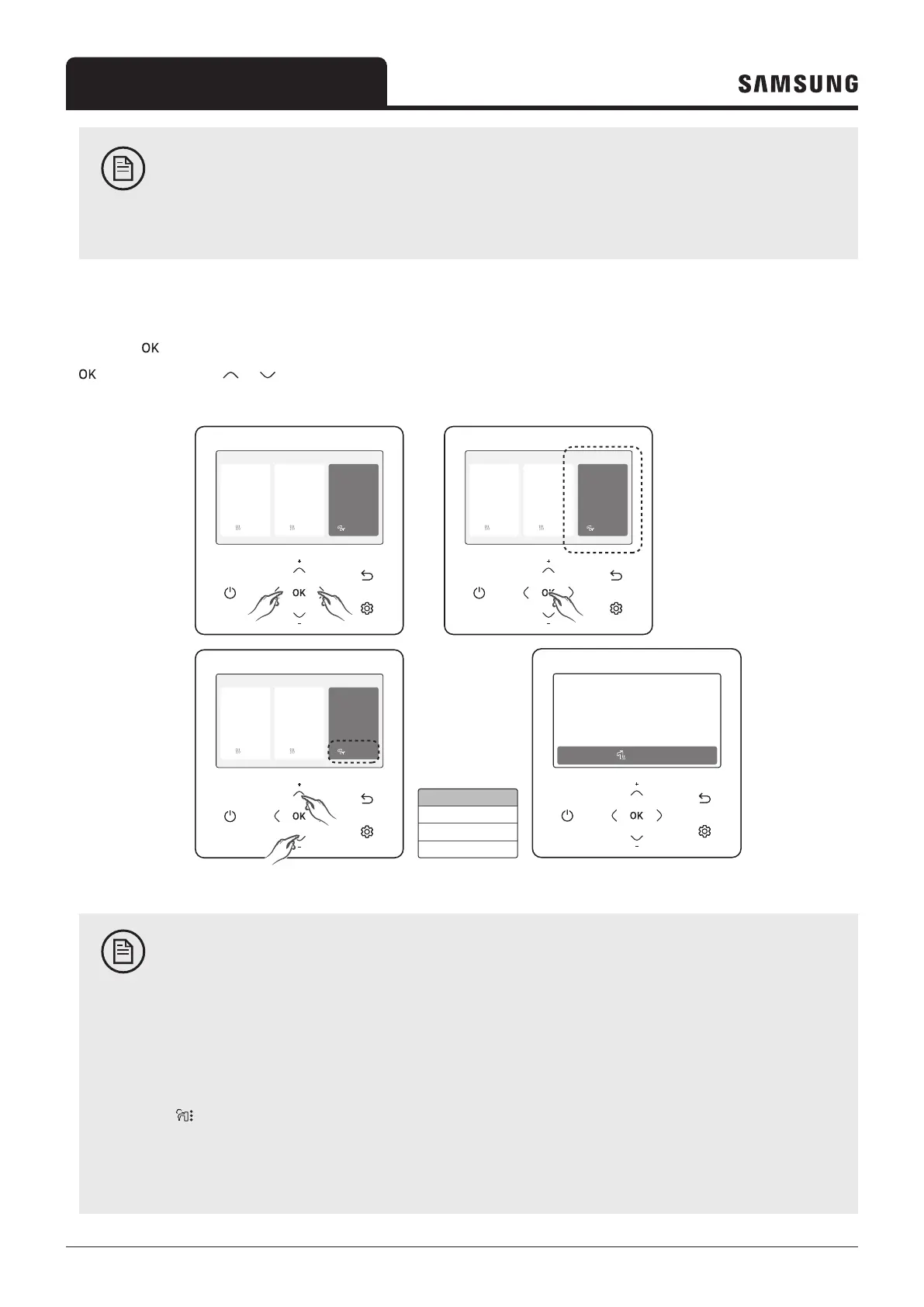
Domestic Hot Water (DHW) mode
Press the button to enter the Setting screen from the home screen with the DHW activated. On each screen, press the
and then press the or button to select and use any of Economic, Standard, Power, and Forced modes.
Outdoor 07/30/2022 1:30 PM
Zone1
Zone2
30
Heat
Set
°
°
28.2
.0
24
Heat
Set
°
.0
DHW
45
Economic
Set
°
.0
Outdoor 07/30/2022 1:30 PM
Zone1
Zone2
30
Heat
Set
°
°
28.2
.0
24
Heat
Set
°
.0
DHW
45
Economic
Set
°
.0
Outdoor 07/30/2022 1:30 PM
Zone1
Zone2
30
Heat
Set
°
°
28.2
.0
24
Heat
Set
°
.0
DHW
45
Economic
Set
°
.0
Standard
Economic
Power
Forced
Standard
Set
Current
84
°
°
.0
-2.4
07/30/2022 1:30 PM
DHW
NOTE
• When the DHW mode is not supported, "Not Supported" appears.
• To operate hot water mode, you need to set the hot water function 'Yes' in the field specification setting
mode (#3011) of wired remote controller.
• When the Cool/Heat mode and the DHW mode are selected at the same time, the Cool/Heat mode and
the DHW mode will operate alternately.
•
(power operation) for the DHW mode cannot be used when the booster heater is not in use.
• If you want to enjoy a leisurely bath or need a lot of warm water urgently, select the Forced mode. When
this mode is enabled, it is assured that the full capacity of the heat pump is only delivered for domestic
water heating.



 To Next Page