EasyManua.ls Logo

Sanding STS-752RC - Page 53

Sanding STS-752RC
152 pages
Print Icon
To Next Page IconTo Next Page
To Previous Page IconTo Previous Page
Loading...
52
STEPS
DISPLAY
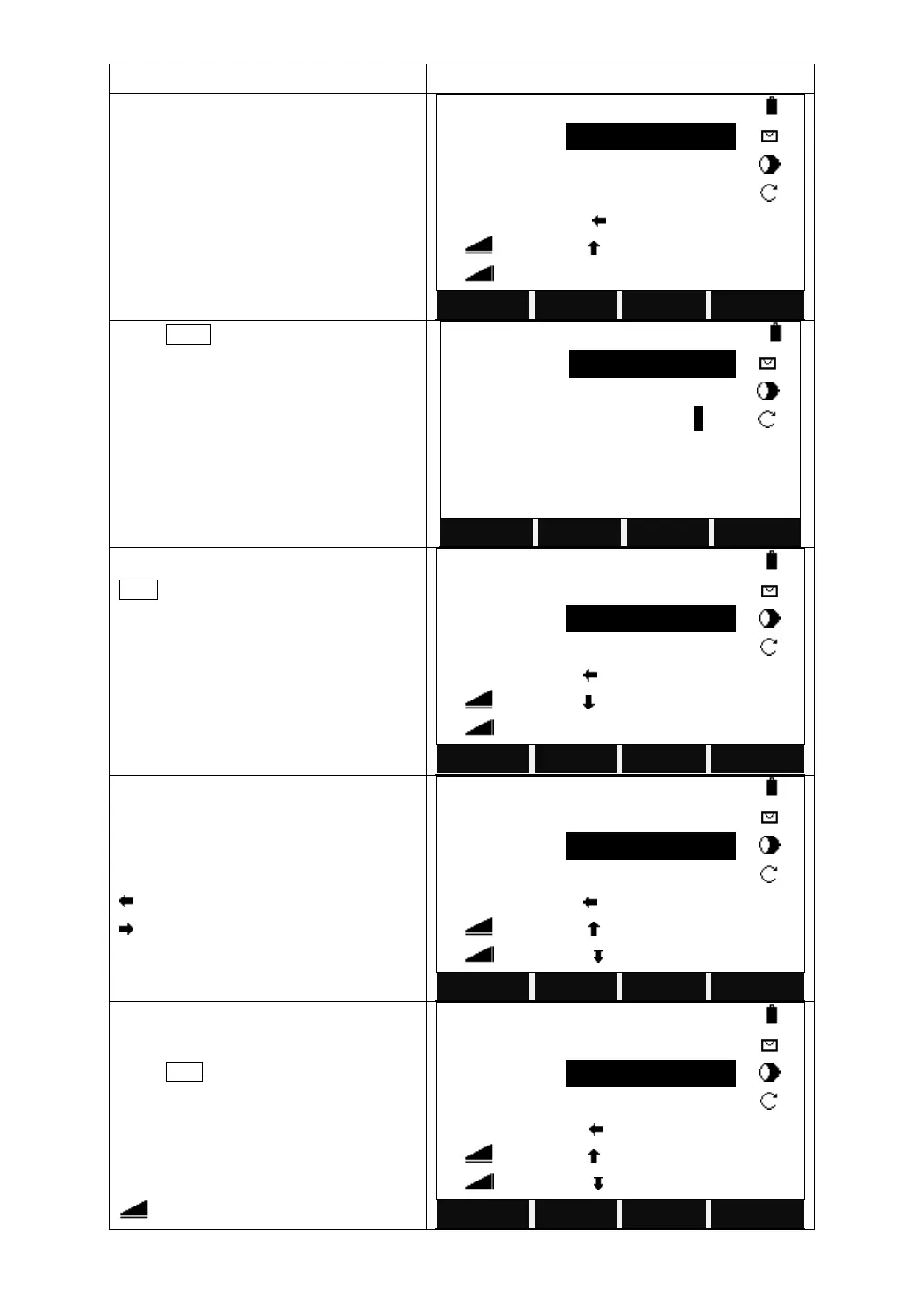
Confirm the point to be stake out.
【Stake Out】 1/3 ▼
Find
:
*
PtID
:
5
Type
:
Known
△Hz
:
-85°51′31″
Ⅰ
△
:
2.055 m
Mem.
△
:
----.--- m
All
DIST
RECORD
↓
Press PAGE to turn to Page 2/3.
Input the reflector height.
【Stake Out】 2/3 ▼
PtID
:
5
Type
:
Known
R.HT
:
1.500 m
△LOff
:
----.--- m
Ⅰ
△TOff
:
----.--- m
Mem.
△H
:
----.--- m
All
DIST
RECORD
↓
Collimate the target prism and press
DIST on the 1
st
page of function bar to
trigger the measurement. It will calculate
and display the offsets between the
current target point and the point to be
staked out.
【Stake Out】 1/3 ▼
Find
:
*
PtID
:
5
Type
:
Known
△Hz
:
-85°51′31″
Ⅰ
△
:
-0.082 m
Mem.
△
:
-0.019 m
All
DIST
RECORD
↓
Rotate the objective lens to make the △
Hz at 0°00′00″. Then indicate the person
who holds the prism to move the prism.
: Move the prism leftward.
: Move the prism rightward.
【Stake Out】 1/3 ▼
Find
:
*
PtID
:
5
Type
:
Known
△Hz
:
-85°51′31″
Ⅰ
△
:
5.082 m
Mem.
△
:
-1.119 m
All
DIST
RECORD
↓
Set the prism at the 0°00′00″ direction
where the objective lens is pointing.
Press DIST to trigger the measurement
again to calculate and display the offsets.
Indicate the person who moves the prism
to move the prism according to the
arrows. Repeat measuring until the △
displays 0.000m.

【Stake Out】 1/3 ▼
Find
:
*
PtID
:
5
Type
:
Known
△Hz
:
0°00′00″
Ⅰ
△
:
2.082 m
Mem.
△
:
-1.119 m
All
DIST
RECORD
↓

Table of Contents

Related product manuals