Page 25
Art. no.: 2.510701 rev.: c
Initial Preparation 3
User Guide Connection to a Host System 3.2
BP-200 plus
3.2.2 CS-200 Connections
3.2.3 CS-200 Settings
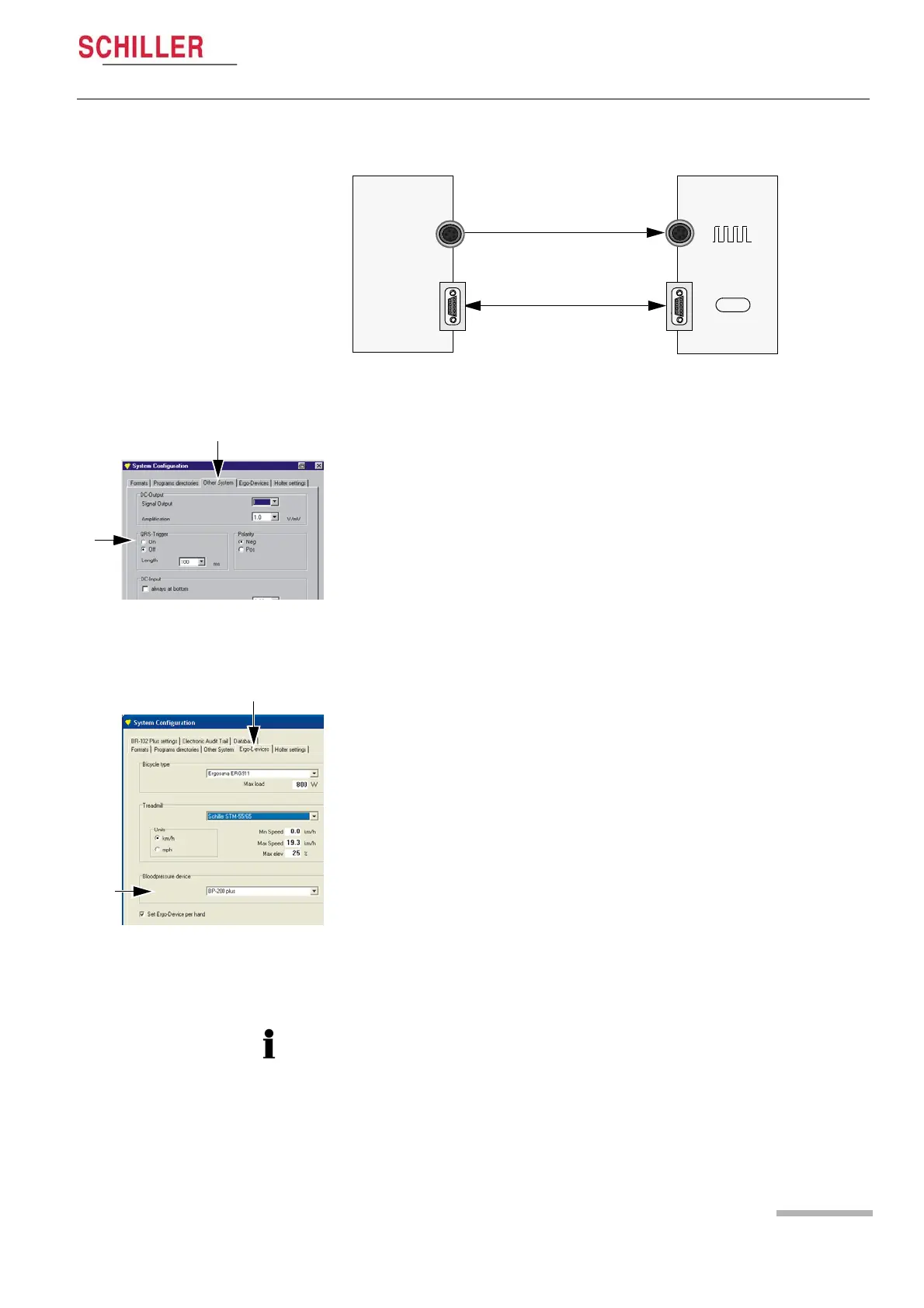
CS-200 BP-200 plus
RS-232 Cable Ass.
Art. No. 4.520373
Trigger Cable Ass.
Art. No. 4.520562
RS-232
DATA I/O
(back
panel)
BP
(back
panel)
Defining the trigger pulse
In the system configuration menu select:
System > Settings > System Configuration > Other System
The signal is a TTL logic level of 5 V. For use with the BP-200 plus make the following
settings:
• QRS trigger: On
• Polarity: Negative or Positive - set the same polarity in the BP-200 plus set-
tings (see page 20 - Setup Measurement).
• Duration: 50ms
Defining the BP Unit
In the system configuration menu select:
• System > Settings > System Configuration > Ergo Devices
• A number of analogue and digitally controlled blood pressure units are predefined.
Select BP-200 plus. If BP-200 plus is not shown select BP-200.
The BP measurement intervals is part of the exercise protocol and defined in the host
system (see CS-200 user guide).


 To Next Page