Page 53
Versions 5
User Guide Ethernet version 5.2
Art. no.: 0-48-0013 Rev. m
FRED easy
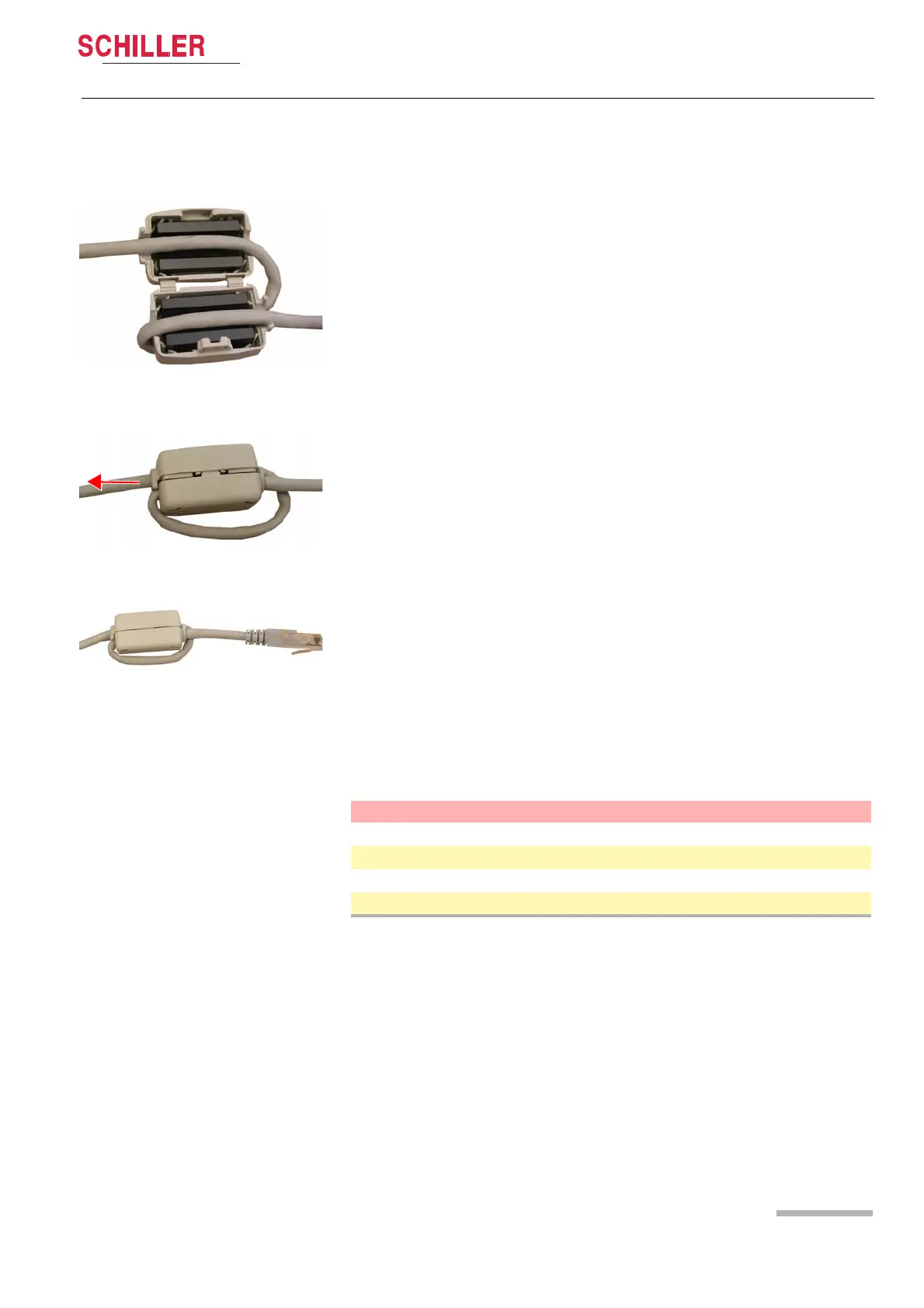
5.2.3 Installing the ferrite core
FRED easy® Ethernet accessories
Fig. 5.6 Installing the cable within the fer-
rite core
Fig. 5.7 Reducing the loop
Fig. 5.8 Correctly installed ferrite core
1. Form a loop and route the Ethernet cable through the open ferrite core (see Fig.
5.6 Installing the cable within the ferrite core).
2. Shut the ferrite core – without closing it completely – and check the cable position.
3. Reduce the size of the loop to place the ferrite core as closely as possible to the
Ethernet plug. To do so, pull the long end of the cable (see Fig. 5.7 Reducing the
loop).
4. Close the ferrite core (see Fig. 5.8 Correctly installed ferrite core).
Part No.
Description
1-58-5303 Ethernet adapter
5-30-0003 Ethernet cable (3 m, category 5)
4-33-0002 Ferrite core
0-05-0026 Ethernet cable (3 m, with ferrite core)















 To Next Page