5Versions
5.3 Online version
Page 56
Art. no.: 0-48-0013 Rev. m
FRED easy
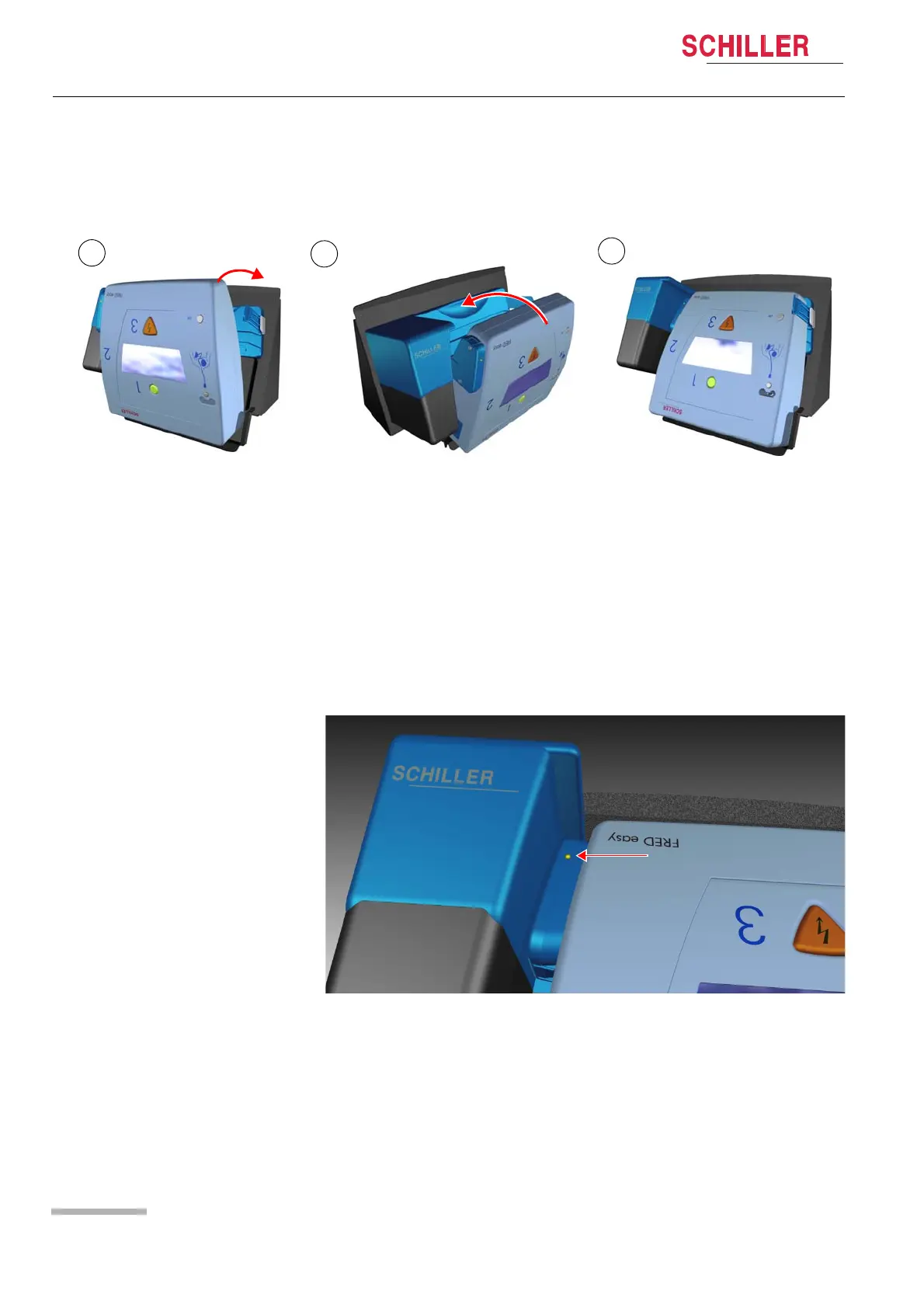
5.3.2 Placing the FRED easy® in the docking station
1. Switch off device.
2. Position the device as shown in illustration (1).
3. Push the device into the docking station (2) until it clicks into place (3).
Fig. 5.10 Inserting the device into the docking station
– The device switches on and starts transmitting the data from its internal memory
in the same way as the Ethernet version (see 5.2.2 Data transmission proce-
dure).
– The indicator (see Fig. 5.11 Communication indicator) is blinking when the de-
vice is able to communicate with the data network.
– The same screens are displayed as during data transmission with the Ethernet
version (see 5.2.2 Data transmission procedure).
Once all data has been transmitted, the display illumination switches off and the mes-
sage "FREDeasy Online READY" is displayed. This message is displayed whenever
the device is able to communicate with the data network. In addition, the indicator is
blinking (see Fig. 5.11 Communication indicator).
Fig. 5.11 Communication indicator
If communication is interrupted, the message "
NO SERVER" is displayed and the indicator remains lit.
You can read and edit the transmitted data using the LifeDataNet® web server.















 To Next Page