5Versions
5.4 Configuration Ethernet/Online using FRECO
Page 60
Art. no.: 0-48-0013 Rev. m
FRED easy
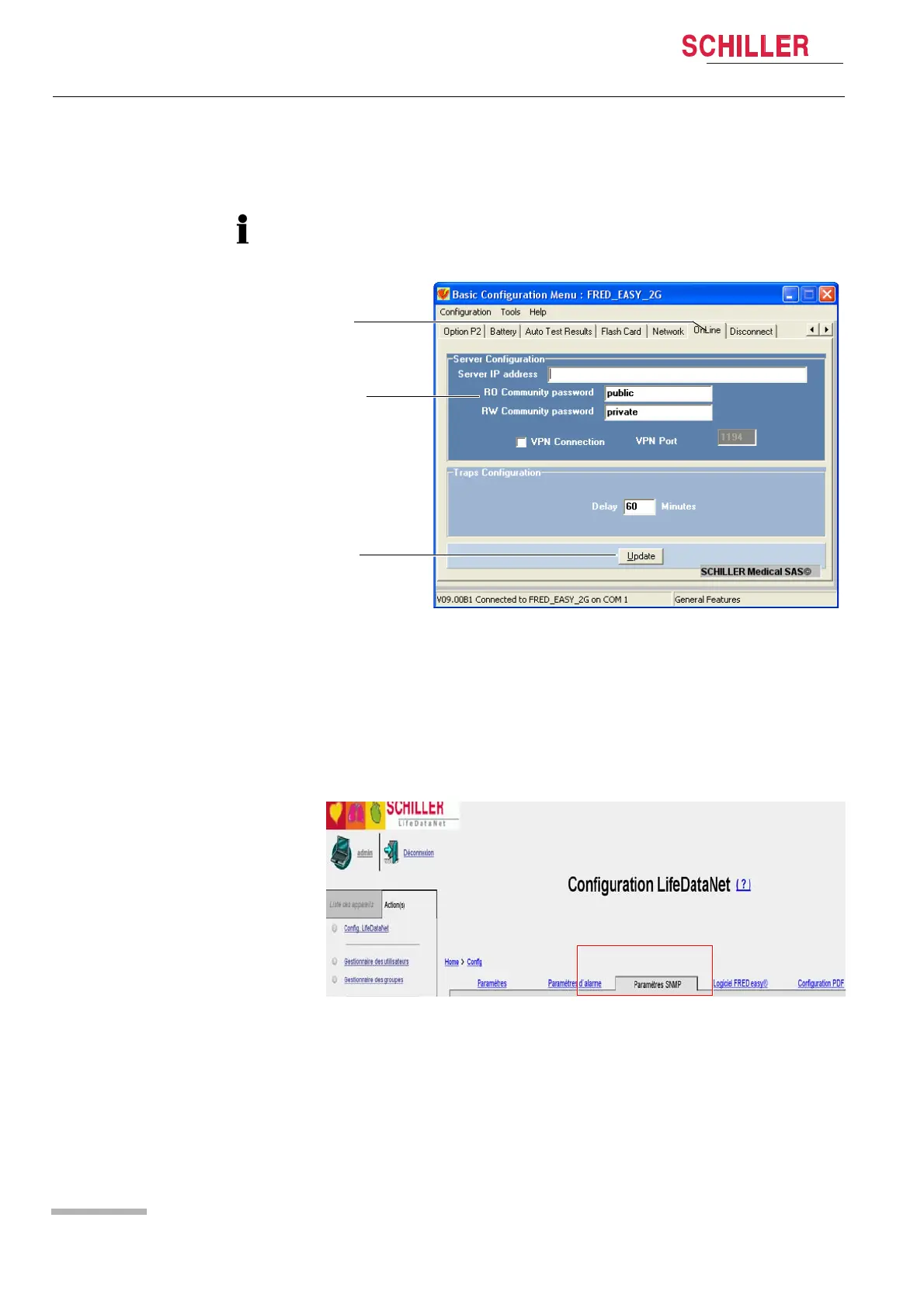
5.4.2 Configuring the "Online" Tab
• Start the FREDCO® software program and select the "Online" tab (1).
Fig. 5.14 Network configuration ("Online" tab)
(1) "Online" tab in FREDCO®.
(2) "RO and RW Community" password.
(3) Confirmation of "Online" tab configuration.
• Enter the "RO and the RW Community" password (2). You can choose any pass-
word, but it must be identical to the password entered in the "FREDeasy®" section
of the "SNMP Parameters" tab in LifeDataNet® (see Fig. 5.15 SNMP parameter
in LifeDataNet®).
Fig. 5.15 SNMP parameter in LifeDataNet®
• Click the "Update" button (3) to apply any changes.
A password provided by SCHILLER must be entered to access the network parameters.















 To Next Page