EasyManua.ls Logo

SCHOK FLIP - Battery Manager

SCHOK FLIP
113 pages
Print Icon
To Next Page IconTo Next Page
To Previous Page IconTo Previous Page
Loading...
24
Battery Manager
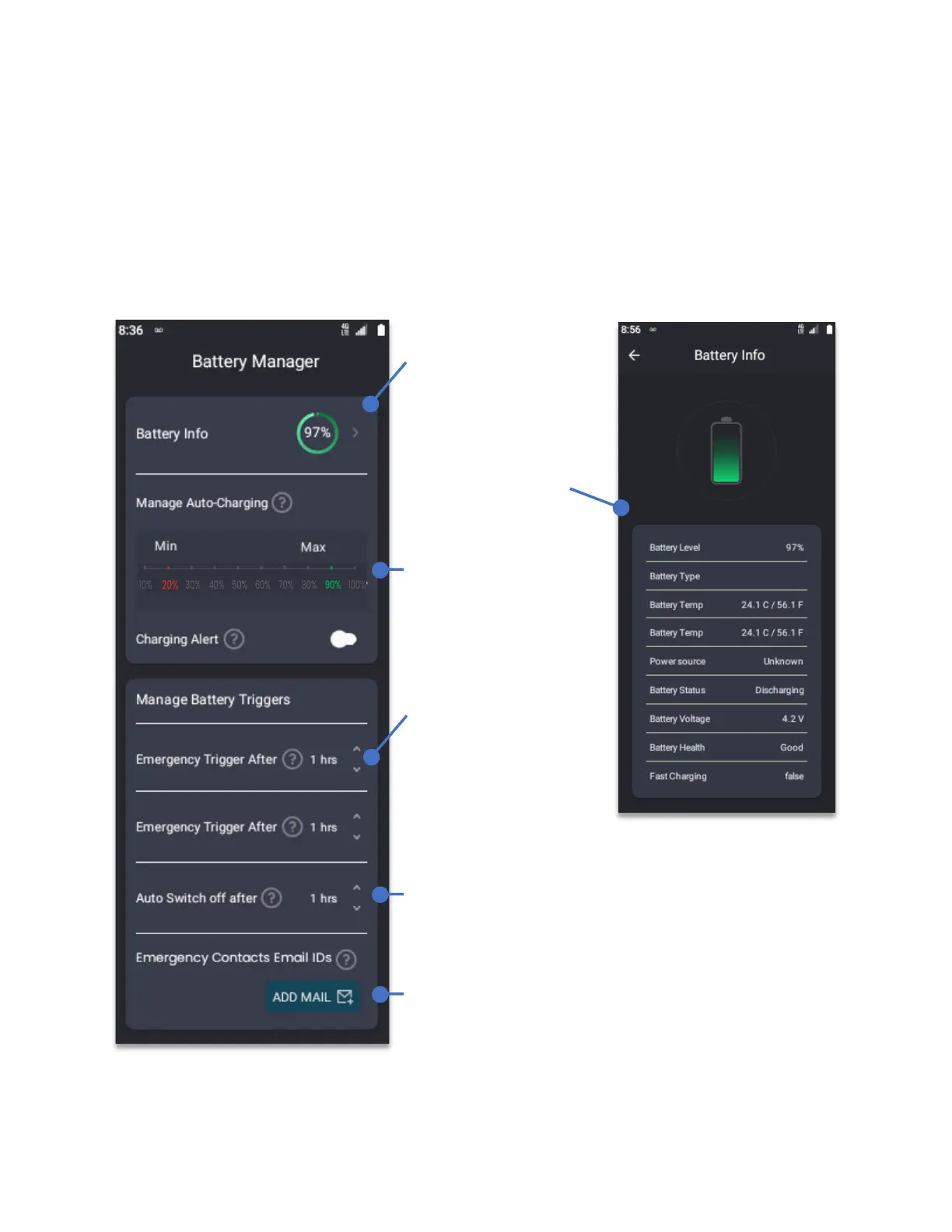
The battery manager presents tips and statistics of device battery, also allowing to configure
the Schok flip charging levels and battery related preferences.
From Home Screen, press the
OK Key
Using the
Navigation key
, press
OK key
on
Battery Manager.
By selecting the
Battery info and
pressing the OK key,
a new window will
appear showing a
detailed view of the
state of the battery.
Set Min-Max Auto-
Charging limit.
TIP: Avoid the battery
going less than 20%
and avoid the battery
to charge to 100%.
Set-up an emergency
Email alert in case
the device is left on
charging for long
periods of time and
there is no motion.
Device can automatically shut down after a certain
pre-set period of time.
Can store up-to three emergency contacts to send
notifications of the state of the battery.

Table of Contents

Related product manuals