Contacts
With the Contacts application you can create, manage and save your contacts in the memory
of the device.
WARNING: If you do a factory reset all the information saved in the device will be deleted
including all your contacts. If you leave the phone without battery for an extended period of
time, your contacts may be lost. It’s recommended that you backup your contacts database
prior to erasing your device. Schok and your carrier are not responsible for lost contacts.
• From Home Screen, press
OK Key
• Using the
Navigation key
, press
OK key
on
Contacts.
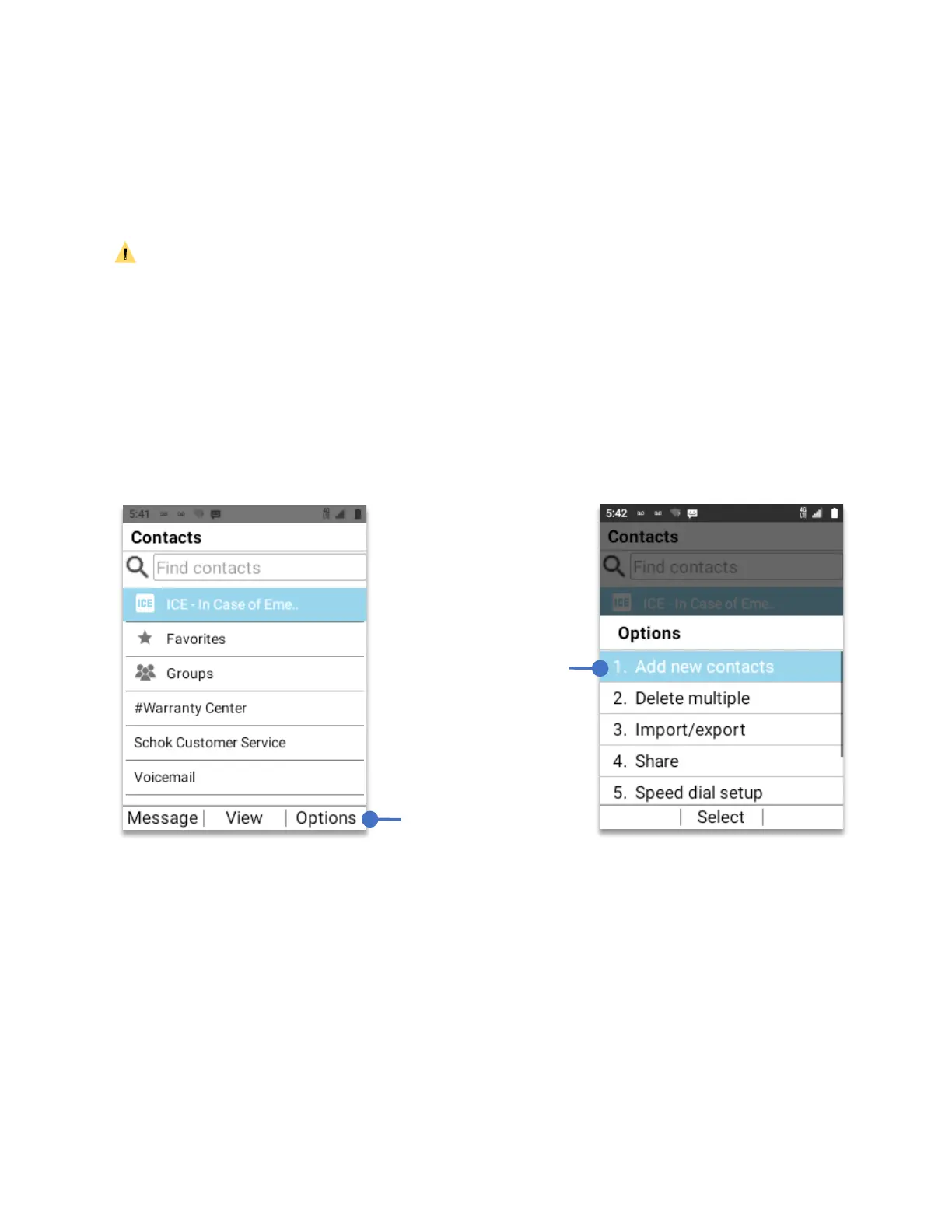
To add a new contact, press the
Right soft key (Options)
Using your
Navigation key
, select
“Add new contacts”
, press the
OK Key
.
Using the
keypad
and the
Navigation key
enter the new contact information.
You can just enter the name and the phone number or, you can enter the full contact
information such as Name, Company, Phone, Email, Address, etc..
To save the contact, press the
OK Key (Save).
Press the
Right soft
key (Options)
Select and
press the
OK Key



 To Next Page