Maintenance
90
12.00 | SWS | Assembly and Operating Manual | en | 389456
7.4 Removing the product from the robot arm
WARNING
Risk of injury due to unexpected movements and falling tools!
If the energy supply is switched on or if residual energy is still
present in the system, this can cause components to move
unexpectedly or fall, which may result in serious injuries.
• Before starting any work on the product: Switch off the energy
supply and secure against re-connection.
• Ensure that no residual energy remains in the system.
• Only carry out maintenance work when the tool is placed in
the storage rack or secured against falling.
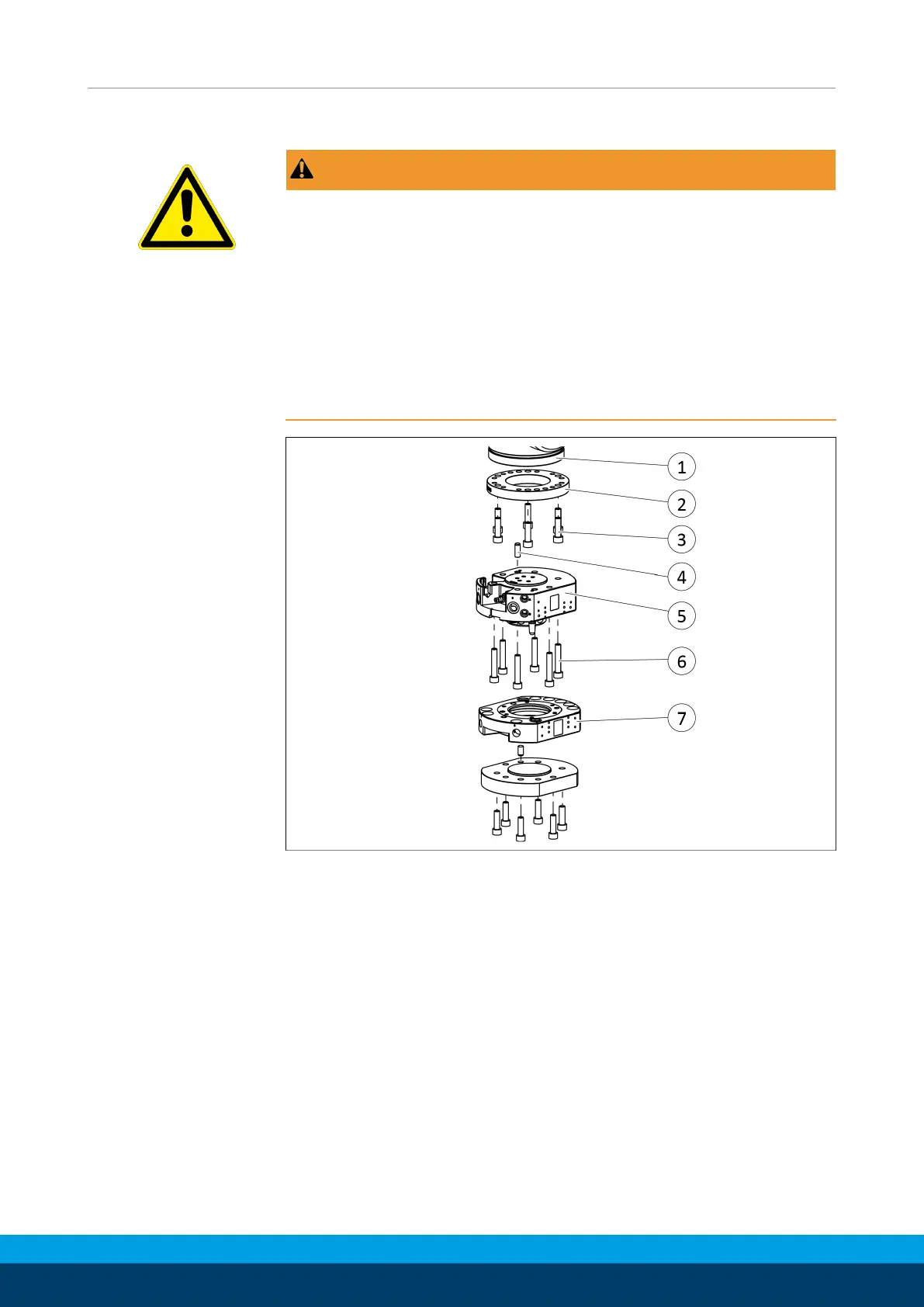
Disassemble the product from the robot
Ø Place the SWA(7) in the storage rack, secure and uncouple it.
Ø Switch off and deactivate all activated supply circuits
(e.g.electrical, air, water, etc.).
Ø Loosen screws(6) and remove SWK(5) from the robot(1). Make
sure that the dowel pin(4) does not fall off.
Ø Put down the SWK(5).
Ø When using an adapter plate: Loosen screws(3) and remove
adapter plate(2) from the robot(1).


 To Next Page
 Loading...