IRD-2600 / IRD-2800
Integrated Receiver Decoders
P/N 2349-72784-00 Page 3-59
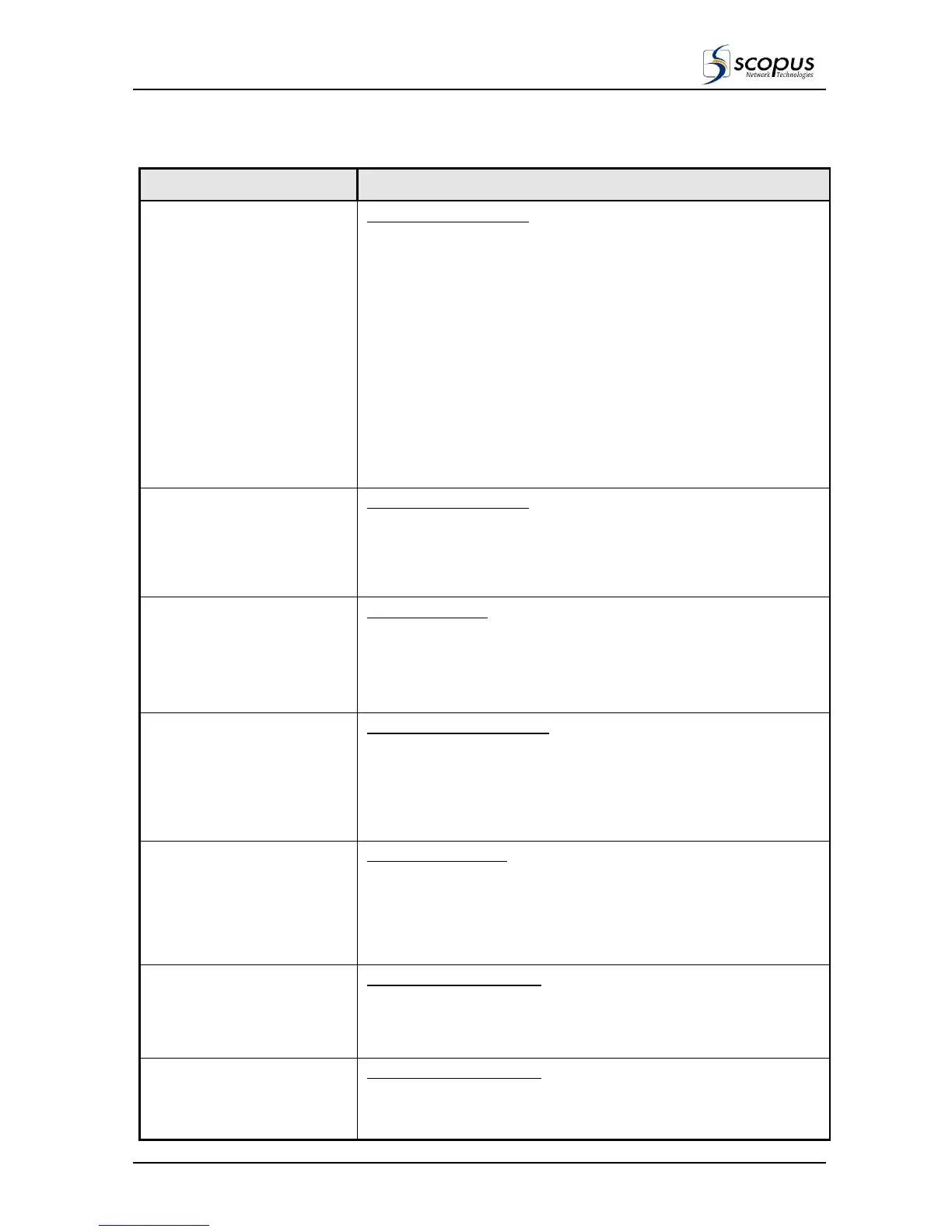
Table 3-20: Graphics Configuration (GFX-CNFG) Sub-Menu Functions
OPTION DESCRIPTION
Graphics OSD
Graphics Display Control
This function ENABLE/DISABLE the On Screen Display (OSD) of the
IRD generated graphics overlay (as selected by the Graphics Display
Sub-Menu, see paragraph 3.5.4.2).
Options available:
Disable: Disables on-screen display of graphic overlay.
EBU-TTX Subtitle: Enables display of EBU Teletext subtitles.
DVB Subtitle No Page: Enables display of DVB Subtitles. One
Language is selected for the provided service.
DVB Subtitle PAGE mode: Enables display of DVB Subtitles the
subtitles Language is selected in the subtitle page.
NOTE
Select DUB Subtitle Page Mode only when required. Working from
DVB Subtitle No Page is more effective
Background Color
Background Color Select
Selects the background color (16 options) for the graphics overlay.
Available options:
Turquoise, White, Black, Cyan, Blue, Grey, Olive, Green, Magenta,
Purple, Violet, Brown, Orange, Pink, Yellow, Red.
Fonts Color
Fonts Color Select
Selects the color (16 options) of the fonts displayed on the graphics
overlay.
Available options:
Turquoise, White, Black, Cyan, Blue, Grey, Olive, Green, Magenta,
Purple, Violet, Brown, Orange, Pink, Yellow, Red.
Background Intensity
Background Intensity Select
Selects the level of transparency (9 levels) for the graphics overlay
background (i.e., how much of the video picture can be viewed through
the overlay).
Available options:
From Level 0 (Opaque) to Level 8 (Transparent).
Fonts Intensity
Fonts Intensity Select
Selects the level of transparency (9 levels) of the fonts displayed on
the graphics overlay (i.e., how much of the video picture can be viewed
through the graphics).
Available options:
From Level 0 (Opaque) to Level 8 (Transparent).
X Position Offset
Subtitle Offset / X Position.
Sets the Lateral position (x) offset of the subtitle graphic overlay
(Teletext or DVB).
Range: from –120 to +120 pixels/x-position offset.
Y Position Offset
Subtitle Offset / Y Position.
Sets the vertical position (y) offset of the subtitle graphic overlay
(Teletext or DVB).
Range: from –120 to +120 pixels/y-position offset.



 To Next Page