IRD-2600 / IRD-2800
Integrated Receiver Decoders
P/N 2349-72784-00 Page 2-7
2.4.5. Power Connection
2.4.5.1. Ground Connection
Ground connection to the IRD is made by connecting an AC power cable to the IRD AC
connector. If the IRD is fitted with a –48V DC power supply please follow the instruction
provided under paragraph 2.4.5.3 below.
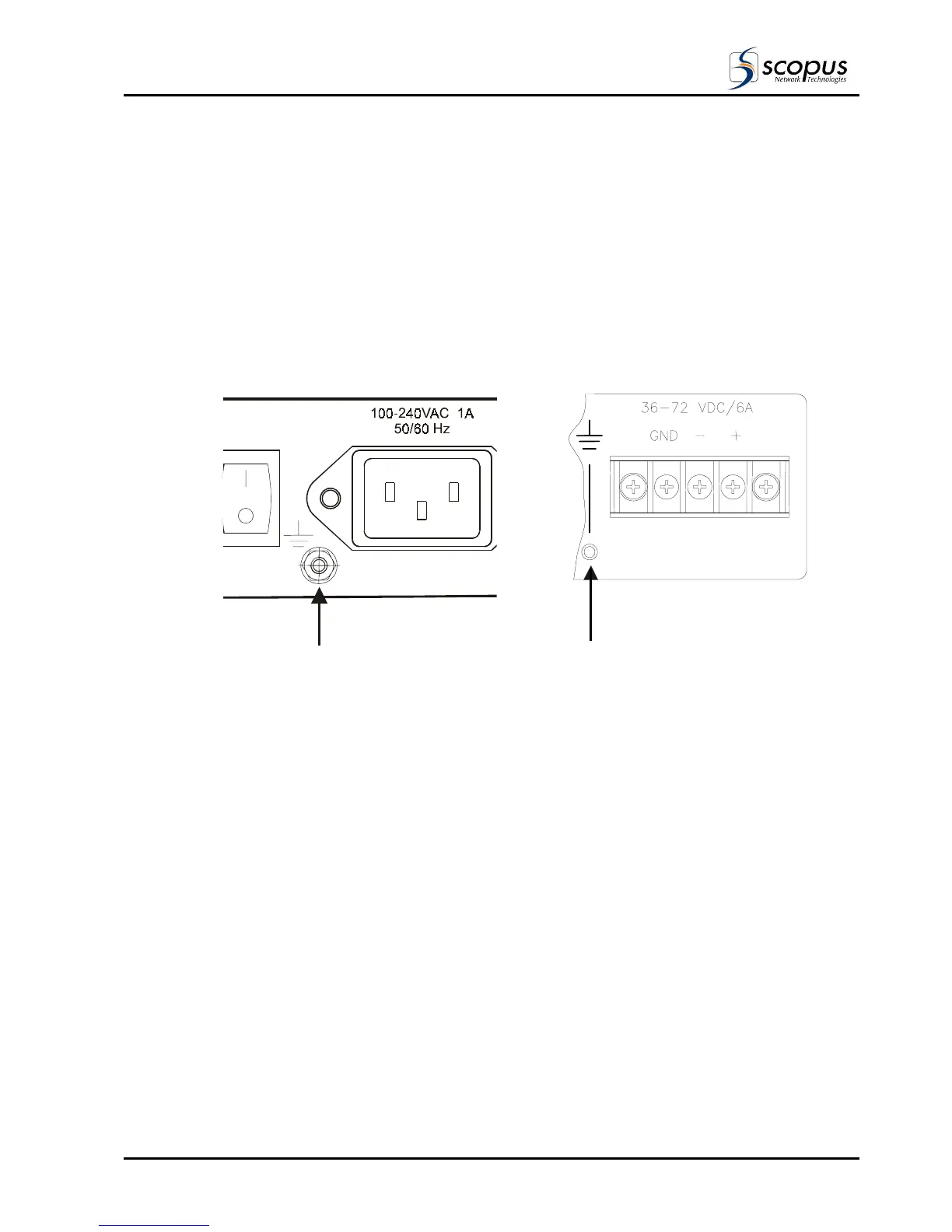
When the IRD is rack mounted, the jackscrew (shown in Figure 2-3) must be connected to
the rack housing, which in turn, should be properly grounded.
Figure 2-3: IRD Jack Screw Ground Connection
AC Power Supply Configuration DC Power Supply Configuration
Ground
Ground
Jackscrew
2.4.5.2. AC Power Connector
Connect the AC power cable to the IRD power connector at the rear of the unit.
(see Figure 2-3) Connect the other end to the AC power source.
2.4.5.3. DC Power Connector
In some cases the IRD is fitted with a –48V DC Power Supply as shown Figure 2-3 (DC
Power Configuration). When this is the case please connect the power source as described
below.
To connect the –48V Power Supply:
a. Connect a (+) 48V DC source wire to the (+) contact on the power terminal board.
b. Connect a (-) 48V DC source wire to the (-) contact on the power terminal board.
c. Connect Grounding point wire to the (GND) contact on the power terminal board.



 To Next Page