Instructions for Use
Resting & Stress ECG with seca ct330/331 and seca diagnostic 5.9
Status display
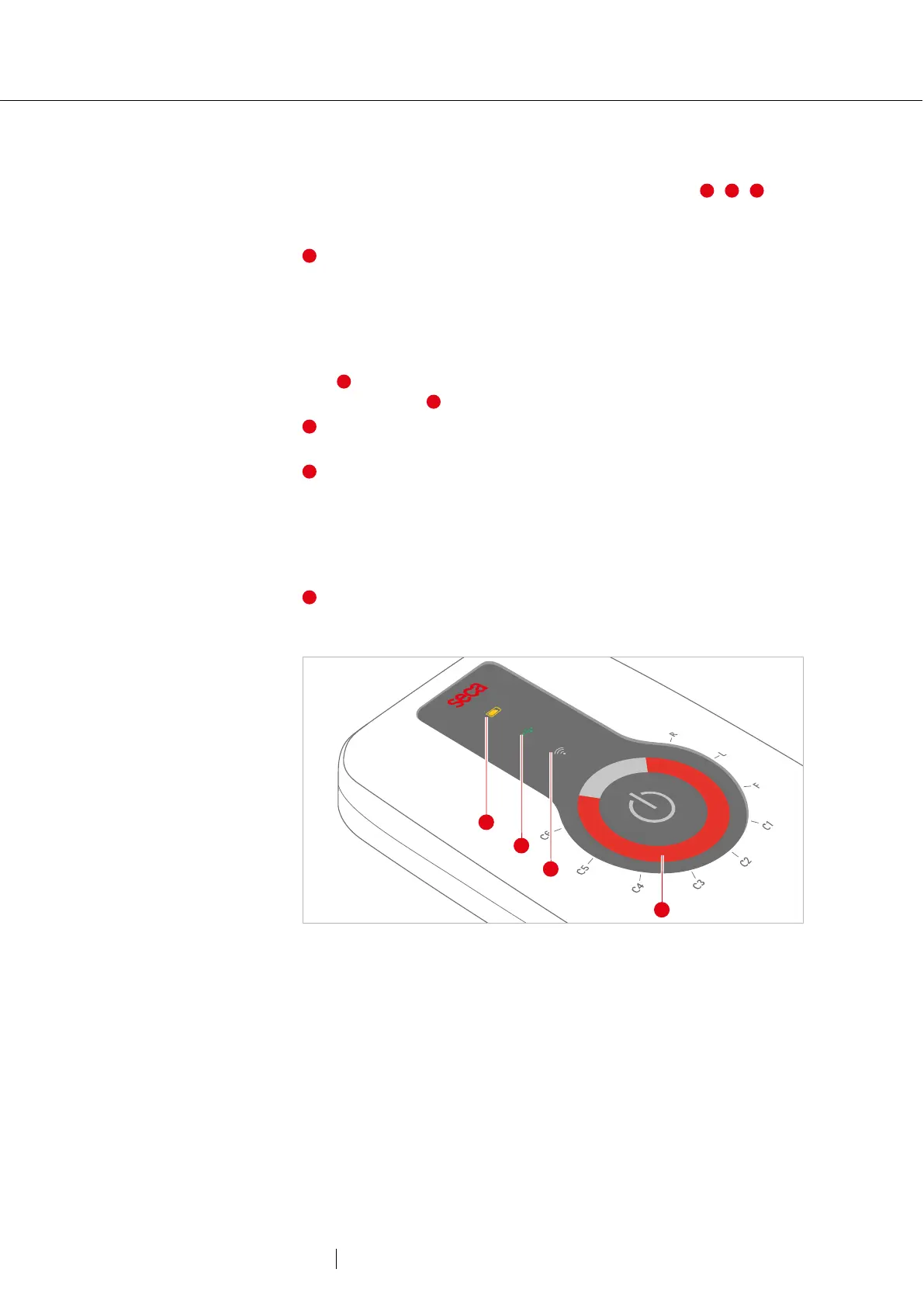
Information about the device status is displayed via LEDs , ,
when the device is switched on:
charge status of rechargeable battery
→ green: good
→ yellow: medium
→ red: low
If seca ct331 (device with rechargeable battery) is being charged, the
LED flashes and indicates the charging status with the corresponding
colour. If the LED flashes red quickly: recharge battery
1)
.
USB connection between device and PC: if the connection is
established, the LED lights up green. If not connected, the LED is off.
Radio connection between device and PC: In radio mode, the LED
lights up blue. The device can now be connected via Bluetooth or WLAN
(depending on the version) or is already connected. During data
transfer, the LED flashes. If not connected, the LED is off. For a change
of connection, e.g. from Bluetooth to USB, the device must first be
switched off and on again.
LED ring: Quality control of the electrode attachment or display of the
recording progress, see 2.6.2 Sequences after switching on, p. 26.
Fig. 2: seca ct330/331 Status display
1) Operating time rechargeable
battery & Bluetooth operation, 4
kHz sampling rate: max. 10 h.



 To Next Page