Instructions for Use
Resting & Stress ECG with seca
ct330/331 and seca diagnostic 5.9
3.4 Resting ECG rhythm strips
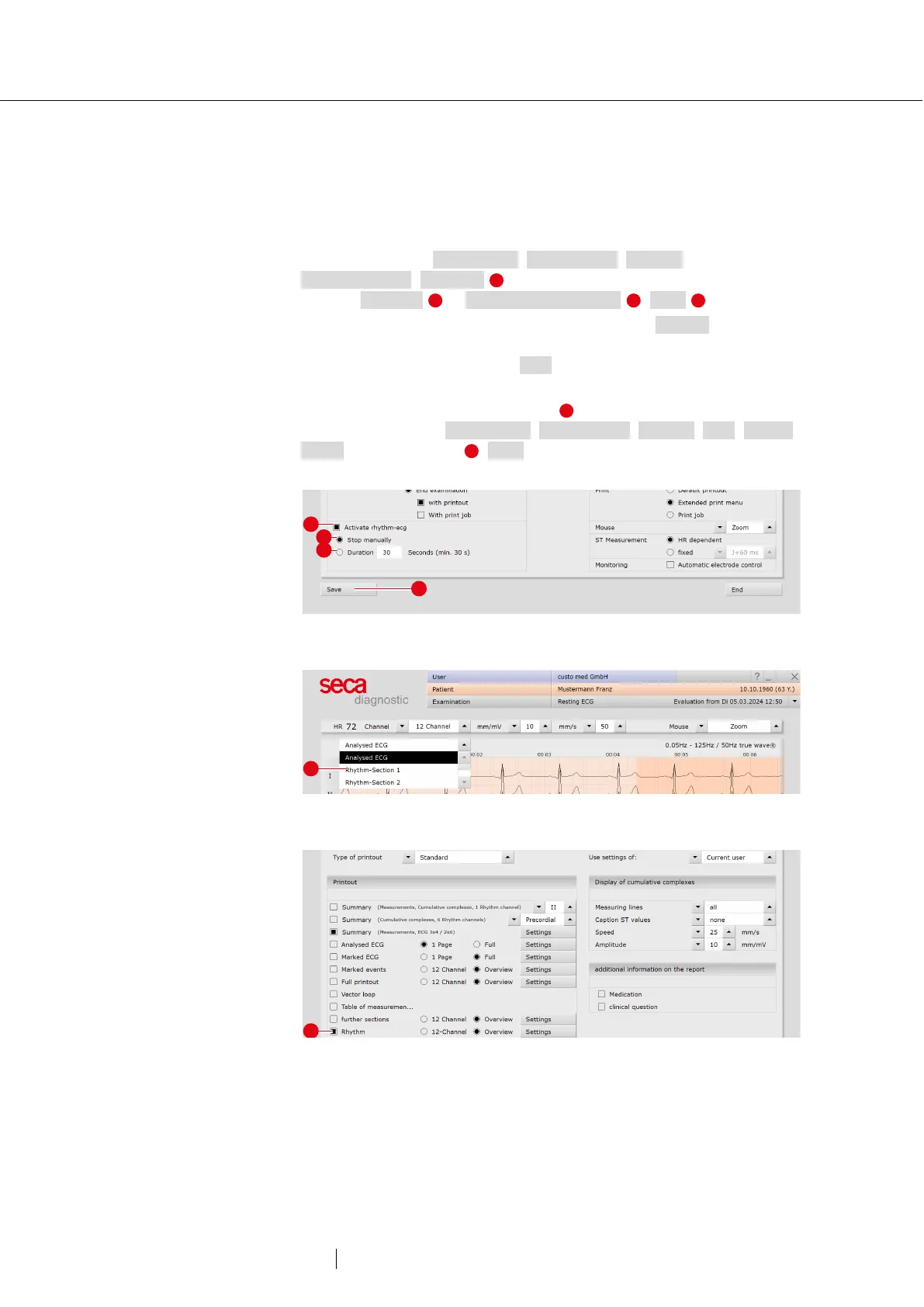
During resting ECG recordings, additional rhythm strips can be
recorded. These are ECG sections of any duration during which the
recording can be manually controlled. The “Rhythm strip” function can
be activated under Examination, Resting ECG, Settings,
Menu/Functions, Workflow . Specify whether the recording is to be
stopped manually or after a certain duration . Save your input.
The recording of a rhythm strip is triggered with the Rhythm button in the
ECG interface. If the recording duration is free, the recording of the
rhythm strip is stopped with the Stop button.
In the evaluation, the available rhythm strips can be called up and
displayed via the menu at the top left . It is possible to print out the
rhythm strips. Under Examination, Resting ECG, Settings, Print, Printed
pages activate Rhythm . Save your input.
Fig. 19: Rhythm strip settings
Fig. 20: Resting ECG evaluation with rhythm strips
Fig. 21: Rhythm strip printout



 To Next Page