Instructions for Use
Resting & Stress ECG with seca
ct330/331 and seca diagnostic 5.9
1.2.3 Patient safety
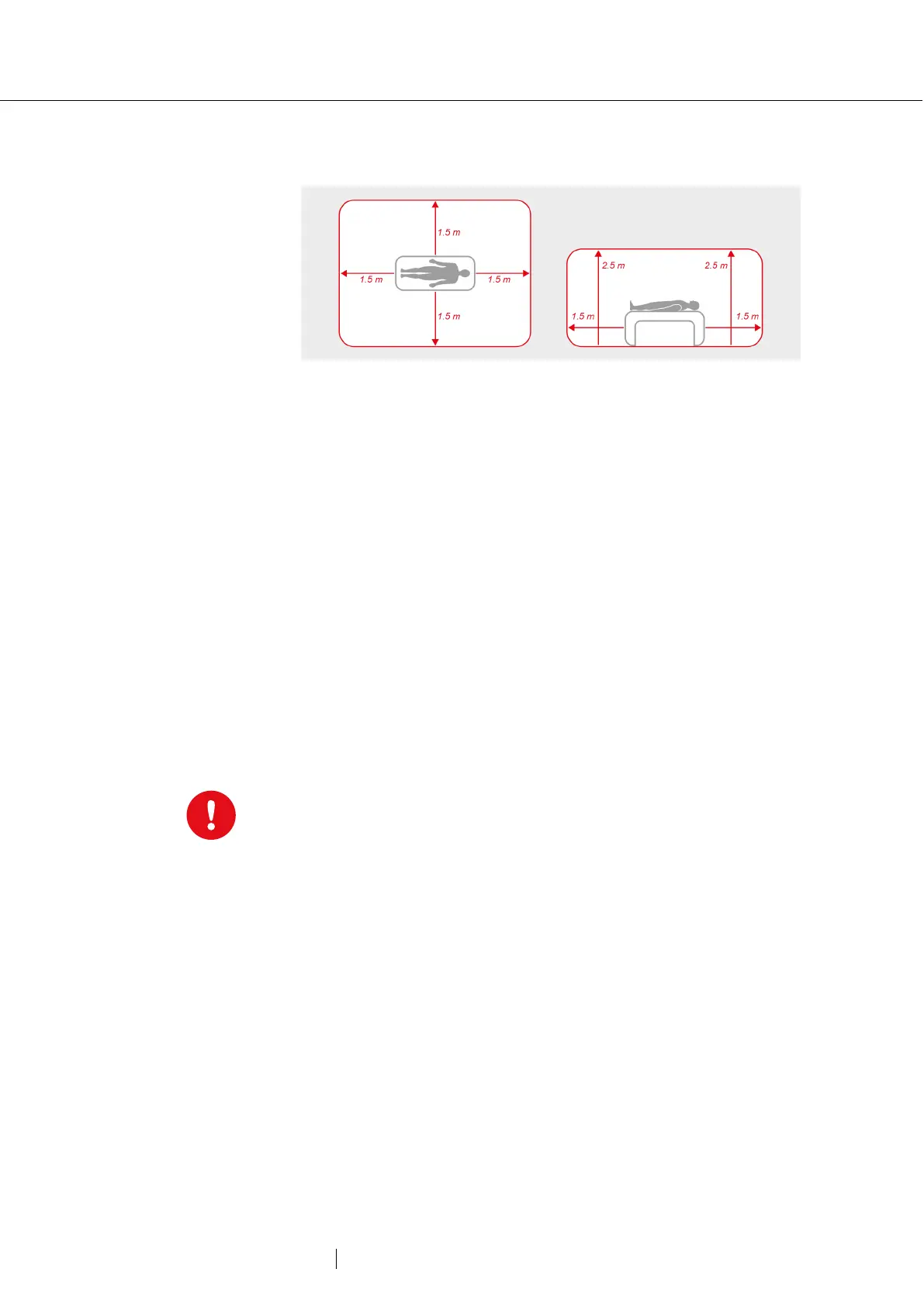
Fig. 1: Safety distances at the patient area
Without medical protective devices, for example medical protector, the
PC and all the non-medical devices connected to the system (e.g. the
monitor and printer) must be set up and used at a distance of at least
1.5 m to the patient unit (see the orange area in the figure) as leakage
currents can occur.
During examination or routine maintenance, do not touch non-medical
equipment and the patient at the same time (risk of electric shock).
Make sure that the electrode contacts do not come into contact with
other conductive parts.
All results achieved by automatic analysis and the resulting unconfirmed
reports produced by the system must be considered as suggestions
only. For diagnosis and therapy purposes it is essential that the results
are checked and assessed by a qualified physician.
1.2.4 System and data security
Patient data must be handled in accordance with the legal
requirements of the respective country (this includes the General Data
Protection Regulation (GDPR)). seca diagnostic offers functions to help
you meet these requirements (e.g., user administration
, password
Manufacturer’s note for users/customers for the integration of
programmable electronic medical systems (PEMS) into existing IT
networks
The seca products and systems are programmable electronic medical
systems (PEMS). The integration of seca products into an IT network
that includes other devices can lead to risks for patients, operators or
third parties that were not previously known. The responsible
organisation should identify, analyse, evaluate and control these risks.
Subsequent changes to the IT network can lead to new risks, and
therefore require additional analysis.
Changes to the IT network include the following: Changes to the IT
network configuration, connecting additional items to the IT network,
removing items from the IT network, updates/upgrades of devices that
are connected to the IT network.



 To Next Page