Instructions for Use
Resting & Stress ECG with seca
ct330/331 and seca diagnostic 5.9
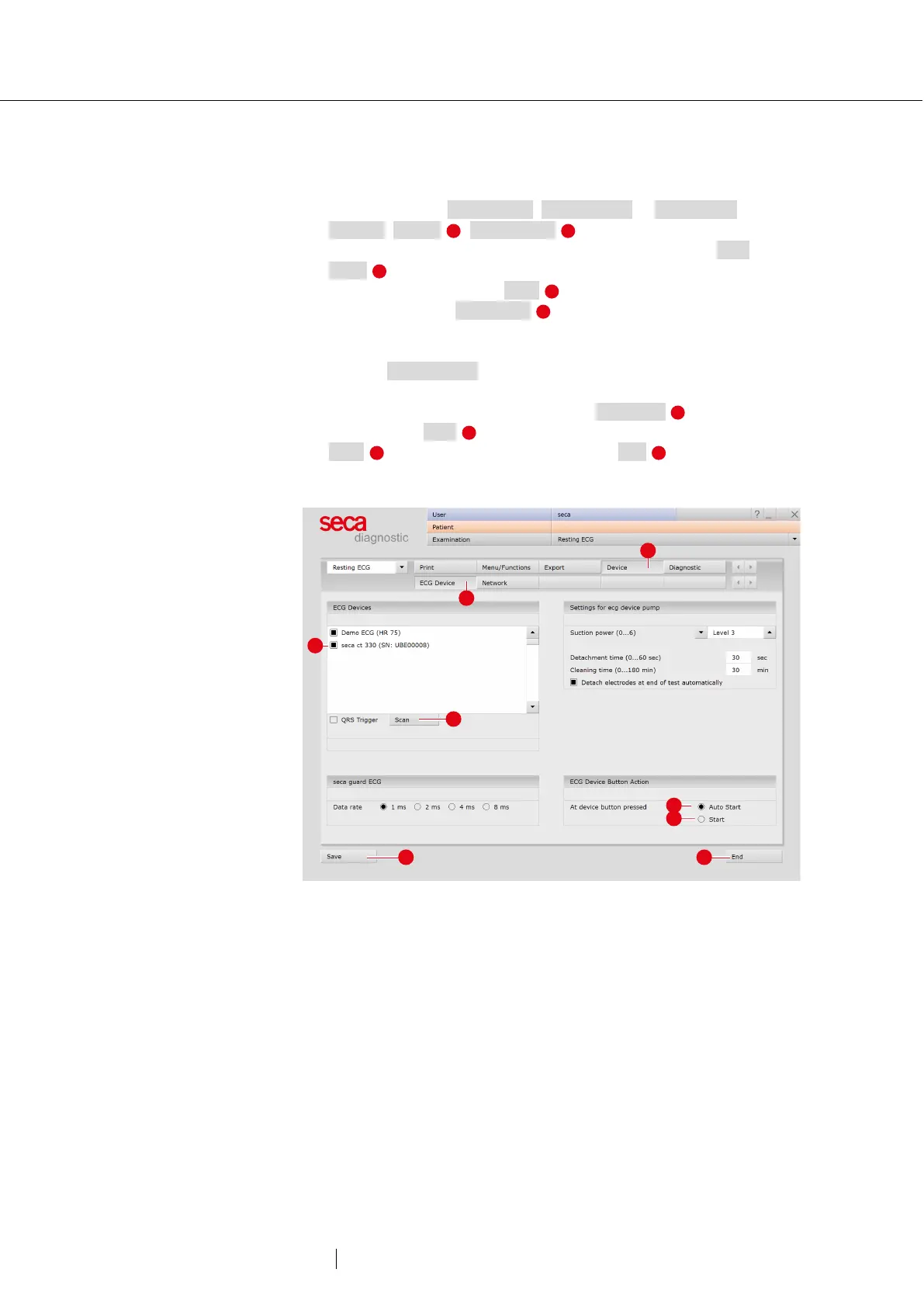
Device configuration for resting and stress ECG
→ Start seca diagnostic.
→ Open the screen Examination, Resting ECG or Stress ECG,
Settings, Device , ECG Device .
→ The ECG device is shown in the “ECG devices” section: seca
ct330 .
→ If it is not displayed, click Scan (search process).
→ Select the device: seca ct330 .
→ A device can be identified by the serial number on the identification
plate and in the software interface (e.g., SN: EAS 0001).
→ Only for Resting ECG: Later on, the ECG recording can also be
started pressing a button on the device instead of using the software
interface. Define the type of recording: Auto Start (automatic
ECG 10 s) or Start (manual recording).
→ Save your input. Close the screen with End .
→ The device is ready for operation.
→ For stress ECG: section for configuring the training device.
Fig. 10: Configuring the ECG device (USB) for resting ECG



 To Next Page