Instructions for Use
Resting & Stress ECG with seca
ct330/331 and seca diagnostic 5.9
Editing options during the recording process
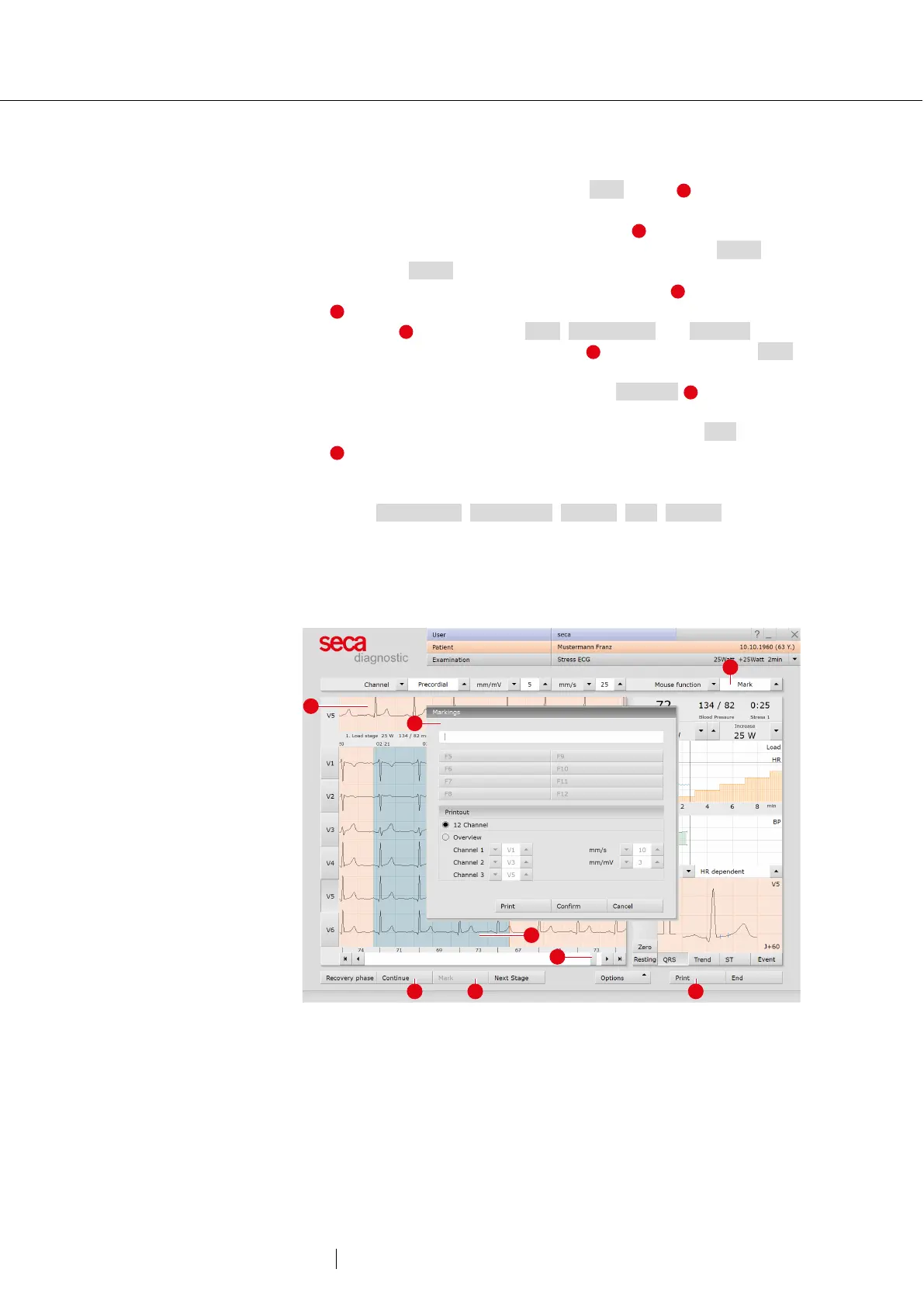
→ Mark ECG automatically: Clicking the Mark button automatically
marks the last six seconds of the recording. A dialogue box opens
for naming, printing and saving the marking .
→ Viewing and marking ECGs and measuring HR during a Pause:
Clicking on Pause will stop the screen display. he recording
continues to run and is displayed on one channel . The scroll bar
can be used to view the current recording. In the “Mouse
Function” area, the tools Mark, Measure HR and Measure can
be found. By dragging the red cursor in the ECG (using the Mark
function), you can mark sections. A dialogue appears for specifying,
printing and saving the marked part. With Continue you return to
the normal view.
→ Online ECG printing (printing ECG): By clicking on the Print button
a screen page of the ECG is printed from the point of clicking.
The printout contains 4.5 to 9 seconds of the ECG, depending on
the display speed.
Select Examination, Stress ECG, Settings, Print, General o define in
the “Online ECG print settings” area whether the ECG should be
printed as it appears on the monitor or if online printing should be
carried out according to previously defined print settings for the
analysed ECG.
Fig. 28: Stress ECG recording, editing options



 To Next Page