Instructions for Use
Resting & Stress ECG with seca
ct330/331 and seca diagnostic 5.9
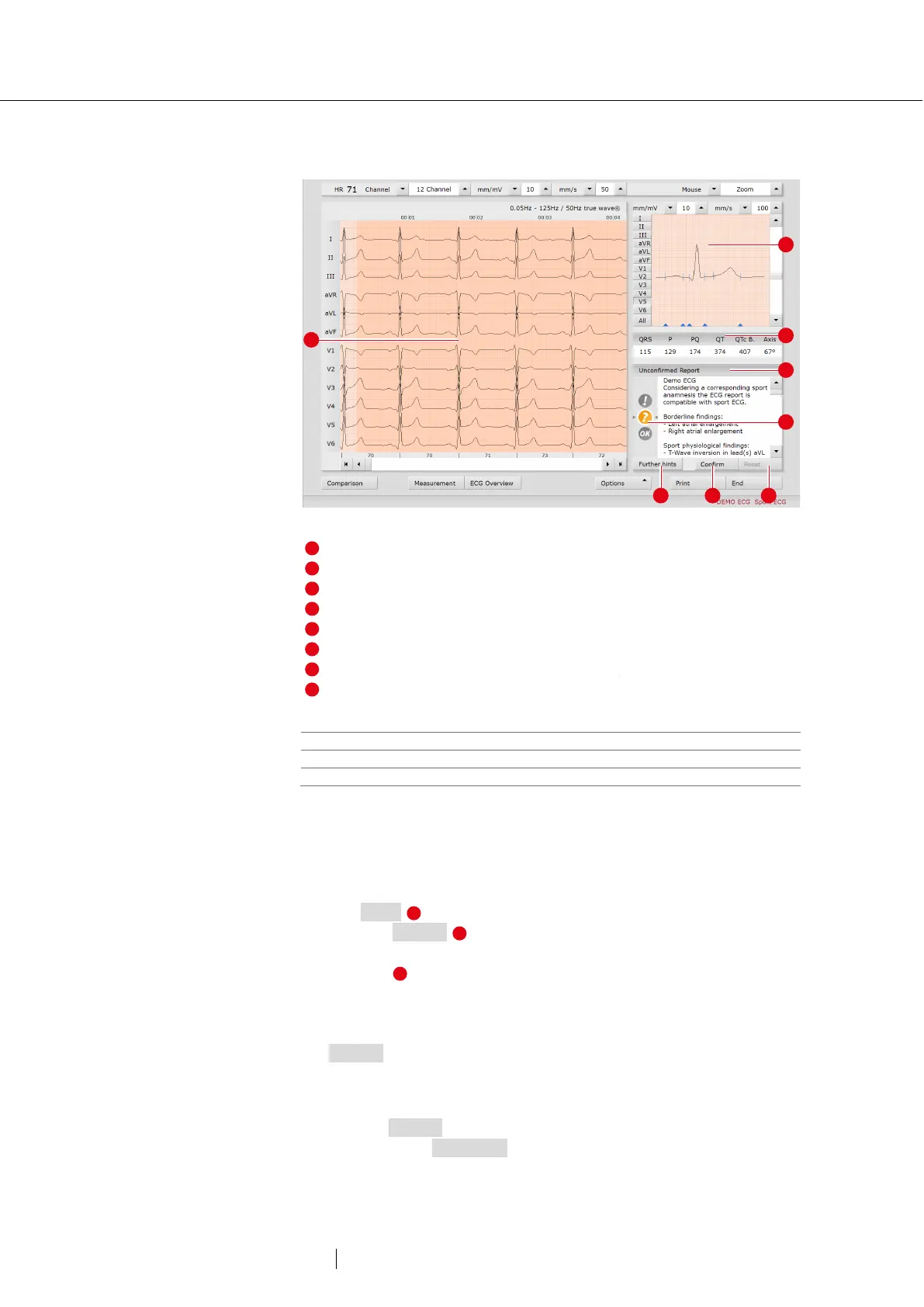
Display and control elements in the Sport ECG
Fig. 38: Sport ECG evaluation view
Status indicator with graphical representation of the evaluation
Notes on further recommended examinations
Reset changes in the unconfirmed report
Confirm the unconfirmed report and adopt as report
Meanings of the status indicator in the unconfirmed report
Red with exclamation mark
Abnormal ECG changes, clarification required
Yellow with question mark
Two or more ECG changes, clarification required
Asymptomatic, no further clarification required
Create Sport ECG report
→ Check the unconfirmed report of the system.
→ If necessary, change the information in the unconfirmed report. Click
with the mouse in the text field 4 and make the changes.
→ Use Reset to undo the changes in the unconfirmed report.
→ Click on Confirm to apply the entries.
→ In the “Status modification” dialogue box (double-click on status
indicator ), check whether the status indicator matches the
unconfirmed report.
→ If the status indicator does NOT match the unconfirmed report,
adjust the status indicator.
→ Confirm the “Status modification” dialogue box.
Return to the standard view
→ Click on Options.
→ Deactivate the Sport ECG option.



 To Next Page