7. Debugging
SMF-MP10S User guide V1.1 Shanghai Seer Intelligent Technology Corporation 50
Precondition: Confirm that the localization status of the robot is normal, and the path
between the destination point and the current location of the robot is unobstructed.
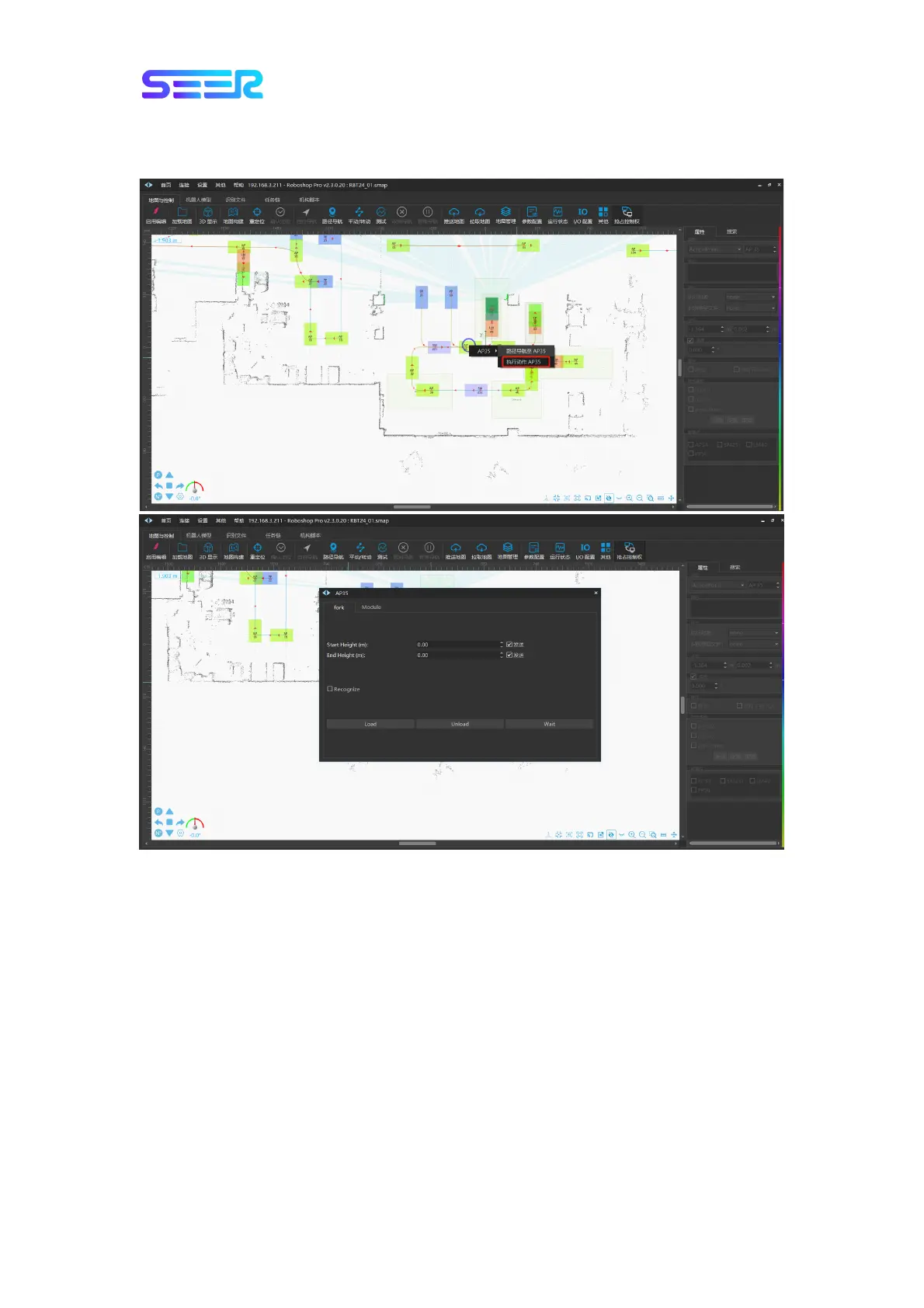
a. Load/unload in the non-recognition mode: Click [Path Navigation] in the module toolbar,
click the left button on the destination point, select [Execute Action AP35] in the pop-up
dialog box, check and remove [Recognize], enter Start Height (front height) and End Height
(final height) in the pop-up dialog box and select Load/Unload option; then, the robot will go
to the front point of AP35 for Start Height action, and then enter AP35 to execute End
Height action and perform corresponding Load/Unload action;
b. Load/unload in the recognition mode: Click [Path Navigation] in the module toolbar, click
the left button on the destination point, select [Execute Action AP35] in the pop-up dialog
box, and check [Recognize] option; the robot will automatically go to the front point of AP35
to recognize and rise up the fork to the shelf height before entering and lifting;


 To Next Page