7. Debugging
SMF-MP10S User guide V1.1 Shanghai Seer Intelligent Technology Corporation 52
7.7 Recognition Function
After the forklift is equipped with a 3D camera, it can perform recognition before picking up
the cargo, so as to adjust the position between the forks and the cargo for more precise
operation. Here are two recognition modes: pallet recognition and material cage recognition.
A Percipio camera is taken as an example below.
7.7.1 Pallet Recognition
For specific operations and parameter settings, refer to the document at
https://shimo.im/docs/ZzkLVrp0o8fBKN3Q/
Obstacle Avoidance and Pallet Recognition
Instructions for Percipio Camera.
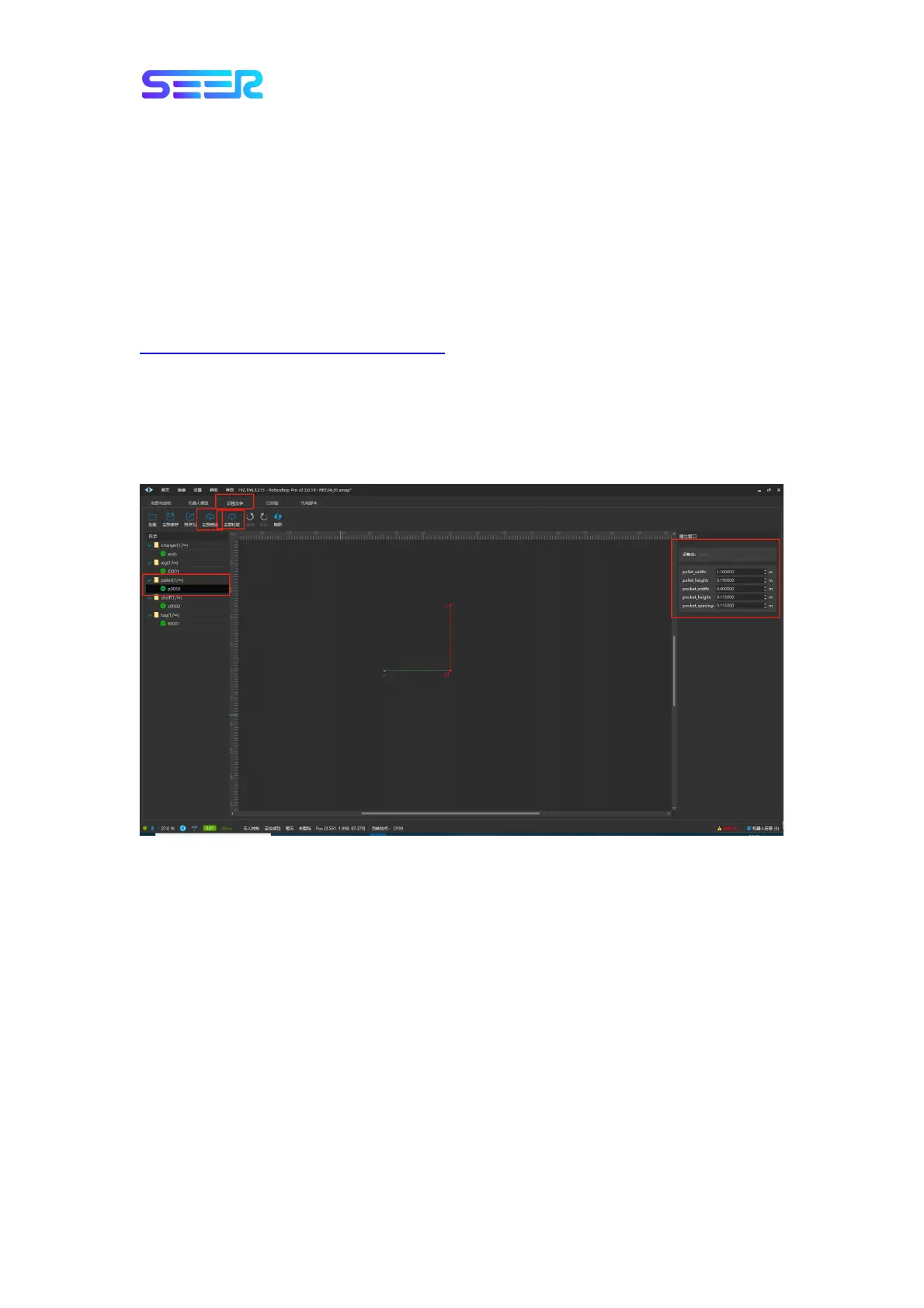
1. For forklift recognizing the pallet, it is necessary to set the pallet data in advance, as
follows: [Recognition File] - [Pull All]- Select [p001] in the [pallet] on the left to modify or
right-click “Copy and add” to create a new one pallet, then modify the pallet parameters,
and then click [Push All] to push the modified pallet recognition file to the robot.


 To Next Page