7. Debugging
SMF-MP10S User guide V1.1 Shanghai Seer Intelligent Technology Corporation 49
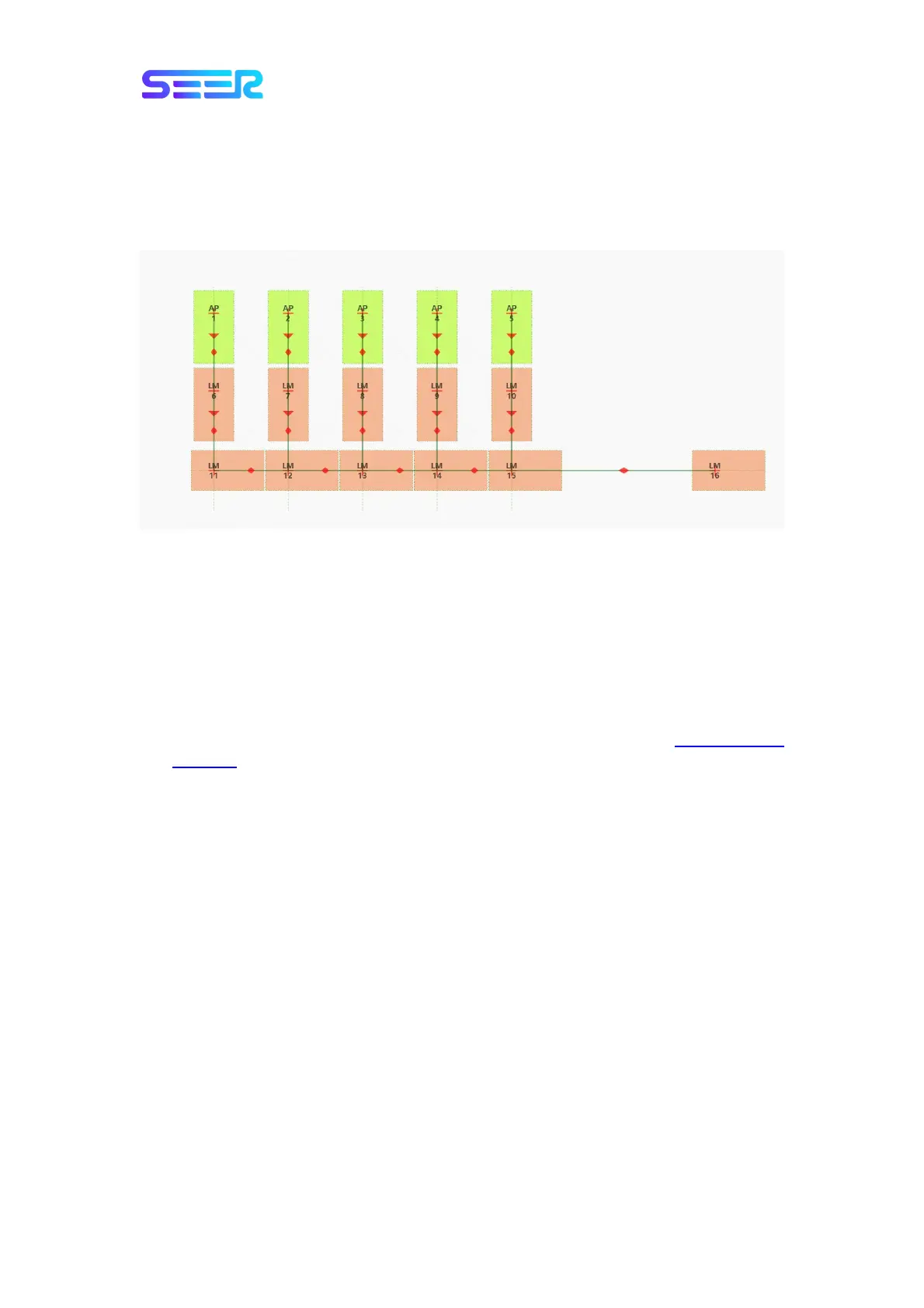
7.4.3.3 Narrow Site Space (Regardless of Recognition)
When the distance between the storage locations does not allow the forklift to drive in an
arch path due to limited space, the path can be drawn only in straight angle, as shown in the
figure below:
7.5 Navigate the Path to Specified Point and Execute the
Corresponding Action
The forklift pickup is divided into two modes: recognition mode and non-recognition mode.
Recognition mode: Use the 3D recognition camera to recognize the location and height
of the shelf in the environment for the purpose of realizing the pickup function; for the
AP point on the map, it is necessary to set a front point in front of the shelf, and it is
unnecessary to accurately set the location of AP point. Note: Refer to
7.7 Recognition
Function for details.
Non-recognition mode: It refers to the mode that realizes the robot pickup function
through the preset path on the map; the AP point on the map is the pickup location of
the robot, a front point is required to set an entry height, and the location of AP point
should be accurately set.


 To Next Page