3. Product Introduction
SMF-MP10S User guide V1.1 Shanghai Seer Intelligent Technology Corporation 15
S/N Name S/N Name
1 Navigation laser 12 Wi-Fi client network interface
2 Blue light 13 Start/stop button
3 Antenna 14 Emergency stop button
4 Key switch 15 Reset button
5 Emergency stop button 16 Antenna
6 Obstacle avoidance laser 17 Drive wheel
7 Ambient light 18 Fork
8 Charger brush board 19
Fork point photoelectric
switch
9 Anti-collision bumper 20 Cargo in place switch
10 Emergency stop button 21 Manual charging interface
11 SRC network interface 22 Emergency stop button
3.5 Operation Panel
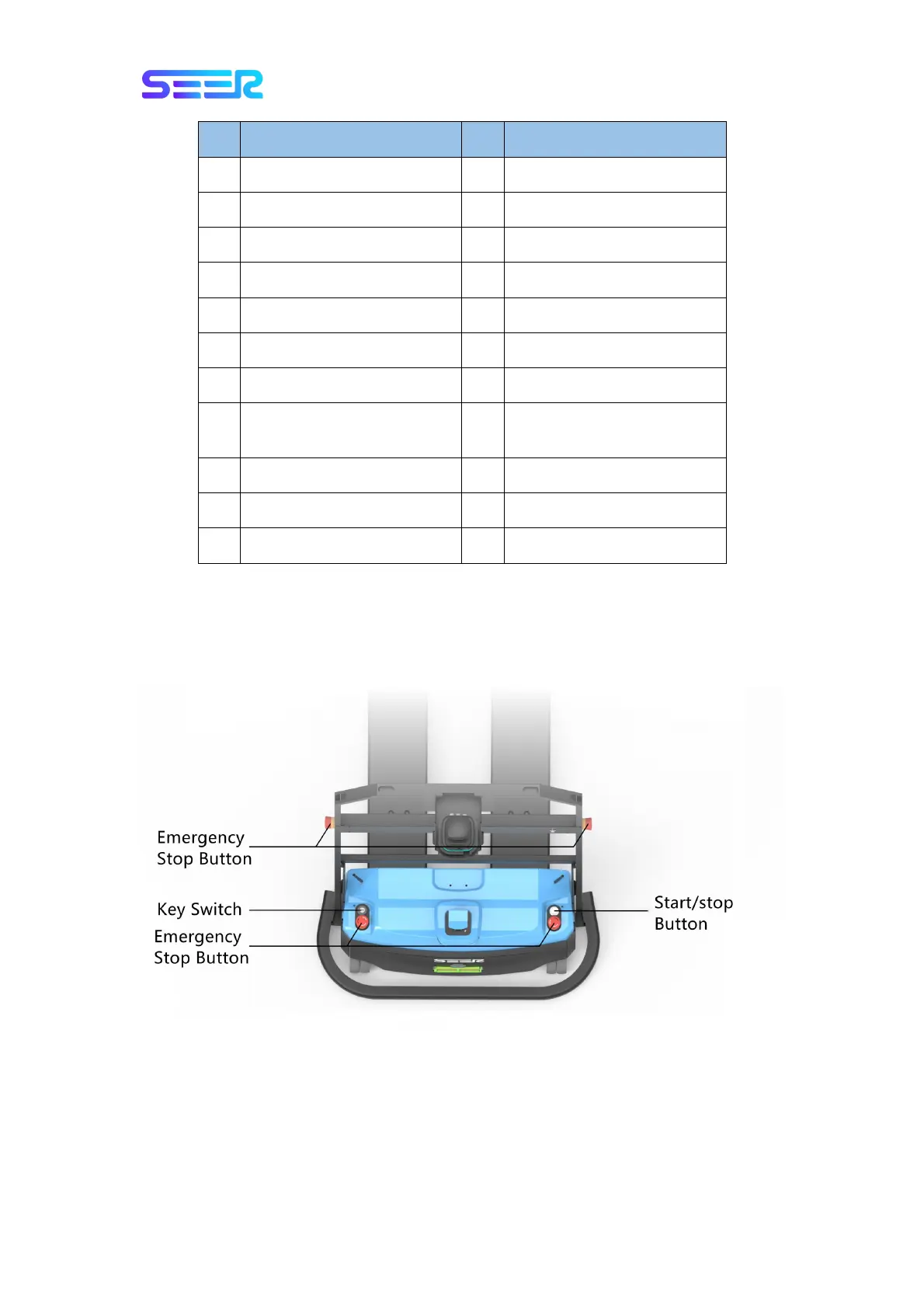
There is an operation panel above the front of the SMF-MP10S, and there are two
emergency stop buttons on both sides of the frame. The specific definition is shown in the
figure below:
Key Switch
Control the ON/OFF of the battery.
Start/Stop Button
The robot will be started if it is pressed, and the green indicator will be normally on.


 To Next Page