10R
25
English
5.4.2 Pairing with Other Sena Headset Models for Intercom
Conversation
The 10R can be paired with all other Sena headset models such as the
20S, SMH10 and the SMH5 for intercom conversation. Please follow
the same procedure as above to pair with these headset models.
Note:
The SMH5 cannot participate in three-way or four-way conference intercom
with the 10R. The SMH5 has a limited capability of having two-way intercom
with other Sena headsets.
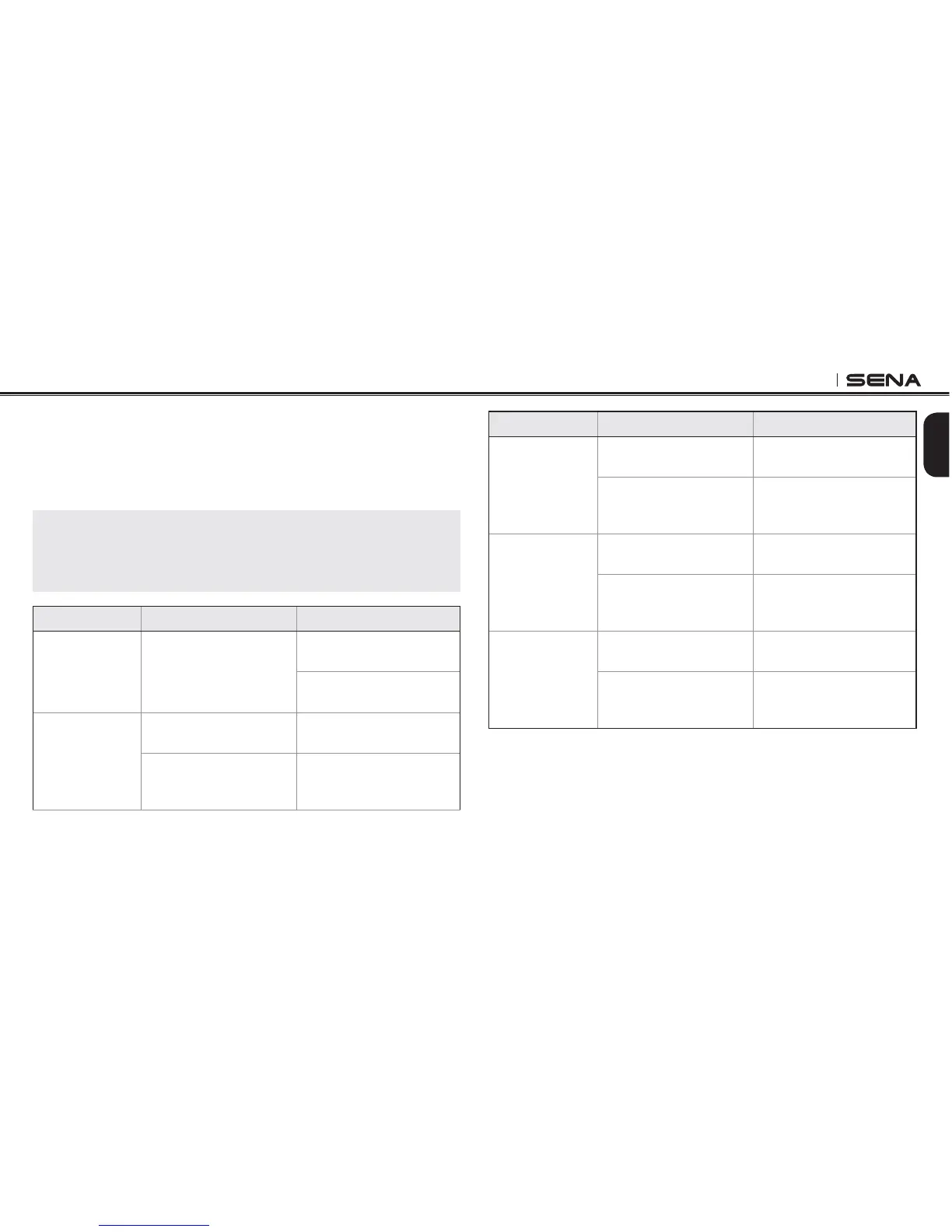
Function Handlebar Remote Headset
Mobile Phone
Pairing
Press the Joystick for
5 seconds
Press the Center Button for
10 seconds
Tap the (+) Button until you
hear, “Phone pairing”
Second Mobile
Phone Pairing
Press the Front Button for
5 seconds
Press the Center Button for
10 seconds
Tap the Rear Button
Tap the (+) Button until you
hear, “Second mobile
phone pairing”
Function Handlebar Remote Headset
Media
Selective
Pairing
Press the Joystick for
5 seconds
Press the Center Button for
10 seconds
Tap the Front Button
Tap the (+) Button until you
hear, “Media selective
pairing”
Phone
Selective
Pairing
Press the Joystick for
5 seconds
Press the Center Button for
10 seconds
Tap the Rear Button
Tap the (+) Button until you
hear, “Phone selective
pairing”
Intercom
Pairing
Press the Front Button for
5 seconds
Press the Center Button for
5 seconds
Tap the Front Button of
any one of the two
headsets
Tap the Center Button of
any one of the two
headsets
Button Operation Table for Bluetooth Pairing



 To Next Page