DVR Setup
700-1014 R002 2–9
16. In the Configuration menu, click Alarm/Signal.
17. In the Alarms and Signals menu, click Alarms.
CAUTION: Select Menu Options for Each Alarm
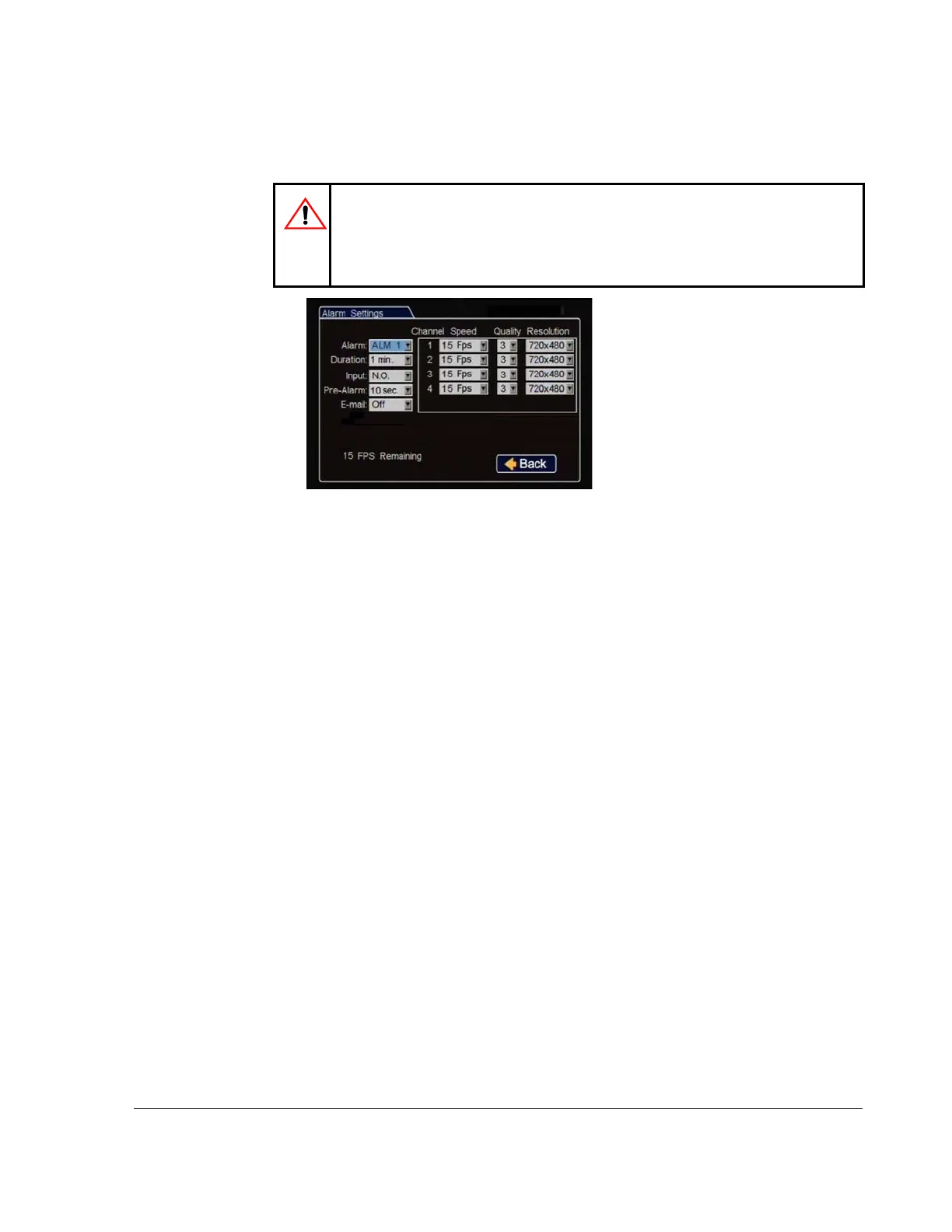
From the Alarm drop down list, when any alarm (ALM 1, ALM 2, ALM3, or
ALM 4) is selected, ALL of the settings on the Alarm Settings menu must be
configured for that alarm. Configure settings for each alarm.
Alarm: By default, Alarm 1 is
connected to the DVR alarm button.
Alarms 2-4 can come from signals,
GPS geo-fencing, G sensor, or
excessive speed.
Duration: Set the Duration for how
long the DVR will record video
flagged at the alarm record settings.
Input: Applies to Alarm 1 only.
Choose Normally Open or Normally Closed, depending on the switch type used.
Pre-Alarm: Select how many seconds of pre-alarm video is included in the
flagged alarm recording.
Email: This setting is used to automatically send an email when this alarm is
triggered. Leave at default unless instructed otherwise.
Speed, Quality, and Resolution: For each alarm, select record settings to be
used for the duration of the Alarm. Turn off unused channels to avoid DVR
video loss events.
Click Back to save the menu settings.
Figure 2-14
Alarm Settings Menu



 To Next Page