9.5.2 Run Button Operation: Navi Drive
-18-
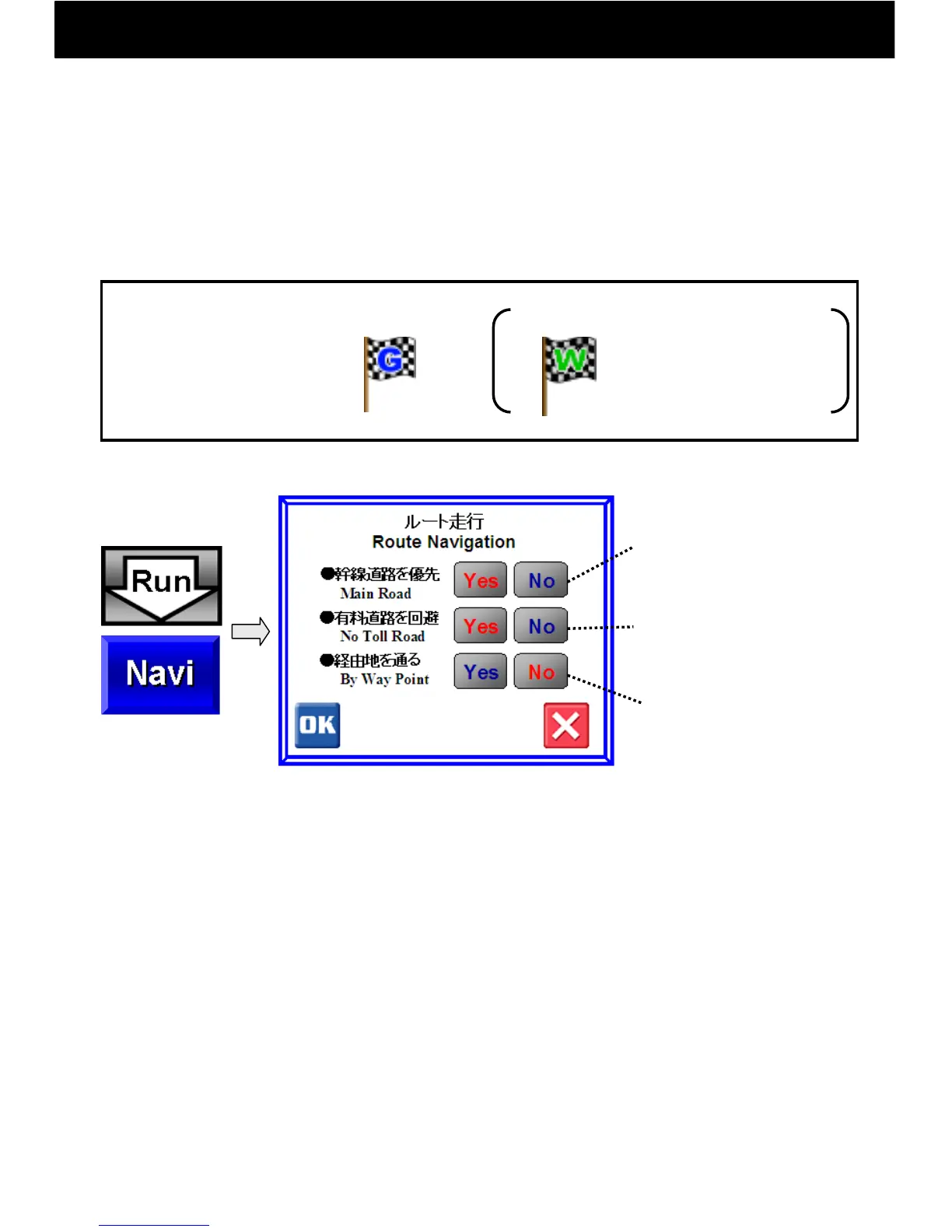
After setting a goal point, touch the Navi button on the
screen and start driving. A goal flag must be set
beforehand.
Goal Flag
Way Flag
To compute
through waypoints,
set a way flag
beforehand.
① Navi Drive
Flags to Set:
Computed with preference
for expressways,
national highways,
and local roads,
in that order.
When the direct distance
is over 300 km, toll
roads may be used.
Compute passing near
waypoint way flags
A route search is carried out and the route to be driven is decided.
1) Select route search parameters using the “Yes” and “No” buttons.
(Selected buttons have red letters.)
2) After parameters have been selected, press OK to begin driving.
3) When actual vehicle position is more than 80 m off route, a new
route search will be executed automatically.
4) In a Navi Drive, narrow streets are not included in route searches.
When your goal point is on a narrow street, route guidance will end
at a distance from your goal point. In such cases, use the goal
direction line as a rough guide and head for your goal.
* Absolutely do not drive when in Walk Navi mode



 To Next Page