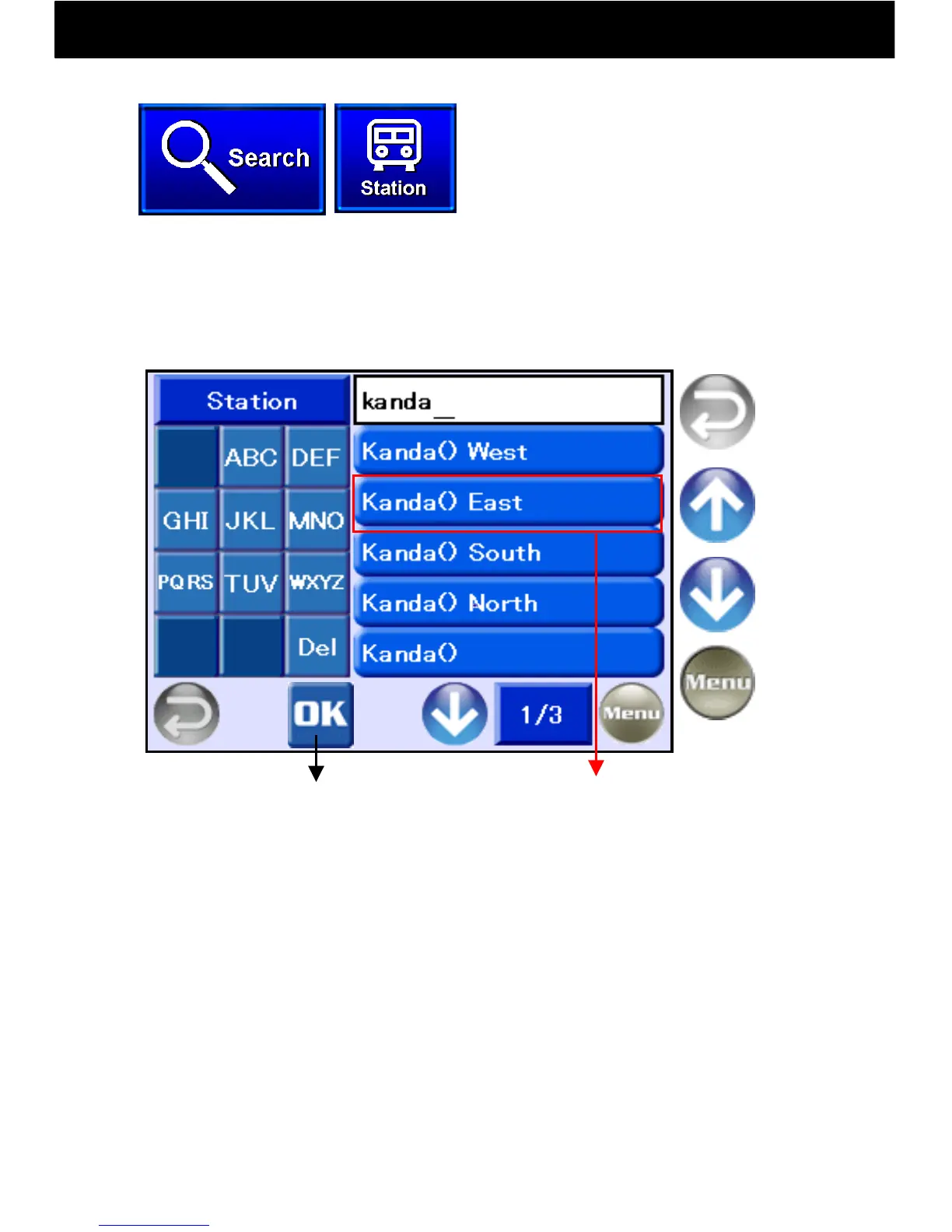
9.10.2 Search by Station
-29-
Names are classified alphabetically. Refine your search by pressing the
letters, and then use the bar buttons to the right, make a selection and
display a map. All train stations, expressway interchange ramps, and
airports in the country are included.
Return to
Previous
Screen
Return to
Menu
Previous
Page
Next
Page
Touch the Search button and select
“Station.”
Confirm Spelling
① Enter one or more letters and then press OK. Up to 100 station names
will be displayed in alphabetical order. To display a map, press a station
name bar button to the right.
② When keys are pressed, letters are displayed in the entry frame on
the right. If no key is pressed for three seconds, the cursor will move to
the right.
③ Delete single letters by pressing the “Del” key.
④ In the above example entry, “Kanda,” the “JKL” key was pressed twice to
display “k,” the “ABC” key was pressed once to display “a,” the “MNO” key
was pressed twice to display “n,” the “DEF” key was pressed once to
display “d,” and the “ABC” key was pressed once to display “a.”
Display Map



 To Next Page