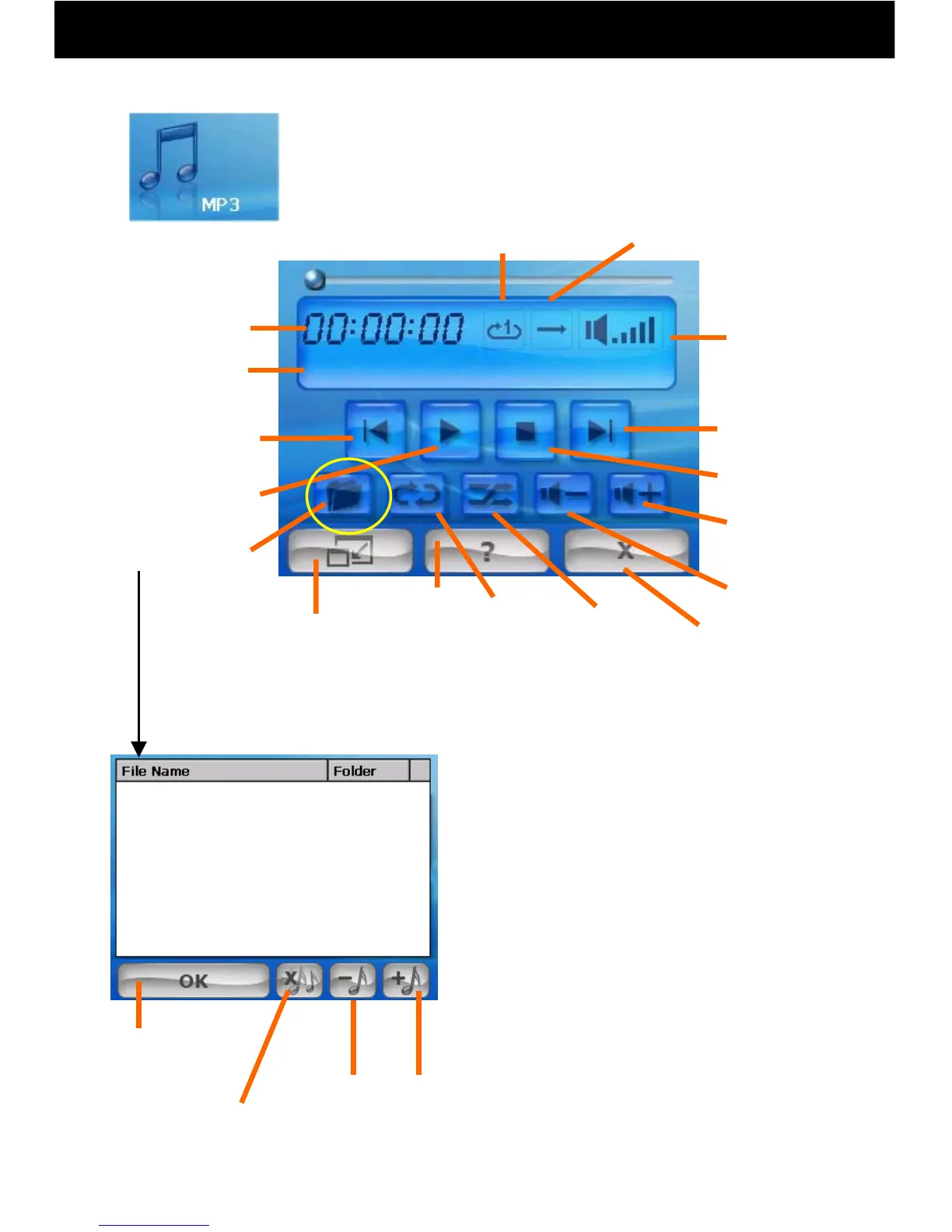
10.1 MP3 Player
-42-
● Playing music (MP3s, WMAs)
① Touch the MP3 icon on the main menu.
② Touch “Open Play List”
Erase 1
Song
Repeat
Finish and
Return
Current
Song Name
Finish Editing
the Playlist
Next Song
Previous
song
Stop Play
Play/Pause
Decrease
Volume
Help
Minimize
*Other functions, such as Navi, may
be used when music is playing.
Increase
Volume
Shuffle
Open
Playlist
Add 1 Song
Erase All
Songs
Playlist Screen
Play Time
Volume
Repeat Display Shuffle Display
Symphony No.9 (Scherzo).wma
③ When “Add 1 Song” is touched, the
SDMMC folder will be displayed.
Select the songs you would like to add
from here, and touch OK.
④ Select songs you want to play from
the play list and touch OK.
⑤ Songs can be then played from the
Operation Screen.
Operation Screen:



 To Next Page