Doc# E145701 6 - 23
6: Using the Shark® 100 Meter
Electro Industries/GaugeTech
The Leader In Power Monitoring and Smart Grid Solutions
Electro Industries/GaugeTech
The Leader In Power Monitoring and Smart Grid Solutions
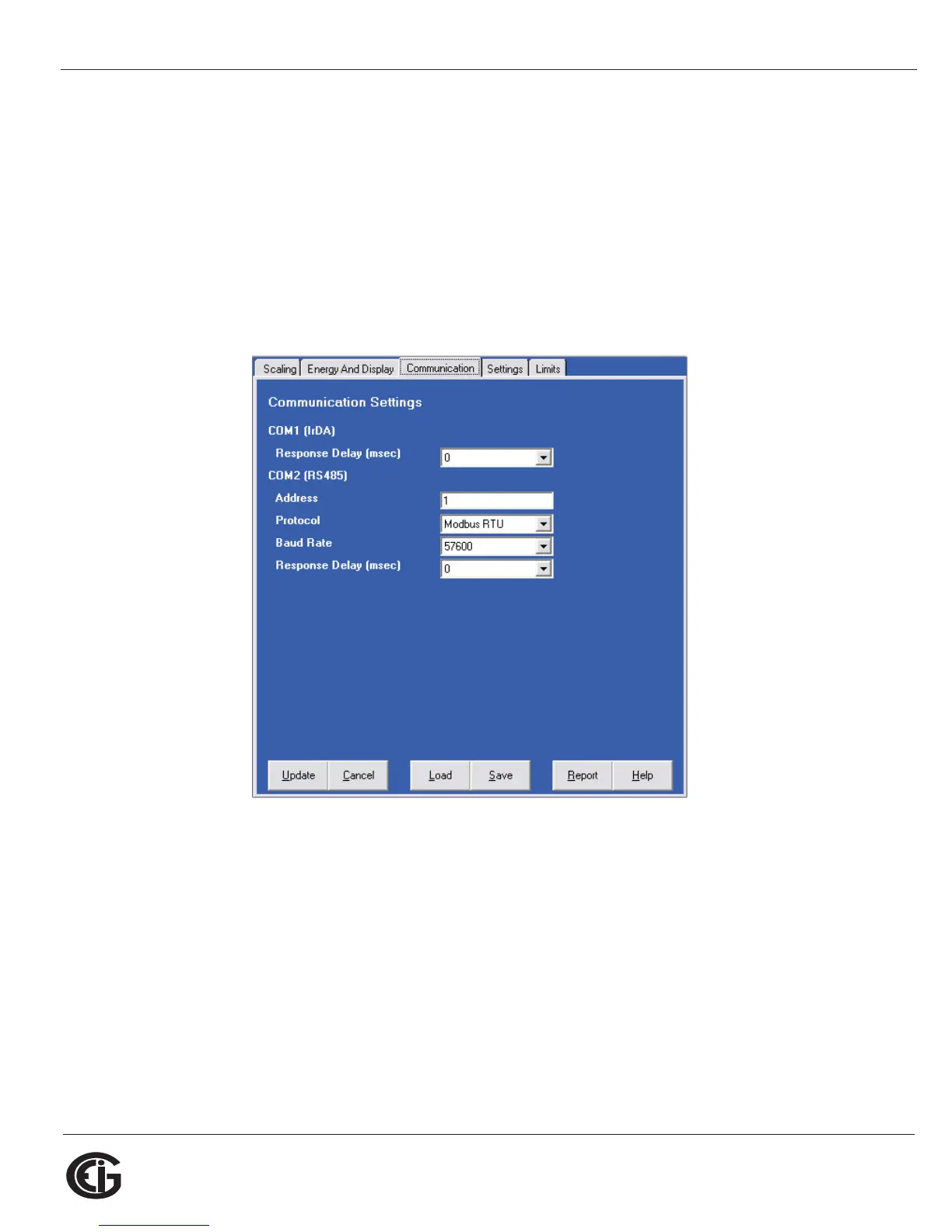
8. Click the Communications tab. You will see the screen shown below. Use this
screen to enter communication settings for the meter's two on-board ports: the
IrDA port (COM 1) and RS485 port (COM 2). Make any necessary changes to set-
tings.
NOTES:
• If you have a Shark® 100 - INP10 or a Shark® 100B/100BT, you don’t program
the RS485 port.
• If you have a Shark® 50 meter, you won’t see the IrDA port settings.
9. Valid Communication Settings are as follows:
COM1 (IrDA)
Response Delay (0-750 msec)
COM2 (RS485)
Address (1-247)
Protocol (Modbus RTU, Modbus ASCII or DNP)
Baud Rate (9600 to 57600)
Response Delay (0-750 msec)
DNP Options for Voltage, Current, and Power - these fields allow you to choose
Primary or Secondary Units for DNP, and to set custom scaling if you choose



 To Next Page