Doc# E145701 5 - 3
5: Communication Installation
Electro Industries/GaugeTech
The Leader In Power Monitoring and Smart Grid Solutions
Electro Industries/GaugeTech
The Leader In Power Monitoring and Smart Grid Solutions
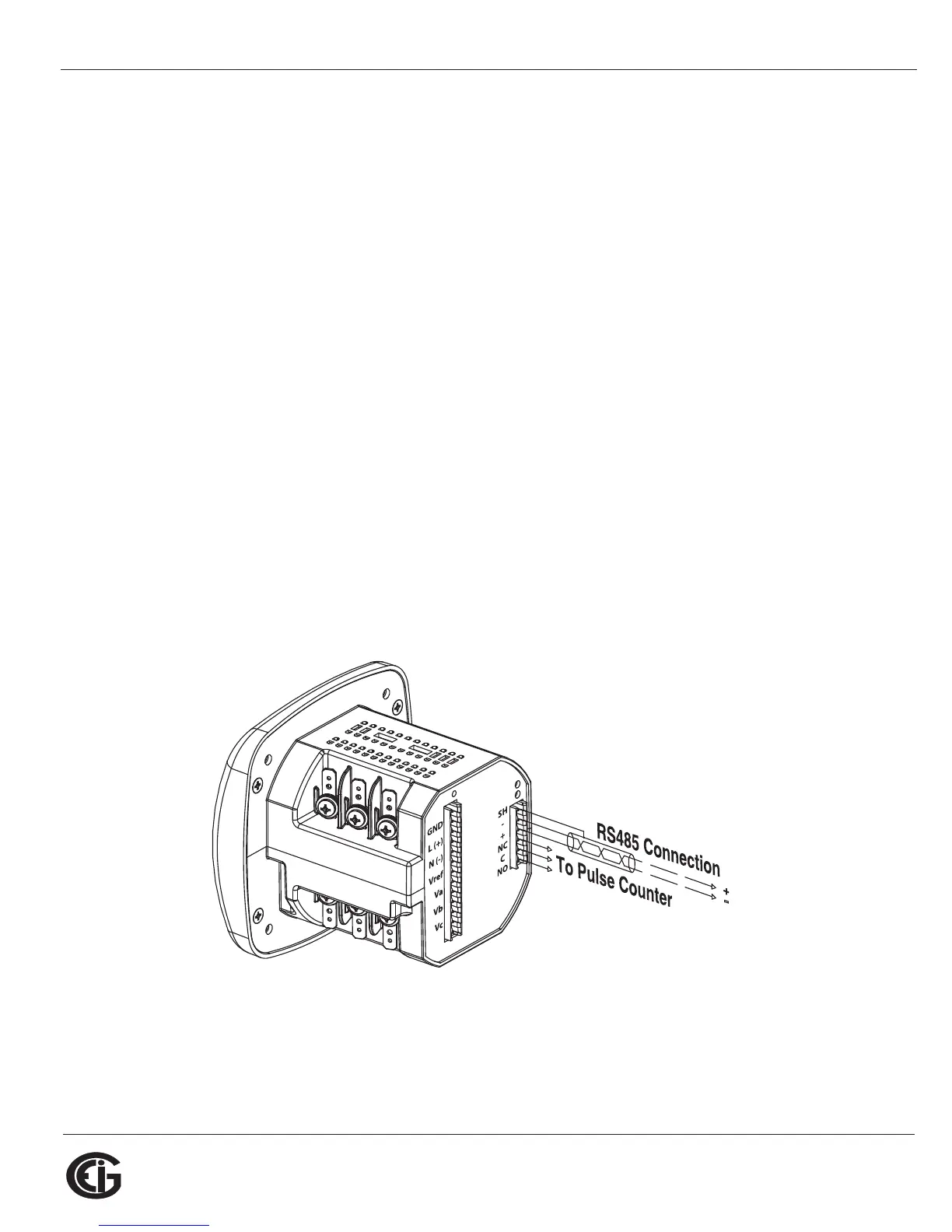
5.1.2: RS485/KYZ Output Com 2 (485P Option)
The 485P Option provides a combination RS485 and KYZ Pulse Output for pulsing
energy values. The RS485/KYZ Combo is located on the terminal section of the meter.
NOTE: The Shark® 100B meter and Shark® 100 meters with the INP10 option also
have a KYZ pulse output, but do not have an RS485 option (see Section 5.2 and
Chapter 7).
See Section 2.2 for the KYZ Output specifications, and Section 6.3.1 for pulse
constants.
The Shark® 100/50 meter’s RS485 can be programmed with the buttons on the face
of the meter or by using Communicator EXT
TM
3.0 software. See Chapter 6 for instruc-
tions on these two modes.
Standard RS485 Port Settings
Address: 001 to 247
Baud Rate: 9600, 19200, 38400 or 57600
Protocol: Modbus RTU, Modbus ASCII, DNP 3.0 (DNP 3.0 is available with the Shark®
100 meter’s V-3 and V-4 only.)
Figure 5.2: 485P Option with RS485 Communication



 To Next Page