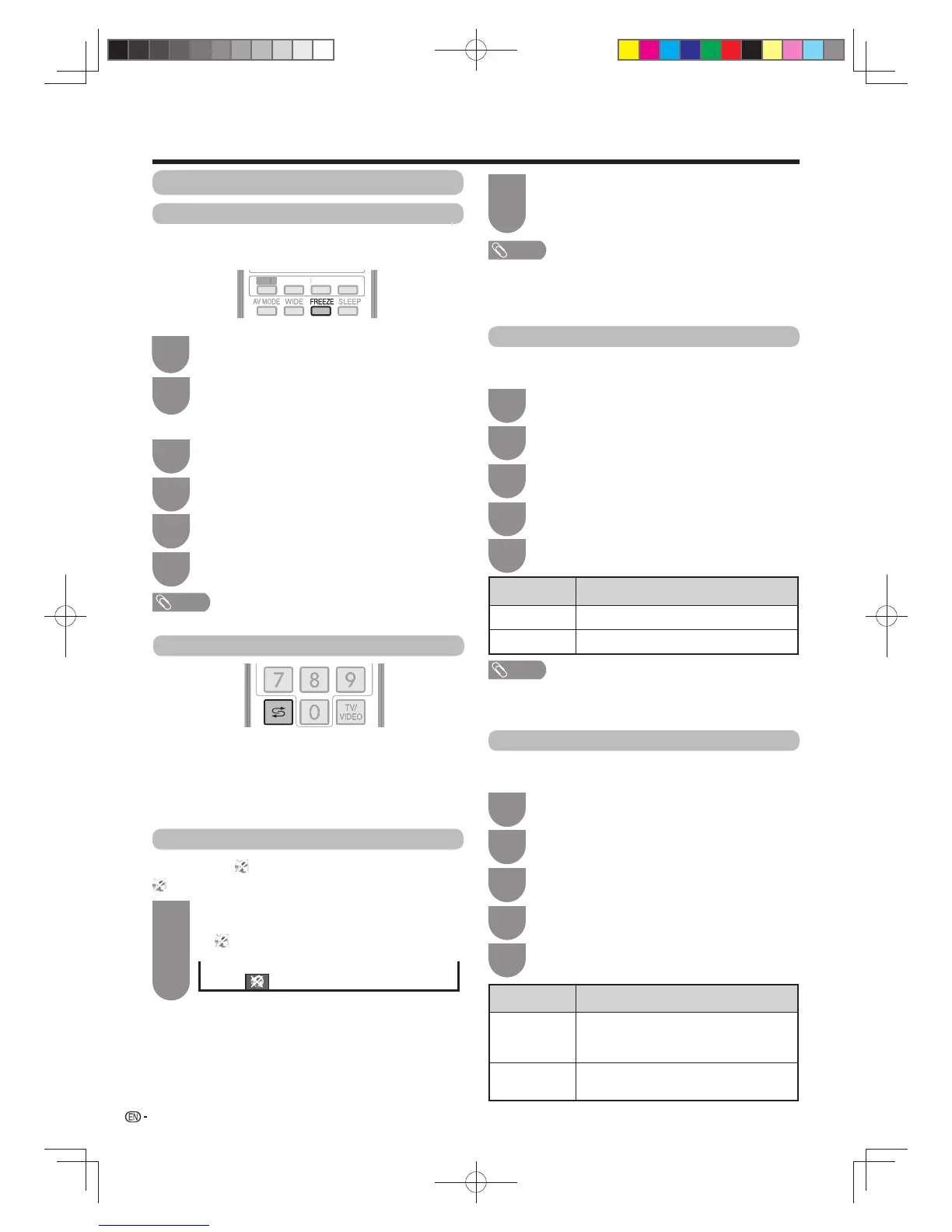
Muting the audio temporarily
Using Mute (
) on the remote control unit
mutes the current sound output.
1
2
NOTE
• Mute will be cancelled after 30 minutes. However,
the TV will not suddenly output loud sound as the
volume level will be set to 0 automatically. Increase
the volume level by pressing
VOL
k
.
Mute
Press
Mute
.
• The sound is silenced.
• “ ” is displayed while the mute function is on.
Press
Mute
again within 30 minutes to cancel
the mute.
• Before 30 minutes, the volume level returns to the
previous setting.
28
Freezing the image
Allows you to capture and freeze one frame from a
moving image that you are watching.
Watching TV
NOTE
• The still image automatically goes out after 30 minutes.
Press
FREEZE
.
• Captures one frame from a moving image.
1
Press
FREEZE
again to cancel the function.
Using Freeze on the menu screen
1
Press
c
/
d
to select “Setup”.
2
Press
b
/
c
/
d
to select “Option”.
3
Press
a
/
b
to select “Option for view”, and
then press
ENTER
.
4
Press
a
/
b
to select “Freeze”, and then press
ENTER
.
Returning to the previously selected channel
Press
A
to switch the currently tuned channel to the
previously tuned channel.
Press
A
again to switch back to the currently tuned
channel.
Press
A
to toggle between the currently selected
input source and the previously selected one.
Outputting only audio
When listening to music from a music programme, you
can set the display off and enjoy audio only.
Press
MENU
and the MENU screen displays.
1
Press c/d to select “Setup”.
2
Press
a
/
b
to select “Audio only”, and then
press
ENTER
.
4
Press
a
/
b
to select “On”, and then press
ENTER
.
5
NOTE
• When you make operations that change the picture on the
TV such as by changing the input source, the “Audio only”
function is set to “Off”.
Selected item Description
On Audio is output without screen image.
Off
Both picture and audio are output.
Press
b
/
c
/
d
to select “ECO”.
3
2
Quick start
You can reduce the TV’s start-up time after turning on
the power with the remote control unit.
Press
MENU
and the MENU screen displays.
1
Press
c
/
d
to select “Setup”.
2
Press
a
/
b
to select “On”, and then press
ENTER
.
5
Press
b
/
c
/
d
to select “View setting”.
3
Selected item Description
On
The TV quickly starts up from standby,
approximately 21 W of power consumption
is required during standby.
Off Power consumption is small during
standby.
Press
a
/
b
to select “Quick start”, and then
press
ENTER
.
4
EFFECT BOOST
SURROUND
3D
EFFE



 To Next Page