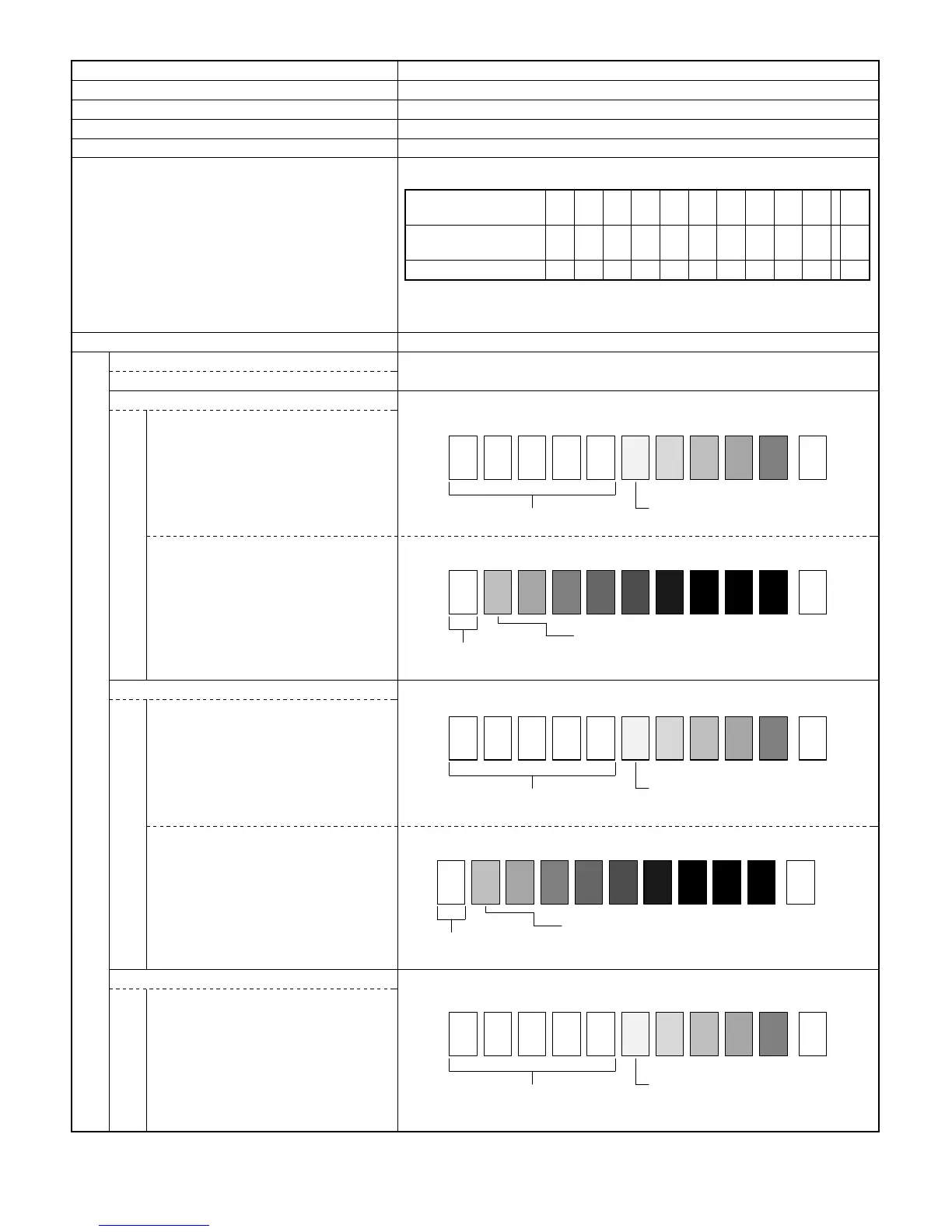
Procedures for Adjusting the Copy Density
Item Description
(1) Auto-exposure density level 3 (Normal level) Key operator PGM.20
(2)Initial setting of TSM mode 0 (Cancel) Key operator PGM.22
(3) Setting of AE sensor characteristics Perform Simulation 47
(4) Setting of drum sensitivity Perform Simulation 26-07
(5) Setting of test chart Test chart comparison table
(6) Adjustment of copy density
A. Adjusting the developing bias output –300 V (manual exposure 1)
Perform Simulation 8-01
B. Adjusting the manual-exposure copy density Perform Simulation 46-01
ME 1
ME 5
C. Adjusting the TSM mode
TS 1
TS 5
D. Adjusting the copy density in photo mode
PE 1
UKOG-0162FCZZ
DENSITY No.
12345678910 W
UKOG-0089CSZZ
DENSITY No.
0.1 0.2 0.3 0.5 1.9 0
KODAK GRAY SCALE 1 2 3 4 19 A
SHARP CORPORATION
MADE IN JAPAN
Not copied
Slightly copied
1 10
W
23456789
Copied
1 10
W
23456789
Not copied
Not copied
Slightly copied
1 10
W
23456789
Copied
1 10
W
23456789
Not copied
Not copied
Slightly copied
1 10
W
23456789
7 – 21











 To Next Page