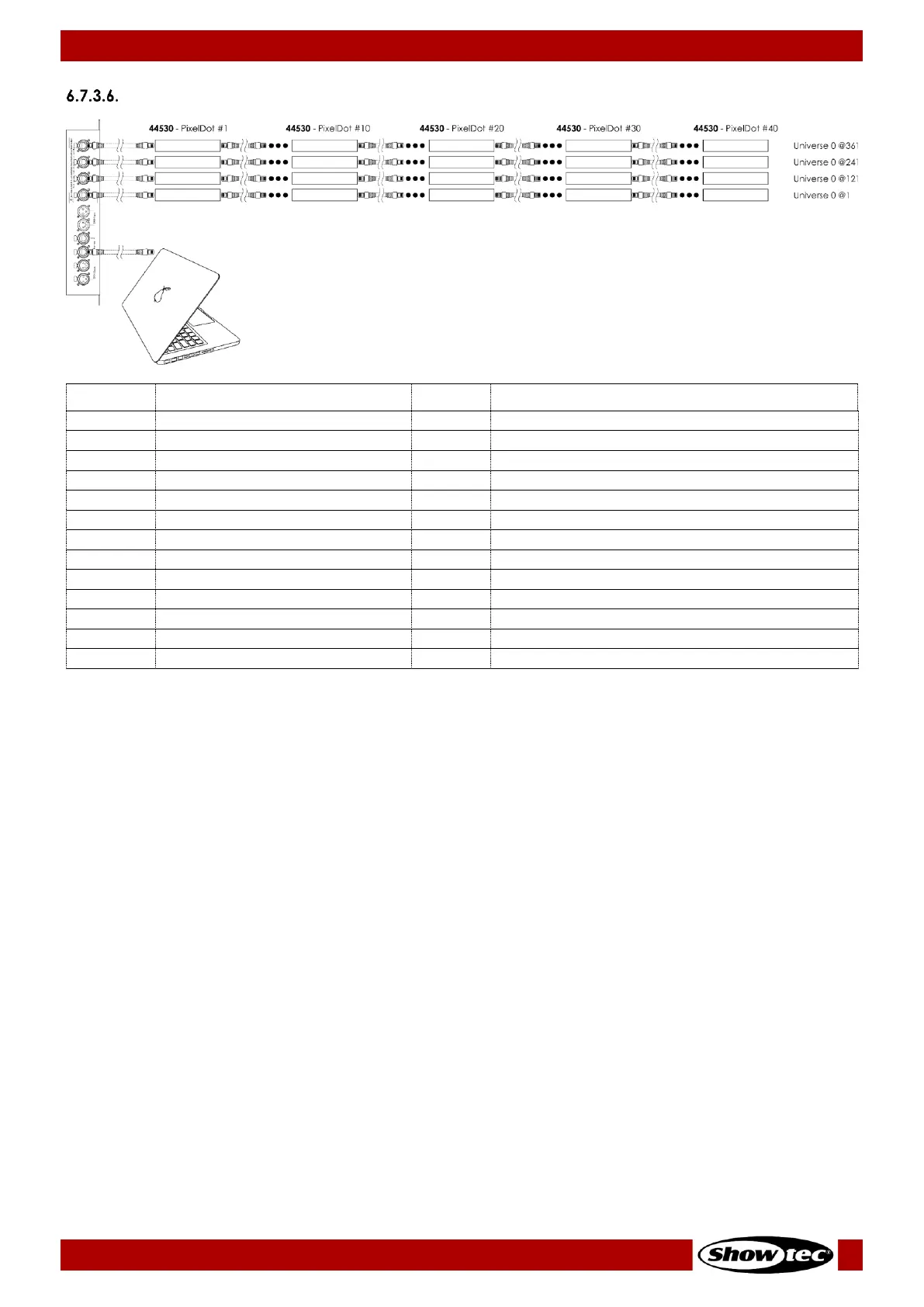
480 Channels (DMX and Art-Net)
Red (PixelDot 1, output 1)
From low to high intensity (0–100 %)
Green (PixelDot 1, output 1)
From low to high intensity (0–100 %)
Blue (PixelDot 1, output 1)
From low to high intensity (0–100 %)
Red (PixelDot 2, output 1)
From low to high intensity (0–100 %)
Green (PixelDot 2, output 1)
From low to high intensity (0–100 %)
Blue (PixelDot 2, output 1)
From low to high intensity (0–100 %)
Red (PixelDot 3, output 1)
From low to high intensity (0–100 %)
Green (PixelDot 3, output 1)
From low to high intensity (0–100 %)
Blue (PixelDot 3, output 1)
From low to high intensity (0–100 %)
Red (PixelDot 40, output 4)
From low to high intensity (0–100 %)
Green (PixelDot 40, output 4)
From low to high intensity (0–100 %)
Blue (PixelDot 40, output 4)
From low to high intensity (0–100 %)
Note: The 480-channel is available when 40xPixDOT option was selected in the menu.
See 6.6.3.2. Set Output and 6.6.3.3. DMX on page 28 for more information.






 To Next Page