Operator controls and displays
5.6 Holding, operating and setting down the HMI device
Wireless Teach Pendant F IWLAN V2
Operating Instructions, 08/2010, A5E02453837-01
95
● Bit coding of illuminated pushbutton
State T1
Not pressed 0
Pressed 1
● Bit coding of illuminated pushbutton LEDs
State T1
Off 0
On permanently 1
5.6 Holding, operating and setting down the HMI device
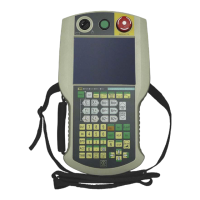
Holding and operating the HMI device
The HMI device is equally easy to hold and operate for right-handers and left-handers
because it is designed symmetrically. The free hand can be used to operate the operator
controls on the front side.
Note
Read the section "Safety-related operator controls (Page 88)".
The neck strap provides support for holding of the Wireless Teach Pendant F IWLAN. Use
the velcro closure on the neck strap to attach the strap to HMI device and adjust the length
as necessary.
The method of holding the HMI device shown in the following figure enables you to control
movements in the plant to be monitored during servicing, for example.
The hand holding the HMI device can also be used to activate the enabling button. The
enabling button is optimally accessible. In a dangerous situation, a safety shutdown is
triggered in a panic reaction by releasing or fully pressing the enabling button.
The EMERGENCY STOP button can also be quickly reached with your free hand.







 To Next Page