Main Screen
Screen Layout
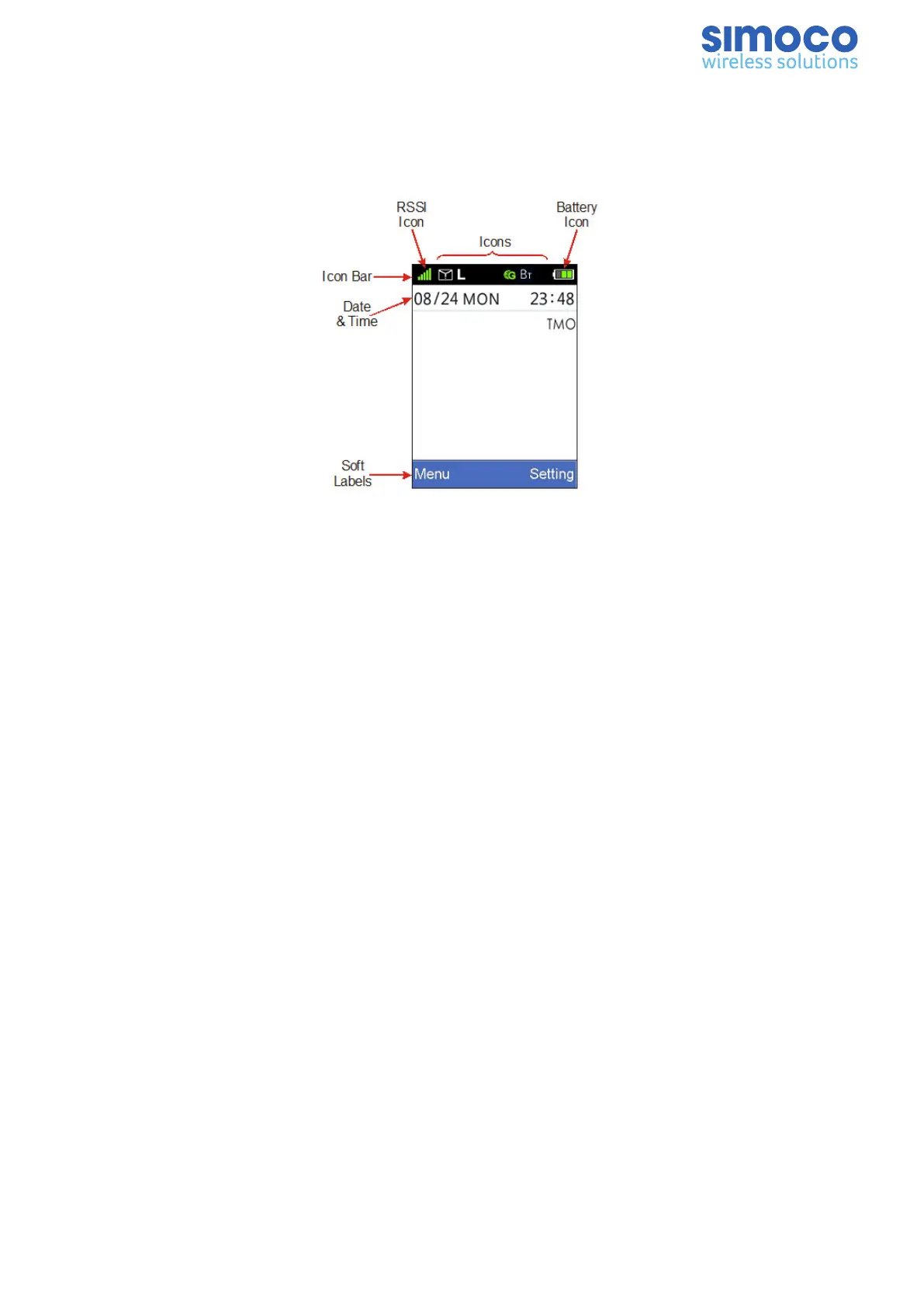
The default screen layout is shown below.
Figure 7: Screen Layout
The screen has three main areas: the Icon Bar; the Text Panel; and the Soft Labels area.
Soft Labels
The bottom line of the display is used for the Soft Labels associated with the Menu/OK
and Setting keys. The soft label text is defined in the FPP.
Text Panel
The main area of the screen is the Text Panel, which displays textual information in
various lines.
Icons
The Icon bar is used to display the Standard and Special Icons.
Standard Icons are displayed in several positions as shown above. Therefore, up to 9
Icons can be displayed at once.
The Special Icons include the:
n Battery Icon - This is always displayed on the default screen at the top left on the
Icon bar. Ii indicates the condition of the battery.
n Rx Signal Strength Indicator - This is displayed on the default screen at the top
right on the Icon bar. The stronger the Rx signal, the more bars will be displayed.
Details of the various Icons that are displayed on the Radio’s LCD are shown in Table 5.
Doc Number: TNM-U-E-0156 Issue: 2.3 Page 8


 To Next Page