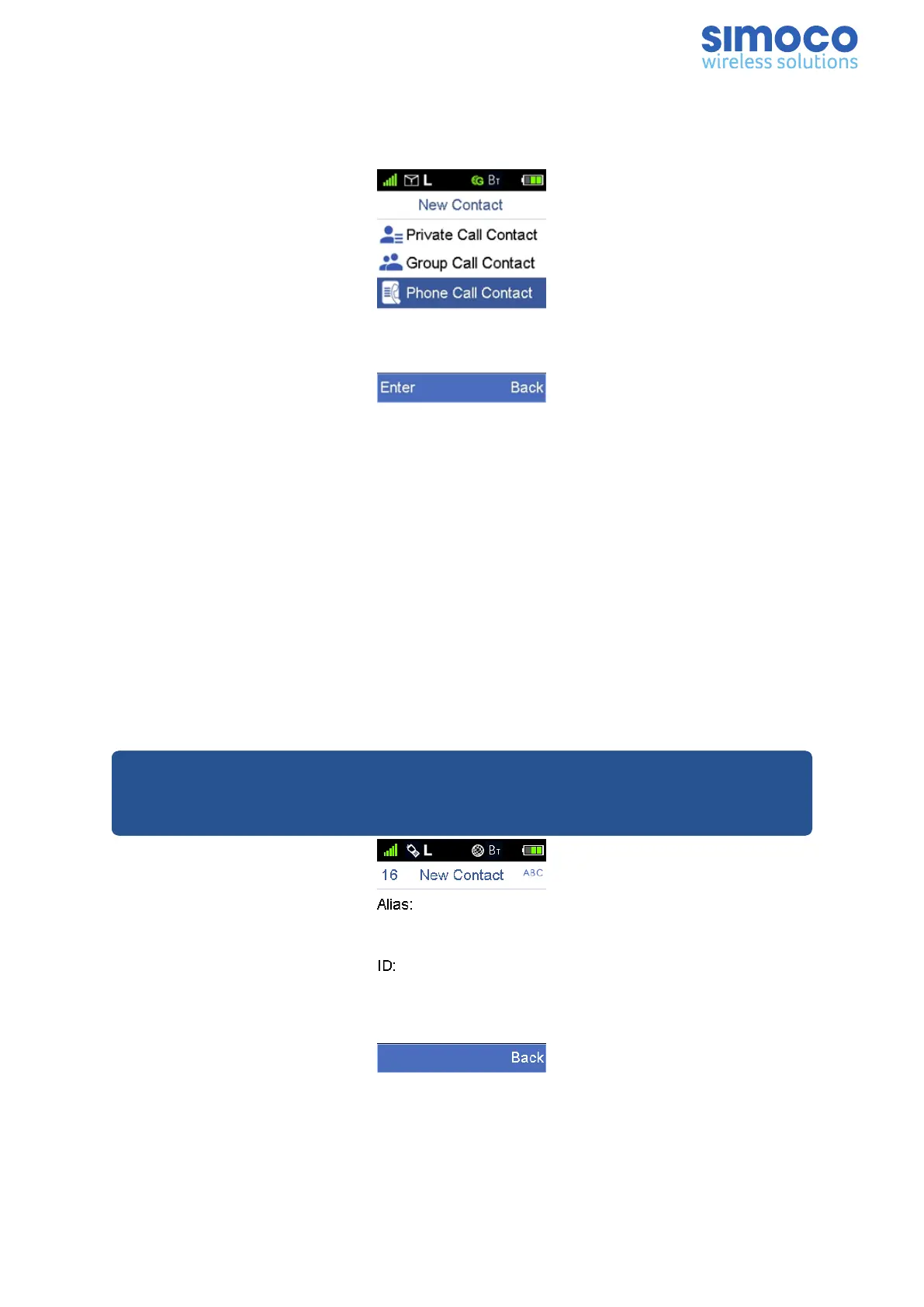
New Contact
The New Contact menu allows the user to add a new contact to the Private Call, Group
Call and Phone Call contact lists.
Figure 16: New Contact Menu Screen.
To add a new contact carry out the following:
1. From the home screen, select ‘Menu’ > ‘Contact’ > ‘New Contact’.
2. From the New Contact menu screen, use the ▲ and ▼ keys to select the type of
new contact to be added (i.e. either Private Call, Group Call or Phone Call
contact) and press the ‘Enter’ key.
3. On the New Contact edit screen, using the keypad enter the relevant details for
the ‘Alias’ and ‘ID’ parameters and press the ‘Save’ key.
When entering the details of the new contact, it is important to remember that:
n The ID of each private call contact must be unique. It is made up of up to seven
digits and should be set according to the dial rules.
n The alias of each private call contact can contain 16 characters at most.
Note: When using the keypad to enter the ‘Alias’ details, pressing the # key will
change the input method between uppercase (ABC), lowercase (abc) and numbers
(123).
Figure 17: New Contact Screen
Doc Number: TNM-U-E-0156 Issue: 2.3 Page 17



 To Next Page