Printer Installation
2-2
1. Unpacking the Printer
1
Unpack and install the printer in a well ventilated area.
In order for proper operation of the cooling fan, nothing should be in the space within 8cm(3 inches)
from the left, right, and back of the product. Avoid the following places;
A. Exposed to the direct sunlight
B. Close to heating equipment or air-conditioner
C. Dusty place
2
Pull out the printer and other components from the box.
Keep the box and buffer materials in case you need to pack the printer.
3
Remove tape in and on the printer and remove the packing material from the tray.
4
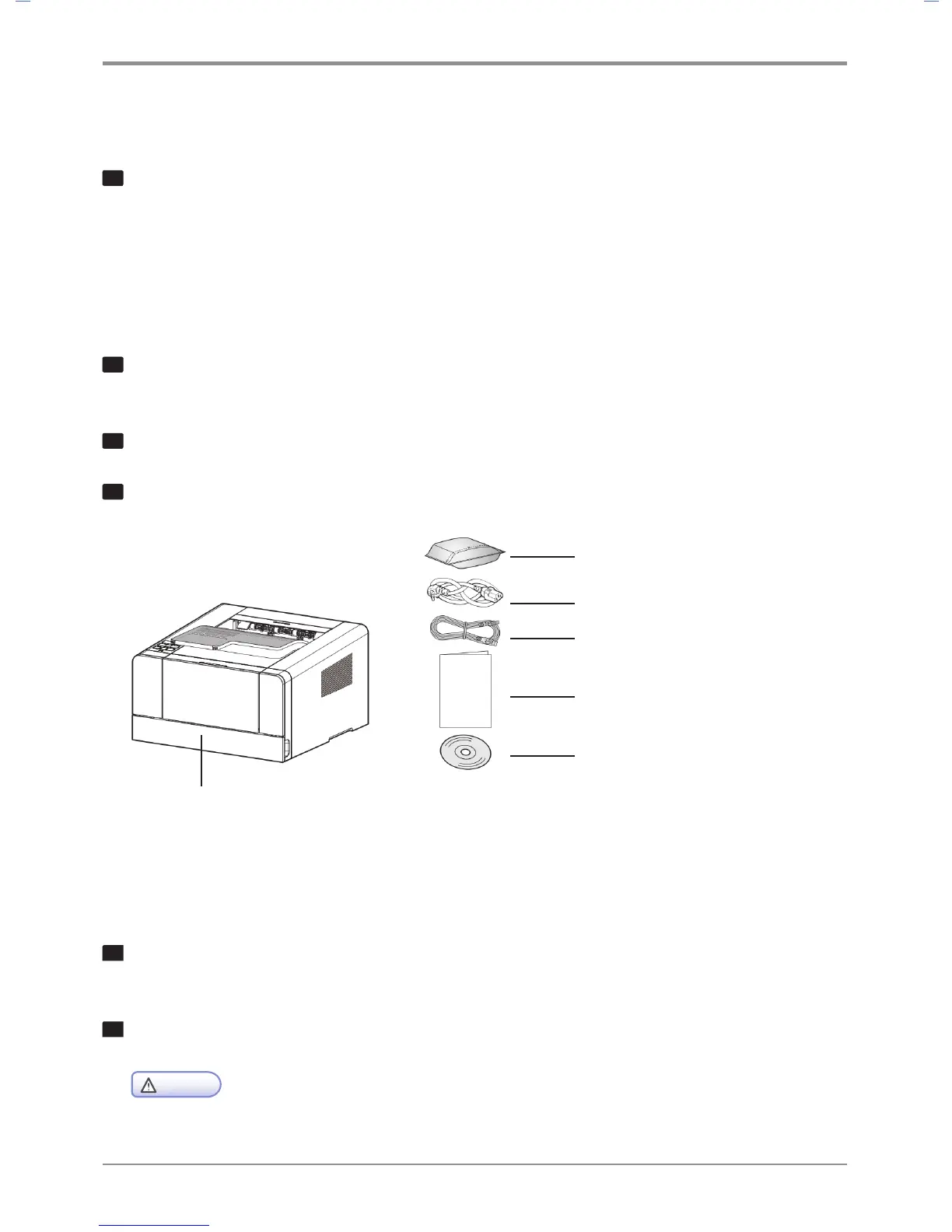
Check if the following components are included.
* Notification of the Enclosed Parts: Main Machine, Driver CD(Including a user guide), Power Cord,
USB Cable, Quick Installation Manual, Cartridge, Ferrite Core(NOT Included in this model)
5
Should you require assistance during installation or if any of components are missing or damaged,
contact the store of purchase.
6
Install printer on a flat surface.
Caution
-
Installing the printer on an uneven floor may cause machine failure or lead to printing of abnormal images.
1. Tray 1 (250 sheets by default)
3. Power cord
2. Enclosed cartridge
4. USB cable
5. Quick Installation Guide
6. The driver CD and
the user manual CD included



 To Next Page