Printer Management
4-8
Drum Cartridge Replacement
Printer displays [Replace Drum Ctg.] on the LCD to give notice automatically before the drum cartridge
reaches its life. You can print the menu setting page to check the status of the drum cartridge. (If you change
the drum cartridge before resetting the drum cartridge counter, the menu page may not present the status of
the drum cartridge correctly).
When [Replace Drum Ctg.] appears on the LCD for the first time, you must replace the drum cartridge immediately.
After the drum cartridge reaches its life, the device can operate for some time but print quality drops significantly.
When [Replace Drum Ctg.] is displayed but the drum cartridge is used without replacement, at some point, the LED
lamp will blink in red to alert that replacement is needed.
If the drum cartridge continues to be used without replacement in this condition, at some point, users may experi
-
ence inconvenience (user must press a button below the LCD window to print, this is not an error) and the LED
lamp will keep blinking in red. If the drum cartridge still continues to be used without replacement, the printer will
stop working for its own protection and [Drum Ctg. Life End] will be displayed.
User must replace the old drum cartridge with a new one immediately.
1
Switch off the printer.
2
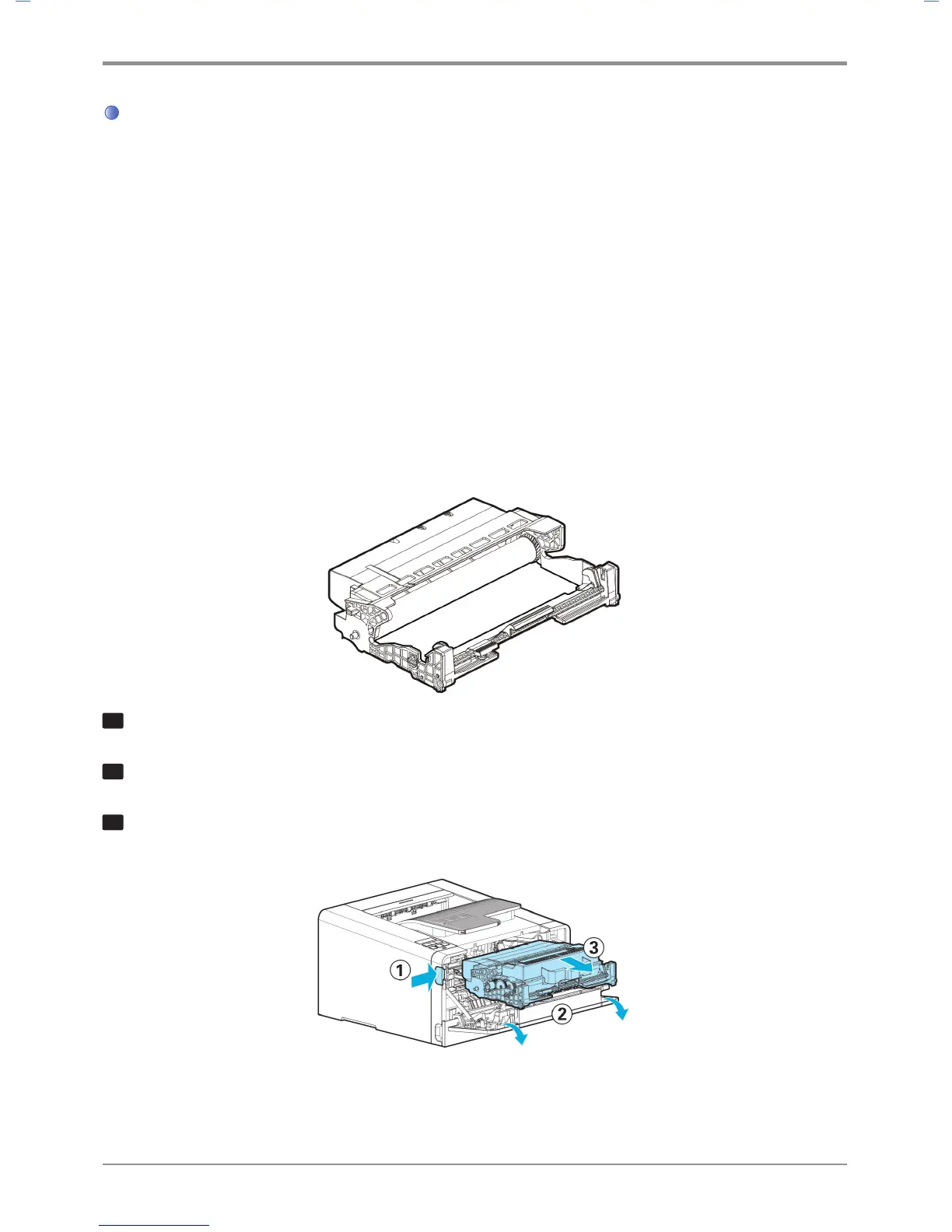
Press the unlock button (①) on the left side of the printer to open the front cover (②).
3
Hold the handle to pull out the cartridge.
(Be sure to hold handle with the back of your hand facing up)



 To Next Page