Sinterit LISA X User Manual | 17
IMPORTANT!
After 10 seconds the electrolock will reactivate and it will no longer be possible to lift the lid. If you
still want to open the printer, slide the UNLOCK LID button again on the printer screen.
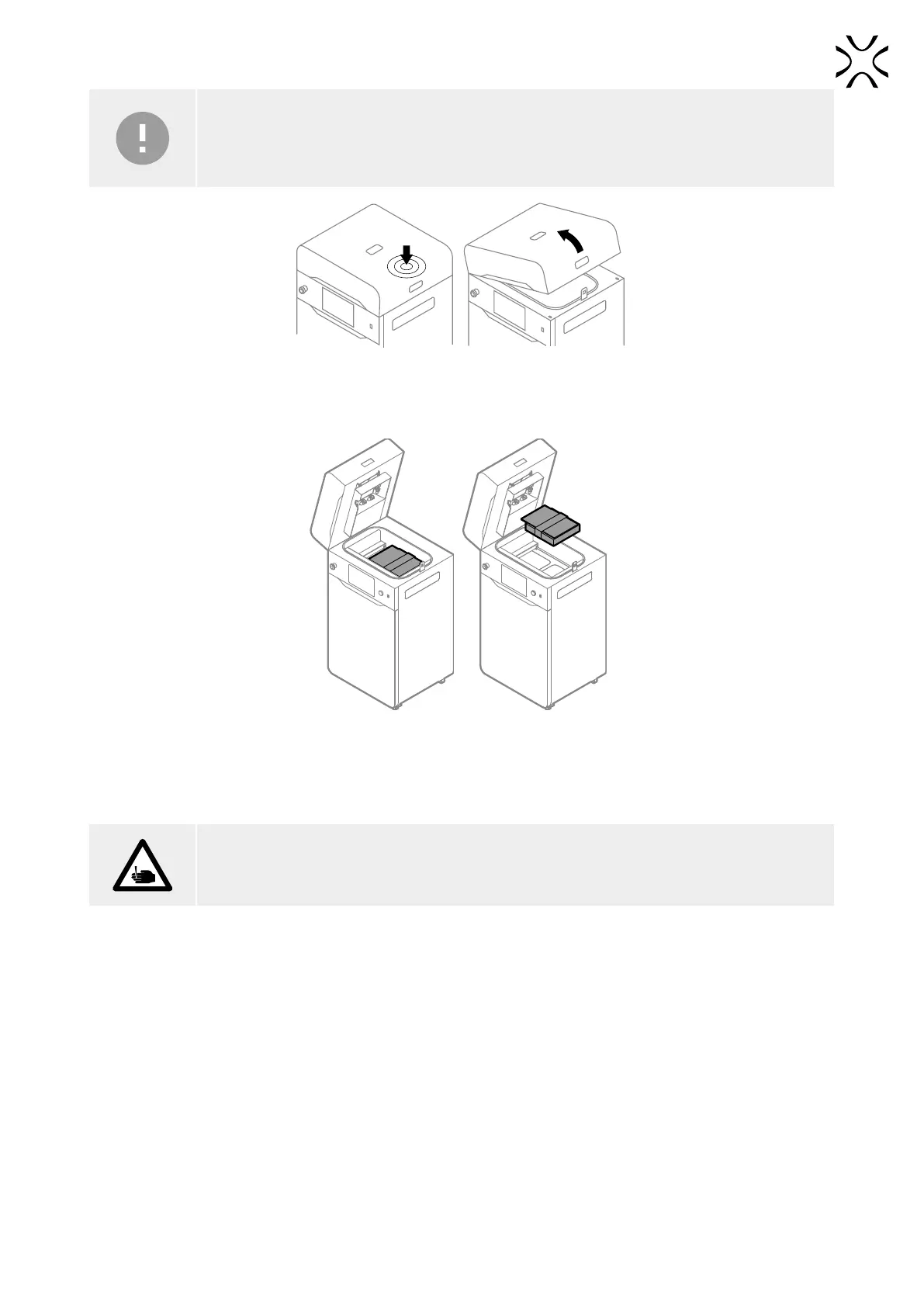
Fig. 5.3 Lifting the printer lid.
9. Remove the Start up box with the laser protective glass and other acessories (g. 5.4).
Fig. 5.4 Removing the box with accessories.
5.2 MOUNTING THE LASER PROTECTIVE GLASS
ATTENTION!
Beware of sharp edges. Wear the protective gloves, in order to prevent cutting yourself on the sharp
edge of the laser module.
1. Remove the split pin from the heating module.
2. Lower the heating module.
3. Take the laser protective glass out of the box. Then put the box in the ight case for safekeeping.
4. Delicately wipe the glass on both sides with a cotton cloth soaked in 2% salicylic spirit (ethanol solution) or another
ethanol-based cleaning solution. You may also use cleaning wipes provided in Dedicated Powder Tools.



 To Next Page