MAINTENANCE FUNCTIONS
Troubleshooting
SKF Enlight Collect IMx-1 System
User Manual
Revision F
• Use Device Manager to confirm Ports (COM & LPT) has a device called:
o "Gadget Serial"
• For Windows 10 a driver should already be installed, for Windows 7 it will
need to be manually installed. If the device isn’t present or has errors, use the
Zadig.exe described later.
o Note that Microsoft support for Windows 7 has ended and that SKF
always recommends using supported operating systems and
installing the latest updates.
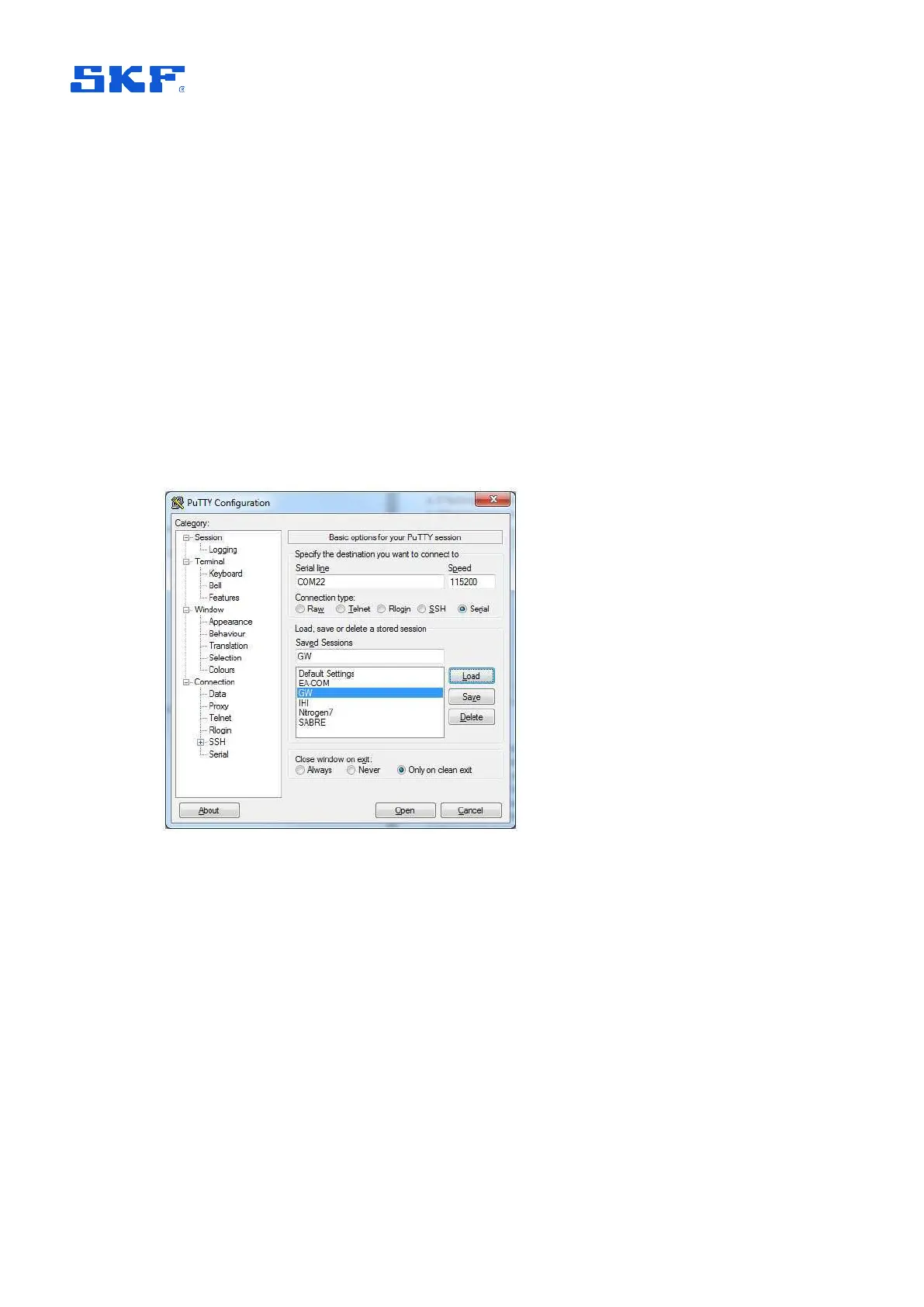
• With the driver installed and the terminal emulator launched, connect at
115 200 baud and 8-N-1: 8 data bits, no parity and 1 stop bit. A typical
configuration is shown below:
Figure 59 A typical terminal configuration for using the service interface
Reset to factory defaults
• At the login prompt, initiate the reset by using appropriate credentials for both
Username and Password. When needed, these credentials can be provided
by TSG.
Note: The gateway will respond with the message "Job for factory-reset.service
canceled." when it has completed the factory reset.
Other diagnostic commands and functionality
The Username and Password credentials used above are only valid for the ‘Reset to
Factory default’ functionality. Other diagnostic commands and procedures that from



 To Next Page