2PRO-LINK
®
Edge Hardware and Software User’s Manual
Chapter 1 • Using this Manual
Manual Overview
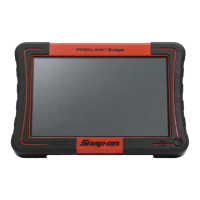
This manual provides basic and detailed information to support you in using the
PRO-LINK
®
Edge. This manual is composed of the following sections:
• T
able of Contents—helps you to find the information you are looking for
quickly and easily.
• Cha
pter 1: Using this Manual—provides an overview of this manual.
• Chapter 2: Har
dware and User Interface Overview—provides an over-
view of the PR
O-LINK
®
Edge hardware, including detailed product
specifications. It also includes an overview of the PRO-LINK
®
Edge user
interface and navigational features.
• Chapter
3: Getting Started—explains the process of connecting the
PRO-LINK
®
Edge to a vehicle and scanning the vehicle for faults. It also
includes an introduction to the various tabs on the Diagnostic Menu, as
well as information on monitoring battery power.
• Ch
apter 4: Using the Diagnostics Menu—provides detailed instructions
on using the Diagnostics Menu when the PRO-LINK
®
Edge is connected
to a vehicle, including its various tabs and features.
• Chapter 5: Usi
ng the Vehicle History Menu—provides detailed instruc-
tions for using the Vehicle History
Menu to manage reports.
• Cha
pter 6: Using the Settings Menu—provides detailed instructions for
using the features of the PRO-LINK
®
Edge Settings Menu.
• Chapter 7: Usi
ng the Applications Menu—provides an overview of the
Applications Menu. It also provides detailed instructions for registering
applications and for installing updates.
• Chapter 8: Usi
ng the Support Menu—provides an overview of the Sup-
port Menu, including account information, tutorials, and troubleshooting
in
formation.
• Chapter
9: Using Record and Playback—provides information on using
the Record and Playback utilities.
• Chapter 10: Using PRO-LINK
®
Repair-Connect—provides detailed in-
structions for using the features of PRO-LINK
®
Repair-Connect. A
subscription to Repair-Connect is required.
Each chapter begins with an “at-a-glance” list
of the chapter contents, along with
corresponding page numbers.


 To Next Page