Appendix B: Opening Conduit Knockouts
Thisstepmaybeperformedbeforeoraftermountingtheinverter.
TheknockoutsforACgrid,PVDCandbatteryDCarealreadyopen.Ifrequired,usethisprocedurefor
openingadditionalknockouts.
ForACconnectionsyoucanuseoneofthefollowingconduitopeningsoptions:
l Option1-ConnecttheACgridandbackuploadswiresusingtheACopening(knockoutalreadyopen;
noneedtoopenanadditionalknockout).Inthiscaseuseminimum1"(32mm)conduitforinserting
allwires.
l Option2-Usetwoseparateconduits:minimum1"(32mm)conduitfortheACgridconnectionand
3/4"(25mm)conduitfortheloadbackupconnection.Inthiscase,anadditionalknockoutshouldbe
openedforthebacked-uploads.
To open conduit knockouts:
1.
MovetheStorEdgeConnectionUnitsafetyswitchandtheinverterON/OFFswitchtoOFF.
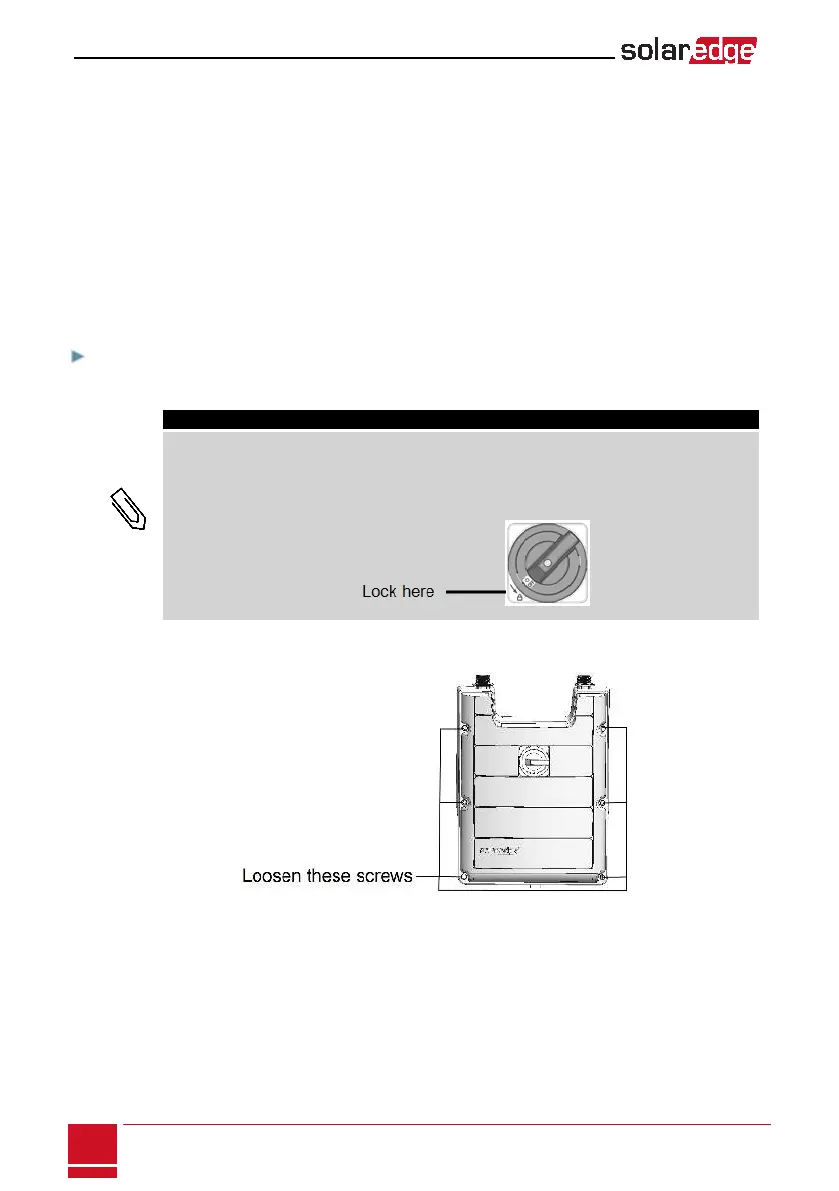
NOTE
When the StorEdge Connection Unit safety switch is OFF (for example during maintenance) it
may be locked to prevent safety hazard:
1. Move the switch to the Lock position.
2. Insert the lock through the knob opening and lock.
2.
LoosenthescrewsonthefrontcoveroftheStorEdgeConnectionUnitusingthesuppliedAllenkey,as
shownbelow:
Figure 43: Opening the StorEdge Connection Unit cover
3. RemovetheStorEdgeConnectionUnitcover.
SolarEdge StorEdge Installation Guide MAN-01-000262-1.2
96
Appendix B: Opening Conduit Knockouts






 To Next Page