Levelogger Series User Guide
Page 39
Retrieve the settings from the attached LTC Levelogger by clicking .
Stop the LTC Levelogger by clicking .
Start the Solinst Levelogger Software Calibration Wizard by clicking the Conductivity Cal tab. The wizard will
guide you through the calibration process. You can exit the wizard after any step to cancel the calibration
session.
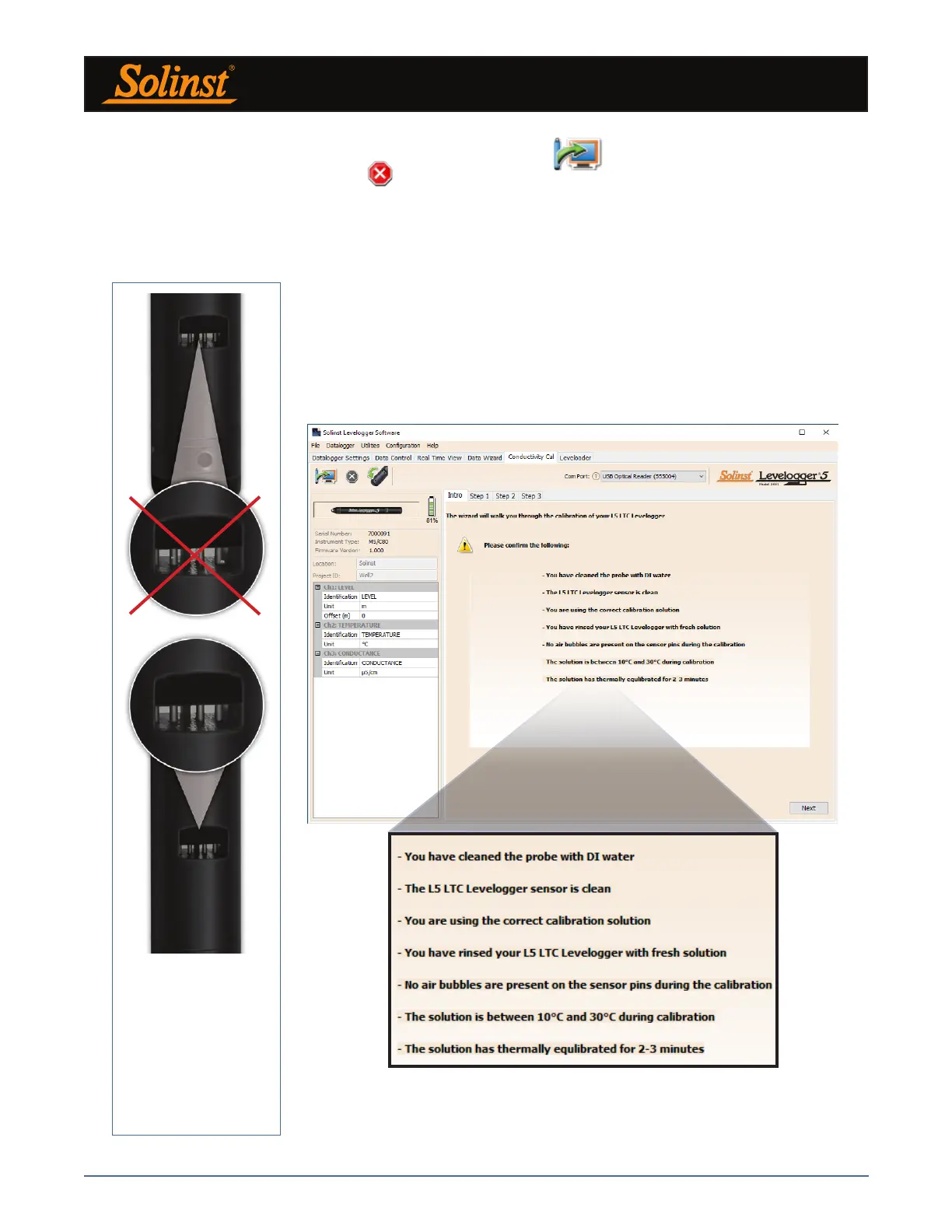
Figure 6-2 Levelogger Conductivity Calibration Wizard Introduction
Introduction: The Solinst LTC Levelogger must be connected to the computer
with an Optical Reader (Desktop Reader 5 or Field Reader 5) during the
calibration and must be in the stopped mode. Ensure you use fresh calibration
solution and allow thermal equilibration of the solution during the process. Also
ensure no air bubbles are present on the sensor and that the pins are clean. See
Section 10.2 for recommended methods to clean the sensor pins. See Section
10.1.5.3 for protection against biofouling conditions.
Note: Ensure that
the calibration
solution covers the
entire sensor cell
and the logger is
agitated to release
entrapped air
bubbles.



 To Next Page