Levelogger Series User Guide
Page 58
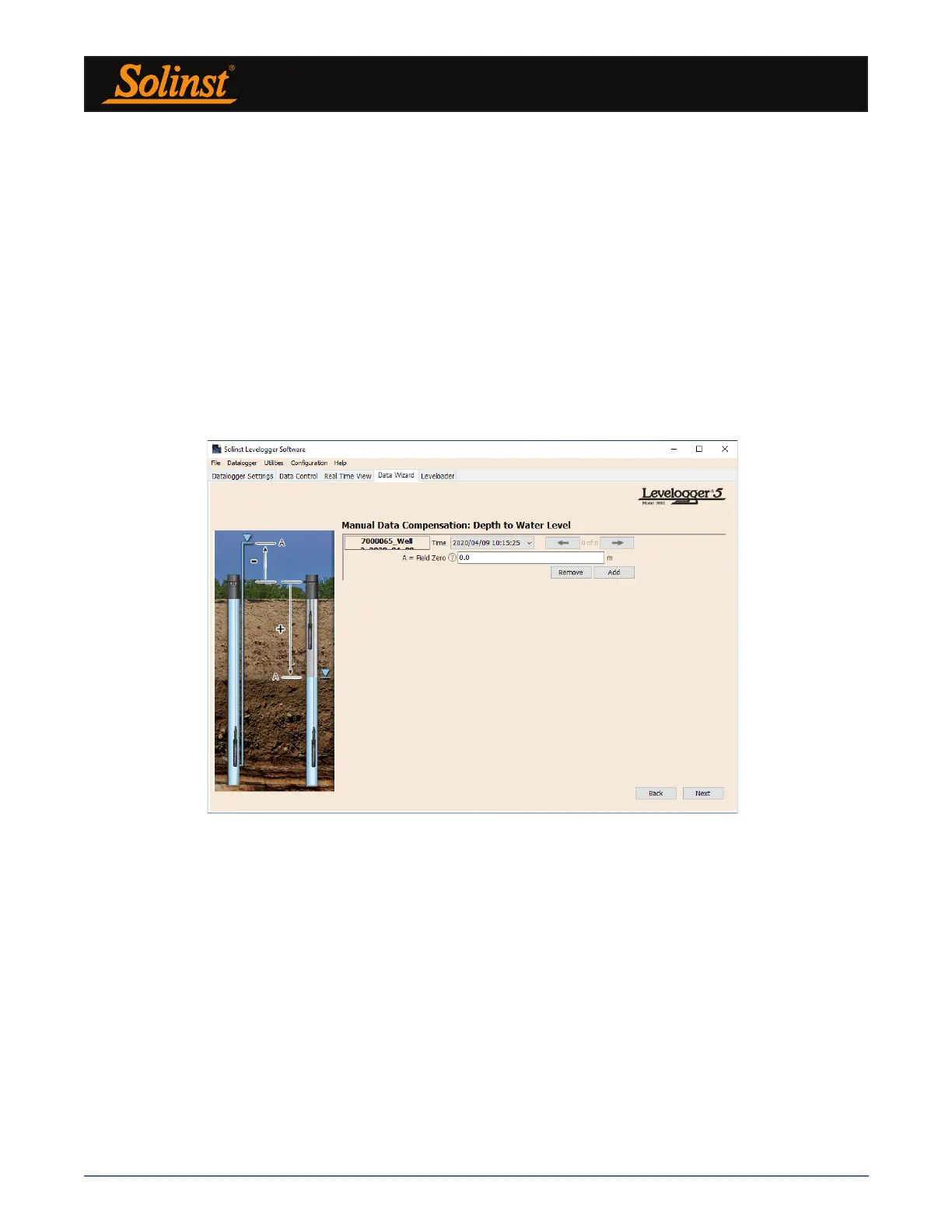
Next, for each selected Levelogger file, you will enter the Field Zero(s) you would like to use to manually adjust
your Levelogger data. (If you have selected Height of Water Above the Sensor or Parameter Adjustments
Only, this window will not be shown.)
For Depth to Water Level adjustments, enter a Field Zero (A). If the static water level is below your Field
Zero measurement, the Field Zero is input as a positive value (e.g. a manual water level meter measurement
taken from the top of a well casing. See Example 8.1). If the static water level is above your Field Zero, the
Field Zero is input as a negative value (such as in an artesian condition).
The Time the Field Zero measurement was taken must replace an actual reading in the Levelogger file. This
is selected from the drop-down menu showing all time stamps in the Levelogger file. Click ‘Add’ to apply the
adjustment. If you need to change a Field Zero, click ‘Update’ after any edits.
Note: The date and time of measurement of the Field Zero must be recorded to complete the adjustment. The Field
Zero must replace an actual reading the Levelogger file. I.e. take a manual measurement immediately after starting
the Levelogger, and note that time.
Figure 8-8 Manual Data Adjustment - Depth to Water Level



 To Next Page